
Table of Content
Read summarized version with
Introduction
Are your emails getting ignored? You’re not alone. Despite being the most preferred communication channel worldwide, 63% of marketers struggle to boost email engagement. That’s a major problem because even the most well-crafted message is useless if it’s never opened or clicked.
The good news? There’s a proven way to fix it: Email A/B testing. By testing different elements of your emails, including subject lines, content, send times, CTAs, and more, you can uncover exactly what resonates with your audience. This can help you craft emails they’ll actually open, click, and read.
In this guide, you’ll learn everything you need to know about A/B testing in email marketing—from what it is, to how to use it to increase opens, clicks, and conversions.
Let’s dive in.
Key Takeaways
Email A/B testing is a method used to compare two or more versions of an email to determine which performs better.
A/B testing is critical for understanding your audience, improving email performance, and eliminating guesswork. It helps you increase open rates, boost click-through rates, drive conversions, and gain a competitive edge.
The key email elements to test for better performance include subject lines, preheader text, email copy, CTAs, send times, visuals, and email design.
Common email mistakes in A/B testing include testing too many variables at once, running tests too short or too long, focusing on the wrong metrics, ignoring audience context, and not documenting test results.
What is Email A/B Testing?
Email A/B testing is a method used in email marketing to compare two or more versions of an email to determine which performs better.
It involves sending two different versions of an email with a slight tweak to small segments of your recipients and then analyzing the results to see which one performs better.
Once done testing, you can then send the version that performs better to the rest of your email list. Testing emails this way helps you understand what actually resonates with your audience so you can optimize your emails accordingly for better engagement.
For instance, if you’re unsure whether a personalized subject line or a shorter email design will resonate more with your audience, A/B testing allows you to test both options.
Why A/B Testing is Essential for Email Marketing
Testing your emails allows you to understand what your audience wants so that you can refine your strategies based on actionable insights to improve open and click-through rates.
Did you know? According to a survey by Radicati, as of 2024, over 360 billion emails were sent and received per day.
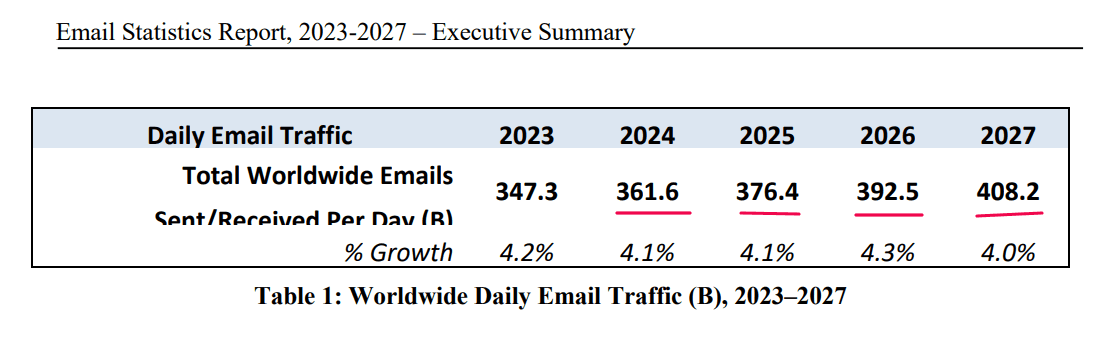
Source: Radicati
The stats indicate that the average person receives a huge number of emails each day, which makes it a tough task to cut through the noise. By A/B testing your email campaigns, you can achieve the following benefits:
Improves email performance
A/B testing is a proven way to enhance the performance of your email campaigns. By testing specific elements, you can identify what drives your audience to take action, which can lead to:
Higher open rates: The subject line is often the first thing subscribers see, and it can encourage people to open or ignore your emails. Email A/B testing allows you to experiment with different subject lines, sender names, and even preview text to determine what grabs attention.
Increased click-through rates (CTR): Once your email is opened, the next goal is to get subscribers to click through to your website or landing page. A/B testing can help you optimize your email content, visuals, and calls-to-action (CTAs).
Boosted conversion rates: Ultimately, the goal of most email campaigns is to drive conversions. A/B testing helps you identify the elements that lead to higher conversion rates, whether it’s the placement of your CTA, the type of offer you’re promoting, or the overall design of your email. By refining these elements, you can create emails that not only engage but also convert.
A heads up: When visitors click through to your landing page after reading your emails, you must provide them with a consistent experience throughout their journey. Otherwise, if they find your landing page content doesn’t resonate with what they read in your email, they will bounce away. But this is easier said than done for most marketers.
Fortunately, you can fix this. With FIBR’s AI-powered audience personalization agent, you can personalize your landing page content based on criteria like traffic sources, visitor behavior, and more.
See what customers say about our software’s audience personalization capability:

Want to see how FIBR works? Book a demo call with our CRO experts to see how we can help you personalize your landing pages to match your email content.
Gaining a better understanding of your audience
One of the most significant advantages of A/B testing emails is its ability to reveal what your subscribers truly want.
Every audience is unique, and what works for one group may not resonate with another. A/B testing allows you to experiment with different tones, styles, and content formats to see what clicks with your subscribers.
You might test a formal, professional tone against a casual, conversational one to see which generates more engagement. Or, you could experiment with different types of content, such as educational versus promotional offers, to determine what your audience prefers.
By understanding your audience’s behaviors and preferences, you can craft emails that feel relevant and valuable to them. This not only boosts engagement but also strengthens your relationship with your subscribers.
Eliminates guesswork
Without A/B testing, email marketing can feel like a guessing game. You might have a vivid idea about what your audience likes, but without data to back it up, you’re essentially shooting in the dark.
A/B testing removes this uncertainty by providing concrete data on what works and what doesn’t.
For example, instead of assuming that a long, detailed email will perform better than a short, concise one, you can test both versions and let the data guide your decision. This approach ensures that your email strategy is based on evidence rather than assumptions.
Cost-effective and time-efficient
A/B testing emails is affordable and efficient. Unlike other marketing strategies that require significant investment, email A/B testing can be done with minimal resources. Most email marketing platforms offer built-in A/B testing tools that make the process straightforward and accessible.
Moreover, A/B testing allows you to quickly identify what works and what doesn’t which can save you time in the long run.
Instead of spending weeks or months on a campaign that may not resonate with your audience, you can test different elements, analyze the results, and make adjustments in a matter of days. This iterative process ensures that your campaigns are constantly improving.
Gives you a competitive advantage
In today’s crowded inbox, you must ensure your emails stand out to get your audience to click and open. A/B testing gives you a competitive edge by helping you create emails that are more engaging, relevant, and effective than those of your competitors.
By continuously testing and optimizing your campaigns, you can stay ahead of the curve and deliver a superior experience to your subscribers.
For example, if your competitors are using generic subject lines, you can use A/B testing to find more compelling options that grab attention. Or, if their emails are cluttered and hard to read, you can test cleaner, more visually appealing designs that make your content easier to consume.
These small but impactful improvements can set you apart from the competition and drive better results for your business.
Key Email Elements to Test for Better Performance
To improve the performance of your email marketing campaigns, test the most essential elements, including the subject lines, preheader text, sender name, email copy, design, and layout, as well as the CTAs.
Here's a more detailed breakdown of key elements to focus on with your email A/B testing campaign:
1. Subject line: The gateway to higher open rates
The subject line is the first thing recipients see, and it often determines whether they open your email or ignore it. A well-crafted subject line can dramatically improve open rates, while a poorly written one can lead to your email being overlooked.
According to Zappia, 47% of recipients will open an email, and 69% will report it as spam based on the subject line.
You need to craft subject lines that grab attention, spark curiosity, and convey value—all within a limited character count.
The good news? A/B testing subject lines can reveal what appeals most to your subscribers. Consider experimenting with the following:
Length: While short subject lines (under 60 characters) are concise and to the point, longer ones (up to 100 characters) can provide more context; you need to test both to see which style your audience prefers.
Personalization: Personalized subject lines, such as including the recipient’s name or location, can create a sense of relevance. In fact, according to research, personalized subject lines can increase your email open rates by up to 35.69%:
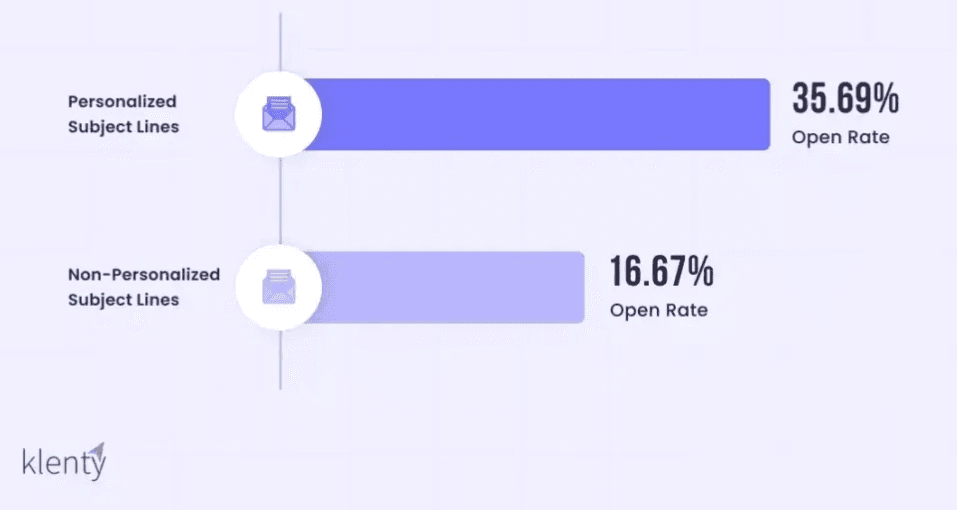
Source: Klenty
Compare these with generic subject lines to measure the difference in engagement. For instance, “John, Your Exclusive Offer Awaits!” vs. “Exclusive Offer Inside.”
Tone: Experiment with different tones—urgent, playful, formal, or humorous—to see what aligns best with your audience’s preferences.
Content: Highlight different aspects of your offer or message in the subject line. For example, test a subject line that emphasizes a discount versus one that focuses on a new product launch.
Punctuation and emojis: While emojis can make your subject line stand out, they may not suit every audience. Test subject lines with and without emojis to gauge their effectiveness.
Pro tip: Avoid overloading your subject line with too many elements. Focus on one variable at a time to ensure accurate results. Additionally, keep your subject line relevant to the email content to avoid misleading recipients.
2. Preheader text: The sneak peek that drives engagement
Preheader text is the snippet of text that appears right below the subject line in most email clients. Like this 👇
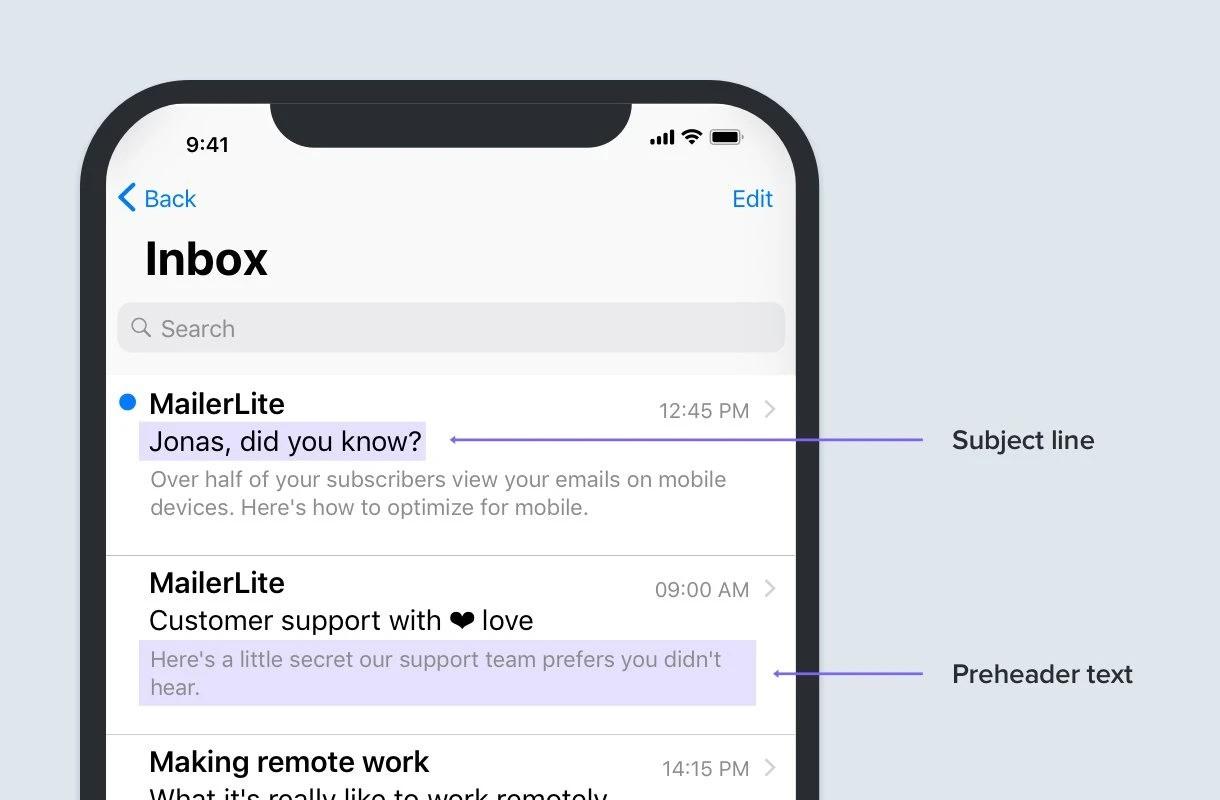
Source: MailerLite
Also known as the preview text, the email preheader text complements the subject line by offering a sneak peek into the email’s content. It also provides an opportunity to add more details or reinforce the value proposition.
A/B test variations by considering the following elements:
Emails with or without it: Test emails with preheader text versus those without it to see if it impacts open rates.
Content: Experiment with different preheader text, such as a summary of the email content, a call-to-action, or a teaser for an offer.
Length: Some email clients truncate preheader text, so test shorter versus longer versions to ensure your message isn’t cut off.
Pro tip: Use the preheader text to complement the subject line, not repeat it. This creates a cohesive narrative that encourages recipients to open the email.
3. Sender name/from address: Building trust and recognition
The sender's name and email address influence whether recipients trust and open your email. A recognizable sender name can boost open rates, while a generic one may lead to your email being ignored or marked as spam.
Test different sender names and email addresses, such as:
Sender name: Test using a company name versus an individual’s name (e.g., “Meenal from [FIBR]”). Personalizing the sender name can make the email feel more human and approachable.
Email address: Compare generic addresses (e.g., [email protected]) with personalized ones (e.g., [email protected]) to see which generates higher engagement.
Pro tip: Maintain consistency in your sender name to build brand recognition over time. Avoid changing it frequently unless you’re testing a new approach.
4. Email content/copy: Crafting compelling messages
The email content/copy is the heart of your message. It’s where you deliver value to your audience so you need to keep it engaging, informative, and persuasive to get recipients to take action.
Testing different approaches to tone, length, and structure can help you identify what resonates best. A/B test the following elements:
Content length: Test short, concise emails against longer, more detailed ones. Some audiences prefer quick reads, while others appreciate in-depth information.
Tone: Experiment with formal versus casual language. A conversational tone can make your email feel more relatable, while a professional tone may be better for certain industries.
Structure: Test bullet points versus paragraphs to see which format makes your content easier to digest.
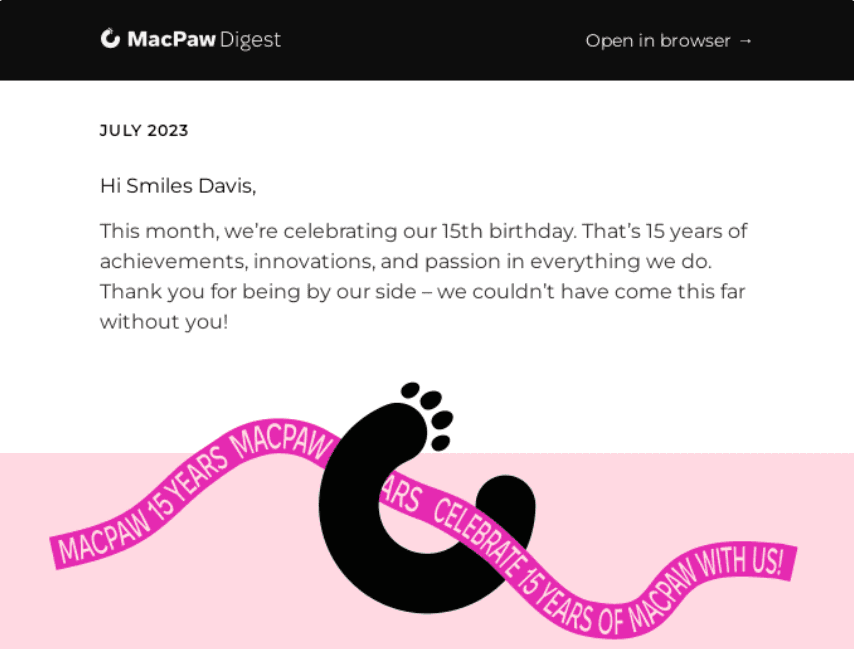
Personalization: Test using the recipient’s name in the email content. Like this 👇
Source: Really Good Emails
Test dynamic content based on their past behavior, such as product recommendations or location-specific offers.
Pro tip: Focus on the recipient’s pain points and how your email provides a solution. Empathy-driven copy often performs better than purely promotional content.
5. Images and visuals: Balancing aesthetics and functionality
Visual elements can enhance the appeal of your email, but they need to be used strategically and align with your message and audience preferences. Too many images can overwhelm recipients, while too few can make your email look bland. A/B test aspects like:
Image placement: Test placing images at the top of the email versus within the body to see which drives more engagement.
Type of visuals: Compare the use of photographs, illustrations, and icons to determine which style resonates best with your audience.
Image-to-text ratio: Test emails with a heavy focus on visuals against those that are primarily text-based.
Pro tip: Always include alt text for images to ensure your message is conveyed even if the images don’t load.
6. Call-to-action (CTA) buttons: Driving action
The CTA is the linchpin of your email, guiding recipients toward the desired action. A well-designed CTA can make the difference between a recipient taking action or ignoring your email. You need to optimize your CTA to improve click-through rates.
Here is what to test:
Text variations: Test different CTA phrases, such as “Shop Now,” “Learn More,” or “Get Started,” to see which drives the most clicks.
Design: Experiment with button colors, sizes, and shapes. For example, a bright, contrasting color may stand out more than a muted one.
Placement: Test placing the CTA above the fold versus at the end of the email. You can also test multiple CTAs throughout the email.
Number of CTAs: Compare emails with a single CTA against those with multiple CTAs to see which approach works best.
Pro tip: Use action-oriented language in your CTAs to create a sense of urgency or excitement.
7. Send time and day: Timing is everything in email marketing
Did you know? Even the best email won’t perform well if it’s sent at the wrong time.
The timing of your email can significantly impact its performance. For instance, sending an email at the right time ensures it lands in your recipient’s inbox when they’re most likely to engage.
Test the following:
Time of day: Test sending emails in the morning, afternoon, and evening to identify the optimal time for your audience.
Day of the week: Compare engagement rates for emails sent on weekdays versus weekends.
Pro tip: Consider your audience’s time zone and daily routines when testing send times.
8. Email design and layout: Enhancing readability
The design and layout of your email affect how easily recipients can consume the content. A cluttered or poorly designed email can frustrate recipients and lead to lower engagement. You need to craft well-structured emails to improve engagement and drive action.
Here are key elements to test:
Single-column vs. multi-column layouts: Single-column designs are clean and easy to read, while multi-column layouts can present more information in a structured way.
Text-to-image ratio: Test different balances of text and visuals to find the ideal mix for your audience.
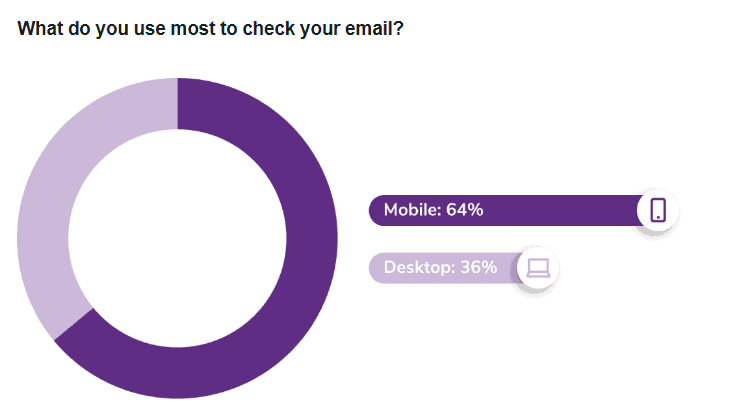
Mobile optimization: With the majority of emails being opened on mobile devices, test designs that prioritize mobile readability.
Source: ZeroBounce
Pro tip: Use whitespace strategically to avoid overwhelming your recipients and to guide their attention to key elements.
Common Mistakes in Email A/B Testing
Email A/B testing is a powerful tool for marketers to optimize their campaigns, but it’s easy to fall into common pitfalls that can undermine its effectiveness. Some of the mistakes marketers make when A/B testing emails include testing multiple variables at once, not running tests sufficiently, focusing on the wrong metrics, ignoring context and your audience, and more.
Let’s dive into these mistakes to understand how to fix them.
Testing too many variables at once
One of the most common mistakes in A/B testing for email marketing is trying to test multiple elements simultaneously.
For instance, changing the subject line, email design, and call-to-action (CTA) all at once might seem efficient, but it creates confusion.
When results come in, you won’t know which change caused the improvement or decline in performance. Was it the catchy subject line, the bold CTA, or the sleek design?
Without isolating variables, the data becomes meaningless.
The solution is simple: focus on one variable at a time. Start with the subject line, as it’s often the first thing recipients see. Once you’ve identified the best-performing subject line, move on to testing the body copy, then the CTA, and so on.
Running tests for too short or too long
Timing is critical in email A/B testing. Running a test for too short a period can lead to skewed results. For example, if you send an email on a Monday and only measure results by Tuesday, you might miss out on responses from subscribers who check their emails later in the week.
On the flip side, running a test for too long can waste resources and delay decision-making.
To strike the right balance, determine the optimal test duration based on your audience’s behavior and the size of your sample.
Ensure your test runs long enough to achieve statistical significance, which means the results are reliable and not due to random chance. Tools like A/B testing calculators can help you determine the ideal duration.
Choosing the wrong metric to measure
Another common mistake is focusing on metrics that don’t align with your campaign goals. For instance, if your goal is to increase click-through rates (CTR), but you’re only tracking open rates, you’re missing the mark.
Open rates might tell you how many people saw your email, but they don’t reveal whether your content resonated enough to drive action.
To avoid this, identify the key performance indicators (KPIs) that matter most to your campaign. If your goal is conversions, track metrics like conversion rates or revenue per email. If engagement is your focus, measure CTR or time spent reading the email. Aligning your metrics with your goals ensures your A/B testing efforts are purposeful and impactful.
Ignoring the context and audience
Email marketing A/B testing often fails when marketers overlook the context of their campaign and the preferences of their audience.
For example, testing a casual, humorous tone might work for a younger audience but fall flat with a more professional demographic.
Similarly, sending a promotional email during the holiday season without considering the context might lead to poor results.
To address this, take the time to understand your audience. Segment your email list based on demographics, behavior, or preferences, and tailor your tests accordingly. Contextual factors like timing, cultural nuances, and current events should also inform your testing strategy.
Not testing your assumptions and hypotheses
A/B testing without a clear hypothesis is like shooting in the dark. Many marketers make the mistake of running tests based on gut feelings or vague assumptions, which leads to random experimentation and wasted effort.
For example, if you assume that a red CTA button will perform better than a blue one, but you don’t articulate why, you’re missing an opportunity to validate your reasoning.
Before launching a test, formulate a clear hypothesis. For instance, “We believe that using a personalized subject line will increase open rates by 10% because our audience responds well to tailored messaging.”
This approach not only gives your test direction but also helps you interpret the results more effectively.
Not documenting and learning from your tests
Finally, failing to document your A/B testing process and results is a missed opportunity for growth. Many marketers run tests, analyze the results, and move on without recording what worked, what didn’t, and why. Over time, this lack of documentation leads to repeated mistakes and lost insights.
To avoid this, maintain a detailed record of every test. Include the hypothesis, the variables tested, the sample size, the duration, and the results. Additionally, document any external factors that might have influenced the outcome, such as seasonality or concurrent campaigns.
This practice not only helps you learn from past tests but also creates a valuable knowledge base for future campaigns.
Best Practices for Running Email A/B Tests
A/B Testing in email marketing isn't just about split testing subject lines anymore. With inbox competition rising, you must get more strategic and nuanced in your email A/B testing efforts. To uncover what resonates with your audience, it takes more than just swapping colors or tweaking CTAs.
It requires strategic experimentation, clear goals, and a deep understanding of both the data and the audience behind it. Below are the best practices to follow when diving into A/B testing for your email marketing campaigns.
Set clear goals and define success metrics
Before you even write your first test subject line or CTA, get crystal clear on what you’re trying to achieve. Are you trying to increase open rates, improve click-through rates, reduce bounce rates, or drive more purchases? Each of these goals requires different testing approaches.
For instance, if your goal is higher open rates, you’ll want to test subject lines or sender names. But if conversions are the focus, then button color or placement, product imagery, or offer positioning may be more relevant.
Defining a single success metric for each test keeps your analysis focused and prevents misinterpretation of results.
Isolate your test variables
Trying to test multiple things at once can make it hard to tell which change made the difference. A/B testing in email marketing is most effective when you isolate one variable at a time.
Let’s say you're testing an email’s CTA. If you also change the header image and subject line in the same test, the data becomes inconclusive.
Test one element at a time for accurate results
It’s tempting to bundle changes together to save time, but that’s a shortcut that kills clarity. Email marketing A/B testing thrives on simplicity. Whether it’s subject lines, CTA copy, images, or send times, testing one element per experiment ensures your results are actionable.
For example, if you’re experimenting with subject lines, keep everything else in the email constant—including preheader text and sender name. This way, if open rates spike, you know the subject line was responsible.
Ultimately, the more granular your approach, the easier it is to scale successful patterns across campaigns.
Document and analyze results for continuous improvement
You’d be surprised how many marketers run A/B tests and then forget to log or review the findings. Without documentation, all that valuable insight gets lost. Create a shared spreadsheet or dashboard to log each test—include variables tested, audience size, results, and what you learned.
But don’t stop there. Look for trends across multiple tests. Maybe certain subject line formats consistently outperform others, or maybe urgency-driven CTAs convert better than informational ones.
These patterns form the foundation for smarter future campaigns. A/B testing in email marketing is only as powerful as your ability to learn and evolve from the data.
Establish a regular testing schedule
Consistency is key. Sporadic tests can still offer value, but a regular testing cadence builds momentum and uncovers deeper trends. Whether you test weekly, biweekly, or monthly depends on your email volume and team bandwidth, but build a rhythm that allows you to test continuously without overwhelming your process.
Also, time your tests around your campaign calendar. Don’t test radically different formats during critical sales periods where risk tolerance is low. Save bold experimentation for mid-cycle campaigns and test smaller tweaks when timing is sensitive.
Ensure statistical significance before declaring a “winner”
One of the biggest mistakes in email A/B testing is calling a winner too soon. Just because version A had 10 more clicks than version B doesn’t mean it’s the better choice, especially if your sample size is small.
Statistical significance helps you determine whether the result is due to the actual change or just random chance. Use an A/B test calculator or tools integrated with your email platform to validate your results. Wait until a large enough sample has responded before deciding which variant performs better.
Test across multiple email clients
Your beautifully designed email might look flawless in Gmail and totally broken in Outlook. Email clients render HTML differently, which can influence how a user engages with your content.
Testing how your email variations display across platforms—mobile vs. desktop, iOS vs. Android, Gmail vs. Yahoo—helps ensure the changes you're testing aren't impacted by technical inconsistencies. Tools like Litmus or Email on Acid can preview how your test emails render across popular clients.
Design elements or CTA buttons might perform differently depending on the environment, so make sure your test reflects the experience most of your audience will have.
Define your audience
Not all segments are created equal. Sending email tests to your entire list can dilute your results. Instead, define a relevant and specific audience for your test. If you’re testing an abandoned cart sequence, target users who’ve added items to their cart in the last 30 days. If it’s a re-engagement campaign, filter for inactive users.
Segmenting allows you to tailor your tests to the behaviors and preferences of each group, producing more accurate insights.
The same CTA might perform well for one audience and flop for another. Email marketing A/B testing is most impactful when your audience is defined with intention.
Over time, these audience-level insights can help you build smarter automation flows and increase personalization, leading to higher engagement and stronger ROI from your email campaigns.
How to Determine the Right Sample Size for Email A/B Testing
Determining the right sample size for email A/B testing is crucial to ensure your results are statistically reliable and actionable. Here’s how you can approach it:
Define objectives: Clearly outline what you’re testing (e.g., subject lines, CTAs, designs) and identify the key metric (open rates, click-through rates, conversions) to measure success.
Set statistical significance: Choose a confidence level, typically 95%, to ensure results aren’t due to random chance. Higher confidence may require a larger sample size.
Estimate variability: Use historical data to understand how your metrics fluctuate (e.g., average open rate with standard deviation). This helps account for natural variations in your data.
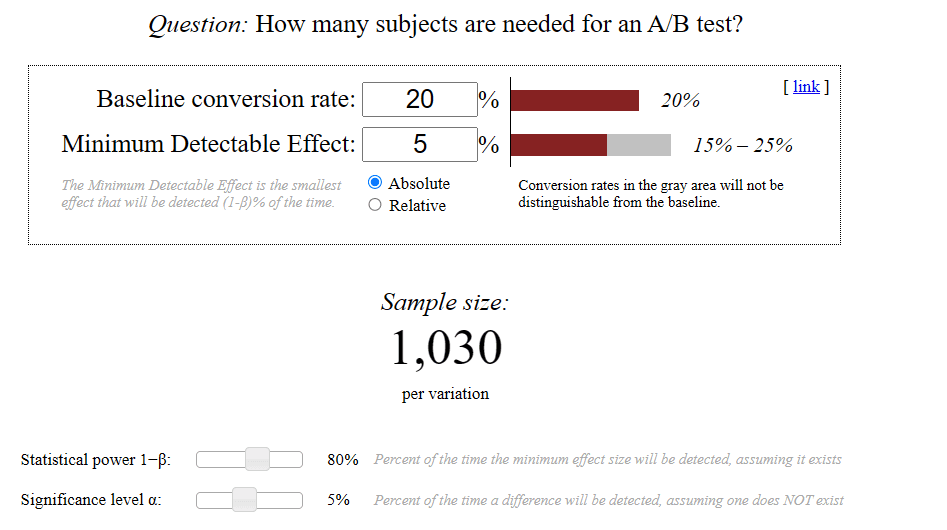
Calculate sample size: Use tools like Evan Miller’s sample size calculator.
Source: Evan Miller
Input your baseline metric, minimum detectable effect (smallest change you want to detect), and significance level to determine the required sample size for each variant.
Consider campaign duration: Ensure your email list can meet the sample size requirements within your testing timeframe. Adjust the duration or goals if necessary.
How to Get Started with Email A/B Testing
Now that you know what email A/B testing is and why it’s important for your campaigns, let’s explore the steps to run your own experiments.
Step 1: Identify your goal and formulate a hypothesis
Before you begin the email A/B testing process, identify what you want to improve. Are you looking to boost open rates, increase click-through rates, or drive more conversions?
Once you’ve pinpointed your goal, develop a hypothesis. For example, if you’re testing subject lines, your hypothesis might be: “A personalized subject line will result in a higher open rate than a generic one.” Having a clear hypothesis ensures your test is focused and measurable.
Step 2: Choose the element to test
In email marketing A/B testing, it’s important to test one variable at a time. This allows you to isolate the impact of that specific element and draw clear conclusions. Here is a brief overview of some common elements you can test. We’ve also covered these in depth in the section above.
Subject lines: Test different lengths, tones, or personalization techniques to see what grabs attention.
Preheader text: Experiment with text that complements the subject line and entices recipients to open the email.
Email content: Try varying the tone, length, or structure of your message to see what drives engagement.
Call to Action (CTA): Test different wording, colors, sizes, or placements of your CTA buttons.
Design elements: Experiment with layouts, images, or fonts to see what visually appeals to your audience.
Sender name/from address: Test whether using a personal name or a company name generates more trust and opens.
Send time: Determine the optimal time to send emails by testing different days and times.
Step 3: Create your email versions
Once you’ve chosen the element to test, create two versions of your email:
Version A (Control): This is your standard email, serving as the baseline for comparison.
Version B (Test): Modify only the chosen element in this version. For example, if you’re testing the subject line, keep everything else identical between the two versions.
Most popular email marketing platforms, including ActiveCampaign, HubSpot, and others offer handy features that allow you to create and test variations for your email A/B testing process.
Ensure that the changes in Version B are meaningful but not so drastic that they skew the results. The goal is to make a controlled adjustment that can provide actionable insights.
Step 4: Select your sample audience
To run an effective A/B test for email marketing, you need to split your email list into two random, representative groups. Most email marketing platforms, like Mailchimp or HubSpot, have built-in A/B testing tools that automatically divide your audience for you.
Make sure your sample size is large enough to yield statistically significant results. If your list is too small, the results may not be reliable. A good rule of thumb is to test on at least 10-20% of your total audience.
Step 5: Send and track your emails
Timing is critical in email A/B testing. Send both versions of your email simultaneously to ensure that external factors, like time of day or day of the week, don’t influence the results.
Once the emails are sent, track key metrics such as:
Open rates: How many people opened the email?
Click-through rates (CTR): How many people clicked on links within the email?
Conversion rates: How many people completed the desired action (e.g., made a purchase or signed up)?
Most email marketing platforms provide detailed analytics to help you monitor these metrics in real time.
Step 6: Analyze the results
After the test has run its course, it’s time to analyze the data (we’ll talk more about this below).
Compare the performance of Version A and Version B to determine which one performed better. For example, if you were testing subject lines, did the personalized version result in a higher open rate?
It’s also important to consider statistical significance. This means ensuring that the difference in performance isn’t due to random chance. Many email marketing tools include built-in calculators to help you determine whether your results are statistically significant.
Step 7: Implement and repeat
Once you’ve identified the winning version, send it to the remainder of your email list. This ensures that the majority of your audience receives the most effective version of your email.
Note that email A/B testing isn’t a one-time activity. Therefore, schedule regular tests to continuously improve your email marketing efforts. Test different elements over time to refine your approach and stay ahead of changing audience preferences.
How to Analyze and Apply Test Results
After closing your test, the next step is to analyze the results to determine what’s to be implemented and what’s not. Analyzing and applying email A/B testing results is a crucial step in optimizing your email marketing strategy. Here’s how to do it effectively.
Gather your A/B test results: Using your email marketing platform’s analytics dashboard, collect all the data from your email A/B testing. This includes metrics like open rates, click-through rates, conversions, and any other KPIs relevant to your campaign. Ensure the data is accurate and organized for easy analysis.
Compare the results to identify patterns: Look for trends or differences between the two versions of your email. For example, did one subject line lead to higher open rates? Did a specific call-to-action (CTA) drive more clicks? Identifying these patterns helps you understand what resonates with your audience.
Use insights to refine and segment future email campaigns: Apply the insights gained to improve your email content, design, and targeting. If a particular CTA performed well, consider using it in future campaigns. Additionally, segment your audience based on their behavior to deliver more personalized and effective emails.
Document results for further learning: Keep a record of your findings. Documenting results helps you track progress over time and provides a reference for future A/B testing for email marketing. This step ensures continuous learning and optimization.
Apply results to a broader email marketing strategy: Finally, integrate the successful elements from your A/B testing into your overall email marketing strategy. Whether it’s refining your email templates or adjusting your send times, these changes can enhance the performance of all your campaigns.
Final Thoughts
A/B testing is an indispensable tool for any email marketer looking to improve their campaigns and achieve better results. It helps you understand your audience, optimize your email performance, eliminate guesswork, and make data-driven decisions.
All these help you create emails that resonate with your subscribers and drive meaningful engagement. Plus, its cost-effective and time-efficient nature makes it accessible to businesses of all sizes.
What’s next after your customers click through to your landing pages? If you’re using email marketing to drive traffic to your landing pages, you need to provide a consistent experience throughout the customer journey.
In this case, you must ensure there is no mismatch between the content on your emails and landing pages. This is another challenge for marketers, but it doesn’t have to be.
With Fibr's audience personalization tool, you can tailor your landing pages to match your audience based on where the visitor comes from. The tool allows you to personalize your landing pages based on criteria such as traffic sources, visitor behavior, and more.
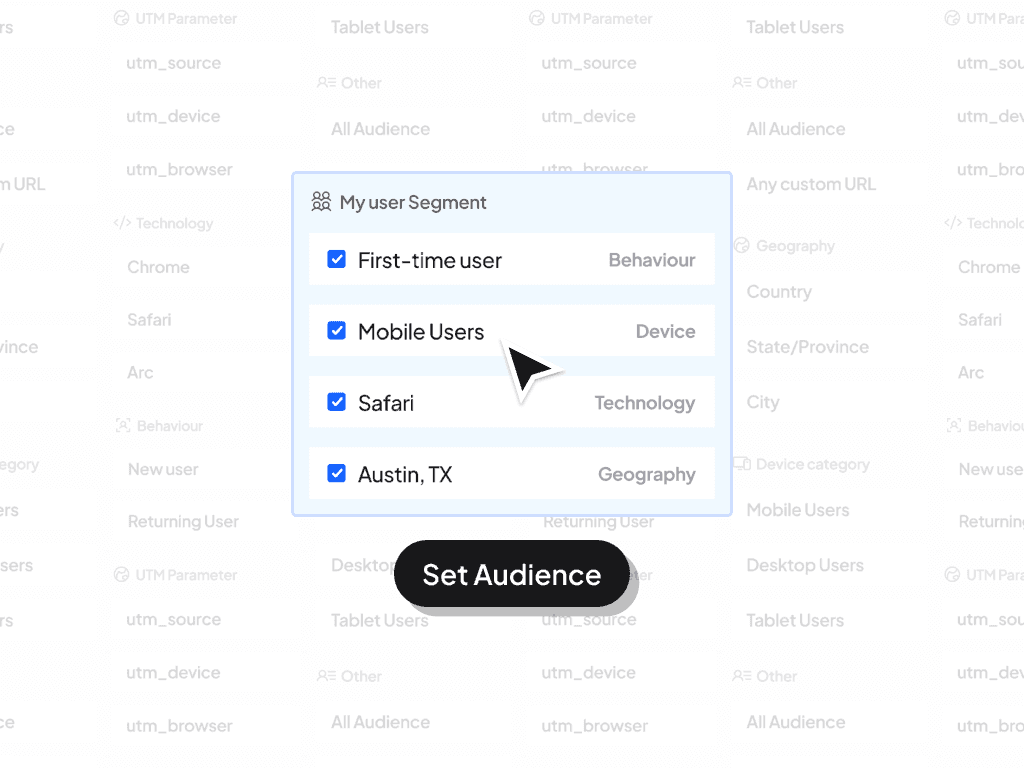
This enables you to create a more relevant and engaging experience for each audience segment, no matter where your visitor arrives from. Book a demo call with our experts today to see how our tool works.
FAQs
1.What are the benefits of A/B testing your emails?
Email A/B testing helps you understand what works best for your audience. It improves open rates, click-through rates, and conversions by identifying the most effective content, design, and timing. This data-driven approach ensures your emails are more engaging, leading to better customer relationships and higher ROI for your campaigns.
2.What challenges does email A/B testing solve?
A/B testing emails address challenges like low engagement, poor deliverability, and unclear audience preferences. It also helps you determine the best subject lines, CTAs, and designs to capture attention. By testing variables, you can overcome guesswork, reduce unsubscribes, and ensure your emails stand out in crowded inboxes, making your campaigns more effective.
3.What components of an email can be tested in the A/B test?
When testing emails, you can experiment with various components, including subject lines, preheader text, sender names, email copy, images, CTAs, and design layouts. You can also experiment with send times, personalization, and audience segmentation to determine which combinations drive the best results for your campaigns.





Pritam Roy
Co-Founder @ Fibr AI
Pritam Roy, the Co-founder of Fibr, is a seasoned entrepreneur with a passion for product development and AI. A graduate of IIT Bombay, Pritam's expertise lies in leveraging technology to create innovative solutions. As a second-time founder, he brings invaluable experience to Fibr, driving the company towards its mission of redefining digital interactions through AI.
Table of Content
Read summarized version with
Introduction
Are your emails getting ignored? You’re not alone. Despite being the most preferred communication channel worldwide, 63% of marketers struggle to boost email engagement. That’s a major problem because even the most well-crafted message is useless if it’s never opened or clicked.
The good news? There’s a proven way to fix it: Email A/B testing. By testing different elements of your emails, including subject lines, content, send times, CTAs, and more, you can uncover exactly what resonates with your audience. This can help you craft emails they’ll actually open, click, and read.
In this guide, you’ll learn everything you need to know about A/B testing in email marketing—from what it is, to how to use it to increase opens, clicks, and conversions.
Let’s dive in.
Key Takeaways
Email A/B testing is a method used to compare two or more versions of an email to determine which performs better.
A/B testing is critical for understanding your audience, improving email performance, and eliminating guesswork. It helps you increase open rates, boost click-through rates, drive conversions, and gain a competitive edge.
The key email elements to test for better performance include subject lines, preheader text, email copy, CTAs, send times, visuals, and email design.
Common email mistakes in A/B testing include testing too many variables at once, running tests too short or too long, focusing on the wrong metrics, ignoring audience context, and not documenting test results.
What is Email A/B Testing?
Email A/B testing is a method used in email marketing to compare two or more versions of an email to determine which performs better.
It involves sending two different versions of an email with a slight tweak to small segments of your recipients and then analyzing the results to see which one performs better.
Once done testing, you can then send the version that performs better to the rest of your email list. Testing emails this way helps you understand what actually resonates with your audience so you can optimize your emails accordingly for better engagement.
For instance, if you’re unsure whether a personalized subject line or a shorter email design will resonate more with your audience, A/B testing allows you to test both options.
Why A/B Testing is Essential for Email Marketing
Testing your emails allows you to understand what your audience wants so that you can refine your strategies based on actionable insights to improve open and click-through rates.
Did you know? According to a survey by Radicati, as of 2024, over 360 billion emails were sent and received per day.
Source: Radicati
The stats indicate that the average person receives a huge number of emails each day, which makes it a tough task to cut through the noise. By A/B testing your email campaigns, you can achieve the following benefits:
Improves email performance
A/B testing is a proven way to enhance the performance of your email campaigns. By testing specific elements, you can identify what drives your audience to take action, which can lead to:
Higher open rates: The subject line is often the first thing subscribers see, and it can encourage people to open or ignore your emails. Email A/B testing allows you to experiment with different subject lines, sender names, and even preview text to determine what grabs attention.
Increased click-through rates (CTR): Once your email is opened, the next goal is to get subscribers to click through to your website or landing page. A/B testing can help you optimize your email content, visuals, and calls-to-action (CTAs).
Boosted conversion rates: Ultimately, the goal of most email campaigns is to drive conversions. A/B testing helps you identify the elements that lead to higher conversion rates, whether it’s the placement of your CTA, the type of offer you’re promoting, or the overall design of your email. By refining these elements, you can create emails that not only engage but also convert.
A heads up: When visitors click through to your landing page after reading your emails, you must provide them with a consistent experience throughout their journey. Otherwise, if they find your landing page content doesn’t resonate with what they read in your email, they will bounce away. But this is easier said than done for most marketers.
Fortunately, you can fix this. With FIBR’s AI-powered audience personalization agent, you can personalize your landing page content based on criteria like traffic sources, visitor behavior, and more.
See what customers say about our software’s audience personalization capability:
Want to see how FIBR works? Book a demo call with our CRO experts to see how we can help you personalize your landing pages to match your email content.
Gaining a better understanding of your audience
One of the most significant advantages of A/B testing emails is its ability to reveal what your subscribers truly want.
Every audience is unique, and what works for one group may not resonate with another. A/B testing allows you to experiment with different tones, styles, and content formats to see what clicks with your subscribers.
You might test a formal, professional tone against a casual, conversational one to see which generates more engagement. Or, you could experiment with different types of content, such as educational versus promotional offers, to determine what your audience prefers.
By understanding your audience’s behaviors and preferences, you can craft emails that feel relevant and valuable to them. This not only boosts engagement but also strengthens your relationship with your subscribers.
Eliminates guesswork
Without A/B testing, email marketing can feel like a guessing game. You might have a vivid idea about what your audience likes, but without data to back it up, you’re essentially shooting in the dark.
A/B testing removes this uncertainty by providing concrete data on what works and what doesn’t.
For example, instead of assuming that a long, detailed email will perform better than a short, concise one, you can test both versions and let the data guide your decision. This approach ensures that your email strategy is based on evidence rather than assumptions.
Cost-effective and time-efficient
A/B testing emails is affordable and efficient. Unlike other marketing strategies that require significant investment, email A/B testing can be done with minimal resources. Most email marketing platforms offer built-in A/B testing tools that make the process straightforward and accessible.
Moreover, A/B testing allows you to quickly identify what works and what doesn’t which can save you time in the long run.
Instead of spending weeks or months on a campaign that may not resonate with your audience, you can test different elements, analyze the results, and make adjustments in a matter of days. This iterative process ensures that your campaigns are constantly improving.
Gives you a competitive advantage
In today’s crowded inbox, you must ensure your emails stand out to get your audience to click and open. A/B testing gives you a competitive edge by helping you create emails that are more engaging, relevant, and effective than those of your competitors.
By continuously testing and optimizing your campaigns, you can stay ahead of the curve and deliver a superior experience to your subscribers.
For example, if your competitors are using generic subject lines, you can use A/B testing to find more compelling options that grab attention. Or, if their emails are cluttered and hard to read, you can test cleaner, more visually appealing designs that make your content easier to consume.
These small but impactful improvements can set you apart from the competition and drive better results for your business.
Key Email Elements to Test for Better Performance
To improve the performance of your email marketing campaigns, test the most essential elements, including the subject lines, preheader text, sender name, email copy, design, and layout, as well as the CTAs.
Here's a more detailed breakdown of key elements to focus on with your email A/B testing campaign:
1. Subject line: The gateway to higher open rates
The subject line is the first thing recipients see, and it often determines whether they open your email or ignore it. A well-crafted subject line can dramatically improve open rates, while a poorly written one can lead to your email being overlooked.
According to Zappia, 47% of recipients will open an email, and 69% will report it as spam based on the subject line.
You need to craft subject lines that grab attention, spark curiosity, and convey value—all within a limited character count.
The good news? A/B testing subject lines can reveal what appeals most to your subscribers. Consider experimenting with the following:
Length: While short subject lines (under 60 characters) are concise and to the point, longer ones (up to 100 characters) can provide more context; you need to test both to see which style your audience prefers.
Personalization: Personalized subject lines, such as including the recipient’s name or location, can create a sense of relevance. In fact, according to research, personalized subject lines can increase your email open rates by up to 35.69%:
Source: Klenty
Compare these with generic subject lines to measure the difference in engagement. For instance, “John, Your Exclusive Offer Awaits!” vs. “Exclusive Offer Inside.”
Tone: Experiment with different tones—urgent, playful, formal, or humorous—to see what aligns best with your audience’s preferences.
Content: Highlight different aspects of your offer or message in the subject line. For example, test a subject line that emphasizes a discount versus one that focuses on a new product launch.
Punctuation and emojis: While emojis can make your subject line stand out, they may not suit every audience. Test subject lines with and without emojis to gauge their effectiveness.
Pro tip: Avoid overloading your subject line with too many elements. Focus on one variable at a time to ensure accurate results. Additionally, keep your subject line relevant to the email content to avoid misleading recipients.
2. Preheader text: The sneak peek that drives engagement
Preheader text is the snippet of text that appears right below the subject line in most email clients. Like this 👇
Source: MailerLite
Also known as the preview text, the email preheader text complements the subject line by offering a sneak peek into the email’s content. It also provides an opportunity to add more details or reinforce the value proposition.
A/B test variations by considering the following elements:
Emails with or without it: Test emails with preheader text versus those without it to see if it impacts open rates.
Content: Experiment with different preheader text, such as a summary of the email content, a call-to-action, or a teaser for an offer.
Length: Some email clients truncate preheader text, so test shorter versus longer versions to ensure your message isn’t cut off.
Pro tip: Use the preheader text to complement the subject line, not repeat it. This creates a cohesive narrative that encourages recipients to open the email.
3. Sender name/from address: Building trust and recognition
The sender's name and email address influence whether recipients trust and open your email. A recognizable sender name can boost open rates, while a generic one may lead to your email being ignored or marked as spam.
Test different sender names and email addresses, such as:
Sender name: Test using a company name versus an individual’s name (e.g., “Meenal from [FIBR]”). Personalizing the sender name can make the email feel more human and approachable.
Email address: Compare generic addresses (e.g., [email protected]) with personalized ones (e.g., [email protected]) to see which generates higher engagement.
Pro tip: Maintain consistency in your sender name to build brand recognition over time. Avoid changing it frequently unless you’re testing a new approach.
4. Email content/copy: Crafting compelling messages
The email content/copy is the heart of your message. It’s where you deliver value to your audience so you need to keep it engaging, informative, and persuasive to get recipients to take action.
Testing different approaches to tone, length, and structure can help you identify what resonates best. A/B test the following elements:
Content length: Test short, concise emails against longer, more detailed ones. Some audiences prefer quick reads, while others appreciate in-depth information.
Tone: Experiment with formal versus casual language. A conversational tone can make your email feel more relatable, while a professional tone may be better for certain industries.
Structure: Test bullet points versus paragraphs to see which format makes your content easier to digest.
Personalization: Test using the recipient’s name in the email content. Like this 👇
Source: Really Good Emails
Test dynamic content based on their past behavior, such as product recommendations or location-specific offers.
Pro tip: Focus on the recipient’s pain points and how your email provides a solution. Empathy-driven copy often performs better than purely promotional content.
5. Images and visuals: Balancing aesthetics and functionality
Visual elements can enhance the appeal of your email, but they need to be used strategically and align with your message and audience preferences. Too many images can overwhelm recipients, while too few can make your email look bland. A/B test aspects like:
Image placement: Test placing images at the top of the email versus within the body to see which drives more engagement.
Type of visuals: Compare the use of photographs, illustrations, and icons to determine which style resonates best with your audience.
Image-to-text ratio: Test emails with a heavy focus on visuals against those that are primarily text-based.
Pro tip: Always include alt text for images to ensure your message is conveyed even if the images don’t load.
6. Call-to-action (CTA) buttons: Driving action
The CTA is the linchpin of your email, guiding recipients toward the desired action. A well-designed CTA can make the difference between a recipient taking action or ignoring your email. You need to optimize your CTA to improve click-through rates.
Here is what to test:
Text variations: Test different CTA phrases, such as “Shop Now,” “Learn More,” or “Get Started,” to see which drives the most clicks.
Design: Experiment with button colors, sizes, and shapes. For example, a bright, contrasting color may stand out more than a muted one.
Placement: Test placing the CTA above the fold versus at the end of the email. You can also test multiple CTAs throughout the email.
Number of CTAs: Compare emails with a single CTA against those with multiple CTAs to see which approach works best.
Pro tip: Use action-oriented language in your CTAs to create a sense of urgency or excitement.
7. Send time and day: Timing is everything in email marketing
Did you know? Even the best email won’t perform well if it’s sent at the wrong time.
The timing of your email can significantly impact its performance. For instance, sending an email at the right time ensures it lands in your recipient’s inbox when they’re most likely to engage.
Test the following:
Time of day: Test sending emails in the morning, afternoon, and evening to identify the optimal time for your audience.
Day of the week: Compare engagement rates for emails sent on weekdays versus weekends.
Pro tip: Consider your audience’s time zone and daily routines when testing send times.
8. Email design and layout: Enhancing readability
The design and layout of your email affect how easily recipients can consume the content. A cluttered or poorly designed email can frustrate recipients and lead to lower engagement. You need to craft well-structured emails to improve engagement and drive action.
Here are key elements to test:
Single-column vs. multi-column layouts: Single-column designs are clean and easy to read, while multi-column layouts can present more information in a structured way.
Text-to-image ratio: Test different balances of text and visuals to find the ideal mix for your audience.
Mobile optimization: With the majority of emails being opened on mobile devices, test designs that prioritize mobile readability.
Source: ZeroBounce
Pro tip: Use whitespace strategically to avoid overwhelming your recipients and to guide their attention to key elements.
Common Mistakes in Email A/B Testing
Email A/B testing is a powerful tool for marketers to optimize their campaigns, but it’s easy to fall into common pitfalls that can undermine its effectiveness. Some of the mistakes marketers make when A/B testing emails include testing multiple variables at once, not running tests sufficiently, focusing on the wrong metrics, ignoring context and your audience, and more.
Let’s dive into these mistakes to understand how to fix them.
Testing too many variables at once
One of the most common mistakes in A/B testing for email marketing is trying to test multiple elements simultaneously.
For instance, changing the subject line, email design, and call-to-action (CTA) all at once might seem efficient, but it creates confusion.
When results come in, you won’t know which change caused the improvement or decline in performance. Was it the catchy subject line, the bold CTA, or the sleek design?
Without isolating variables, the data becomes meaningless.
The solution is simple: focus on one variable at a time. Start with the subject line, as it’s often the first thing recipients see. Once you’ve identified the best-performing subject line, move on to testing the body copy, then the CTA, and so on.
Running tests for too short or too long
Timing is critical in email A/B testing. Running a test for too short a period can lead to skewed results. For example, if you send an email on a Monday and only measure results by Tuesday, you might miss out on responses from subscribers who check their emails later in the week.
On the flip side, running a test for too long can waste resources and delay decision-making.
To strike the right balance, determine the optimal test duration based on your audience’s behavior and the size of your sample.
Ensure your test runs long enough to achieve statistical significance, which means the results are reliable and not due to random chance. Tools like A/B testing calculators can help you determine the ideal duration.
Choosing the wrong metric to measure
Another common mistake is focusing on metrics that don’t align with your campaign goals. For instance, if your goal is to increase click-through rates (CTR), but you’re only tracking open rates, you’re missing the mark.
Open rates might tell you how many people saw your email, but they don’t reveal whether your content resonated enough to drive action.
To avoid this, identify the key performance indicators (KPIs) that matter most to your campaign. If your goal is conversions, track metrics like conversion rates or revenue per email. If engagement is your focus, measure CTR or time spent reading the email. Aligning your metrics with your goals ensures your A/B testing efforts are purposeful and impactful.
Ignoring the context and audience
Email marketing A/B testing often fails when marketers overlook the context of their campaign and the preferences of their audience.
For example, testing a casual, humorous tone might work for a younger audience but fall flat with a more professional demographic.
Similarly, sending a promotional email during the holiday season without considering the context might lead to poor results.
To address this, take the time to understand your audience. Segment your email list based on demographics, behavior, or preferences, and tailor your tests accordingly. Contextual factors like timing, cultural nuances, and current events should also inform your testing strategy.
Not testing your assumptions and hypotheses
A/B testing without a clear hypothesis is like shooting in the dark. Many marketers make the mistake of running tests based on gut feelings or vague assumptions, which leads to random experimentation and wasted effort.
For example, if you assume that a red CTA button will perform better than a blue one, but you don’t articulate why, you’re missing an opportunity to validate your reasoning.
Before launching a test, formulate a clear hypothesis. For instance, “We believe that using a personalized subject line will increase open rates by 10% because our audience responds well to tailored messaging.”
This approach not only gives your test direction but also helps you interpret the results more effectively.
Not documenting and learning from your tests
Finally, failing to document your A/B testing process and results is a missed opportunity for growth. Many marketers run tests, analyze the results, and move on without recording what worked, what didn’t, and why. Over time, this lack of documentation leads to repeated mistakes and lost insights.
To avoid this, maintain a detailed record of every test. Include the hypothesis, the variables tested, the sample size, the duration, and the results. Additionally, document any external factors that might have influenced the outcome, such as seasonality or concurrent campaigns.
This practice not only helps you learn from past tests but also creates a valuable knowledge base for future campaigns.
Best Practices for Running Email A/B Tests
A/B Testing in email marketing isn't just about split testing subject lines anymore. With inbox competition rising, you must get more strategic and nuanced in your email A/B testing efforts. To uncover what resonates with your audience, it takes more than just swapping colors or tweaking CTAs.
It requires strategic experimentation, clear goals, and a deep understanding of both the data and the audience behind it. Below are the best practices to follow when diving into A/B testing for your email marketing campaigns.
Set clear goals and define success metrics
Before you even write your first test subject line or CTA, get crystal clear on what you’re trying to achieve. Are you trying to increase open rates, improve click-through rates, reduce bounce rates, or drive more purchases? Each of these goals requires different testing approaches.
For instance, if your goal is higher open rates, you’ll want to test subject lines or sender names. But if conversions are the focus, then button color or placement, product imagery, or offer positioning may be more relevant.
Defining a single success metric for each test keeps your analysis focused and prevents misinterpretation of results.
Isolate your test variables
Trying to test multiple things at once can make it hard to tell which change made the difference. A/B testing in email marketing is most effective when you isolate one variable at a time.
Let’s say you're testing an email’s CTA. If you also change the header image and subject line in the same test, the data becomes inconclusive.
Test one element at a time for accurate results
It’s tempting to bundle changes together to save time, but that’s a shortcut that kills clarity. Email marketing A/B testing thrives on simplicity. Whether it’s subject lines, CTA copy, images, or send times, testing one element per experiment ensures your results are actionable.
For example, if you’re experimenting with subject lines, keep everything else in the email constant—including preheader text and sender name. This way, if open rates spike, you know the subject line was responsible.
Ultimately, the more granular your approach, the easier it is to scale successful patterns across campaigns.
Document and analyze results for continuous improvement
You’d be surprised how many marketers run A/B tests and then forget to log or review the findings. Without documentation, all that valuable insight gets lost. Create a shared spreadsheet or dashboard to log each test—include variables tested, audience size, results, and what you learned.
But don’t stop there. Look for trends across multiple tests. Maybe certain subject line formats consistently outperform others, or maybe urgency-driven CTAs convert better than informational ones.
These patterns form the foundation for smarter future campaigns. A/B testing in email marketing is only as powerful as your ability to learn and evolve from the data.
Establish a regular testing schedule
Consistency is key. Sporadic tests can still offer value, but a regular testing cadence builds momentum and uncovers deeper trends. Whether you test weekly, biweekly, or monthly depends on your email volume and team bandwidth, but build a rhythm that allows you to test continuously without overwhelming your process.
Also, time your tests around your campaign calendar. Don’t test radically different formats during critical sales periods where risk tolerance is low. Save bold experimentation for mid-cycle campaigns and test smaller tweaks when timing is sensitive.
Ensure statistical significance before declaring a “winner”
One of the biggest mistakes in email A/B testing is calling a winner too soon. Just because version A had 10 more clicks than version B doesn’t mean it’s the better choice, especially if your sample size is small.
Statistical significance helps you determine whether the result is due to the actual change or just random chance. Use an A/B test calculator or tools integrated with your email platform to validate your results. Wait until a large enough sample has responded before deciding which variant performs better.
Test across multiple email clients
Your beautifully designed email might look flawless in Gmail and totally broken in Outlook. Email clients render HTML differently, which can influence how a user engages with your content.
Testing how your email variations display across platforms—mobile vs. desktop, iOS vs. Android, Gmail vs. Yahoo—helps ensure the changes you're testing aren't impacted by technical inconsistencies. Tools like Litmus or Email on Acid can preview how your test emails render across popular clients.
Design elements or CTA buttons might perform differently depending on the environment, so make sure your test reflects the experience most of your audience will have.
Define your audience
Not all segments are created equal. Sending email tests to your entire list can dilute your results. Instead, define a relevant and specific audience for your test. If you’re testing an abandoned cart sequence, target users who’ve added items to their cart in the last 30 days. If it’s a re-engagement campaign, filter for inactive users.
Segmenting allows you to tailor your tests to the behaviors and preferences of each group, producing more accurate insights.
The same CTA might perform well for one audience and flop for another. Email marketing A/B testing is most impactful when your audience is defined with intention.
Over time, these audience-level insights can help you build smarter automation flows and increase personalization, leading to higher engagement and stronger ROI from your email campaigns.
How to Determine the Right Sample Size for Email A/B Testing
Determining the right sample size for email A/B testing is crucial to ensure your results are statistically reliable and actionable. Here’s how you can approach it:
Define objectives: Clearly outline what you’re testing (e.g., subject lines, CTAs, designs) and identify the key metric (open rates, click-through rates, conversions) to measure success.
Set statistical significance: Choose a confidence level, typically 95%, to ensure results aren’t due to random chance. Higher confidence may require a larger sample size.
Estimate variability: Use historical data to understand how your metrics fluctuate (e.g., average open rate with standard deviation). This helps account for natural variations in your data.
Calculate sample size: Use tools like Evan Miller’s sample size calculator.
Source: Evan Miller
Input your baseline metric, minimum detectable effect (smallest change you want to detect), and significance level to determine the required sample size for each variant.
Consider campaign duration: Ensure your email list can meet the sample size requirements within your testing timeframe. Adjust the duration or goals if necessary.
How to Get Started with Email A/B Testing
Now that you know what email A/B testing is and why it’s important for your campaigns, let’s explore the steps to run your own experiments.
Step 1: Identify your goal and formulate a hypothesis
Before you begin the email A/B testing process, identify what you want to improve. Are you looking to boost open rates, increase click-through rates, or drive more conversions?
Once you’ve pinpointed your goal, develop a hypothesis. For example, if you’re testing subject lines, your hypothesis might be: “A personalized subject line will result in a higher open rate than a generic one.” Having a clear hypothesis ensures your test is focused and measurable.
Step 2: Choose the element to test
In email marketing A/B testing, it’s important to test one variable at a time. This allows you to isolate the impact of that specific element and draw clear conclusions. Here is a brief overview of some common elements you can test. We’ve also covered these in depth in the section above.
Subject lines: Test different lengths, tones, or personalization techniques to see what grabs attention.
Preheader text: Experiment with text that complements the subject line and entices recipients to open the email.
Email content: Try varying the tone, length, or structure of your message to see what drives engagement.
Call to Action (CTA): Test different wording, colors, sizes, or placements of your CTA buttons.
Design elements: Experiment with layouts, images, or fonts to see what visually appeals to your audience.
Sender name/from address: Test whether using a personal name or a company name generates more trust and opens.
Send time: Determine the optimal time to send emails by testing different days and times.
Step 3: Create your email versions
Once you’ve chosen the element to test, create two versions of your email:
Version A (Control): This is your standard email, serving as the baseline for comparison.
Version B (Test): Modify only the chosen element in this version. For example, if you’re testing the subject line, keep everything else identical between the two versions.
Most popular email marketing platforms, including ActiveCampaign, HubSpot, and others offer handy features that allow you to create and test variations for your email A/B testing process.
Ensure that the changes in Version B are meaningful but not so drastic that they skew the results. The goal is to make a controlled adjustment that can provide actionable insights.
Step 4: Select your sample audience
To run an effective A/B test for email marketing, you need to split your email list into two random, representative groups. Most email marketing platforms, like Mailchimp or HubSpot, have built-in A/B testing tools that automatically divide your audience for you.
Make sure your sample size is large enough to yield statistically significant results. If your list is too small, the results may not be reliable. A good rule of thumb is to test on at least 10-20% of your total audience.
Step 5: Send and track your emails
Timing is critical in email A/B testing. Send both versions of your email simultaneously to ensure that external factors, like time of day or day of the week, don’t influence the results.
Once the emails are sent, track key metrics such as:
Open rates: How many people opened the email?
Click-through rates (CTR): How many people clicked on links within the email?
Conversion rates: How many people completed the desired action (e.g., made a purchase or signed up)?
Most email marketing platforms provide detailed analytics to help you monitor these metrics in real time.
Step 6: Analyze the results
After the test has run its course, it’s time to analyze the data (we’ll talk more about this below).
Compare the performance of Version A and Version B to determine which one performed better. For example, if you were testing subject lines, did the personalized version result in a higher open rate?
It’s also important to consider statistical significance. This means ensuring that the difference in performance isn’t due to random chance. Many email marketing tools include built-in calculators to help you determine whether your results are statistically significant.
Step 7: Implement and repeat
Once you’ve identified the winning version, send it to the remainder of your email list. This ensures that the majority of your audience receives the most effective version of your email.
Note that email A/B testing isn’t a one-time activity. Therefore, schedule regular tests to continuously improve your email marketing efforts. Test different elements over time to refine your approach and stay ahead of changing audience preferences.
How to Analyze and Apply Test Results
After closing your test, the next step is to analyze the results to determine what’s to be implemented and what’s not. Analyzing and applying email A/B testing results is a crucial step in optimizing your email marketing strategy. Here’s how to do it effectively.
Gather your A/B test results: Using your email marketing platform’s analytics dashboard, collect all the data from your email A/B testing. This includes metrics like open rates, click-through rates, conversions, and any other KPIs relevant to your campaign. Ensure the data is accurate and organized for easy analysis.
Compare the results to identify patterns: Look for trends or differences between the two versions of your email. For example, did one subject line lead to higher open rates? Did a specific call-to-action (CTA) drive more clicks? Identifying these patterns helps you understand what resonates with your audience.
Use insights to refine and segment future email campaigns: Apply the insights gained to improve your email content, design, and targeting. If a particular CTA performed well, consider using it in future campaigns. Additionally, segment your audience based on their behavior to deliver more personalized and effective emails.
Document results for further learning: Keep a record of your findings. Documenting results helps you track progress over time and provides a reference for future A/B testing for email marketing. This step ensures continuous learning and optimization.
Apply results to a broader email marketing strategy: Finally, integrate the successful elements from your A/B testing into your overall email marketing strategy. Whether it’s refining your email templates or adjusting your send times, these changes can enhance the performance of all your campaigns.
Final Thoughts
A/B testing is an indispensable tool for any email marketer looking to improve their campaigns and achieve better results. It helps you understand your audience, optimize your email performance, eliminate guesswork, and make data-driven decisions.
All these help you create emails that resonate with your subscribers and drive meaningful engagement. Plus, its cost-effective and time-efficient nature makes it accessible to businesses of all sizes.
What’s next after your customers click through to your landing pages? If you’re using email marketing to drive traffic to your landing pages, you need to provide a consistent experience throughout the customer journey.
In this case, you must ensure there is no mismatch between the content on your emails and landing pages. This is another challenge for marketers, but it doesn’t have to be.
With Fibr's audience personalization tool, you can tailor your landing pages to match your audience based on where the visitor comes from. The tool allows you to personalize your landing pages based on criteria such as traffic sources, visitor behavior, and more.
This enables you to create a more relevant and engaging experience for each audience segment, no matter where your visitor arrives from. Book a demo call with our experts today to see how our tool works.
FAQs
1.What are the benefits of A/B testing your emails?
Email A/B testing helps you understand what works best for your audience. It improves open rates, click-through rates, and conversions by identifying the most effective content, design, and timing. This data-driven approach ensures your emails are more engaging, leading to better customer relationships and higher ROI for your campaigns.
2.What challenges does email A/B testing solve?
A/B testing emails address challenges like low engagement, poor deliverability, and unclear audience preferences. It also helps you determine the best subject lines, CTAs, and designs to capture attention. By testing variables, you can overcome guesswork, reduce unsubscribes, and ensure your emails stand out in crowded inboxes, making your campaigns more effective.
3.What components of an email can be tested in the A/B test?
When testing emails, you can experiment with various components, including subject lines, preheader text, sender names, email copy, images, CTAs, and design layouts. You can also experiment with send times, personalization, and audience segmentation to determine which combinations drive the best results for your campaigns.
Pritam Roy
Co-Founder @ Fibr AI
Pritam Roy, the Co-founder of Fibr, is a seasoned entrepreneur with a passion for product development and AI. A graduate of IIT Bombay, Pritam's expertise lies in leveraging technology to create innovative solutions. As a second-time founder, he brings invaluable experience to Fibr, driving the company towards its mission of redefining digital interactions through AI.