Table of Content
Read summarized version with
Introduction
You launch two Facebook ad campaigns with the same target audience, budget, and ad copy. The only difference? The image. One features a sleek product shot on a white background, and the other is a lifestyle shot with people using your product.
You run the first ad, and......crickets. No engagement, no conversions.
Then, you launch the second ad with the lifestyle image. Suddenly, it's a different story. Likes, comments, clicks, you name it! Your ad is the hottest ticket in town.
But what if there was a way to predict which ad would bring in valuable conversions and which was doomed to fail? Well, you're in luck, there is a way!
Enter A/B testing, the tried-and-tested method that runs two slightly varying versions of something to determine which gives the best results.
In this article, we explore everything you need to know about Facebook and A/B testing. We cover why it's important, how to perform it, and some challenges and best practices to keep in mind so that you can start maximizing your Facebook ad ROI today.
What is Facebook A/B Testing?
An A/B test is a method of comparing two versions of something to figure out which performs better. A Facebook A/B test is when you compare two versions of a Facebook ad campaign to understand which one resonates with your audience better and drives more conversions.
Facebook A/B tests can be used in four different use cases when you want to test:
1. Creative
This is A/B testing different ad elements like images, videos, headlines, body text, and call-to-action buttons. By tweaking these components, you can identify which creative elements engage your audience the most.
2. Audience
This helps you understand which segment of your audience resonates with your ad the best. You can test factors like age, gender, interests, location, and behaviors.
For example, if you sell hiking gear, you might test your ad on two different audiences: one interested in "outdoor activities" and another interested in "camping and hiking" to see which group is more likely to purchase your products.
3. Delivery Optimization
Facebook Ads offers several optimization options like conversions, link clicks, or impressions. By testing different delivery optimizations, you can find out which setting delivers the best results for your campaign goals.
4. Placement
You can place your Facebook ads on various platforms such as Facebook News Feed, Instagram Stories, Messenger, or the Audience Network. You can also choose between devices like mobile or desktop. This test lets you find out where your ad performs best.
Why Do You Need Facebook A/B Testing?
Running ineffective ads is a waste of money, time, and resources. Facebook A/B testing gives you valuable data to help you understand what works and what doesn't early on in the process.
This allows you to optimize your campaigns for maximum impact and avoid wasting precious resources on strategies that simply don't resonate with your audience.
When you start relying on A/B tests to tell you which ad is more likely to perform better, you can make data-driven decisions rather than relying on guesswork. This leads to more efficient ad spending, better results from your campaigns, and ultimately increased ROI.
Who Is Facebook A/B Testing For?
Facebook A/B testing is essential for anyone who runs ads on the platform, regardless of the size or nature of their business. It provides actionable insights that can significantly enhance advertising effectiveness across various industries and sectors.
For example, small businesses can benefit from identifying the most impactful ad elements and optimizing their ads to ensure that every dollar is spent in a way that guarantees growth. This helps them reach their niche or local audience more effectively.
On the other hand, for larger companies where budget is not an issue, Facebook A/B testing helps optimize campaigns at scale and fine-tune their messaging for different audiences to maintain a competitive edge.
A/B Testing On Facebook - How To Do It Right?
Before learning how to A/B test Facebook ads, let's start by determining answers to these two questions:
1. What is your goal?
Are you trying to:
Increase brand awareness?
Drive website traffic?
Generate leads?
Boost sales?
Having a clear objective will guide your A/B testing strategy. The goal of your A/B test will help you focus on the most relevant metrics and make informed decisions.
2. What are you testing?
As mentioned earlier, you can test for four parameters using Facebook A/B tests: creative, audience, delivery optimization, and placement. Understand which one you are testing for and ensure that it aligns with your goals.
Once you have a clear picture of your A/B testing goals and parameters, it is time to actually set up the test and get it running.
Step 1: Log in to Facebook Ads Manager
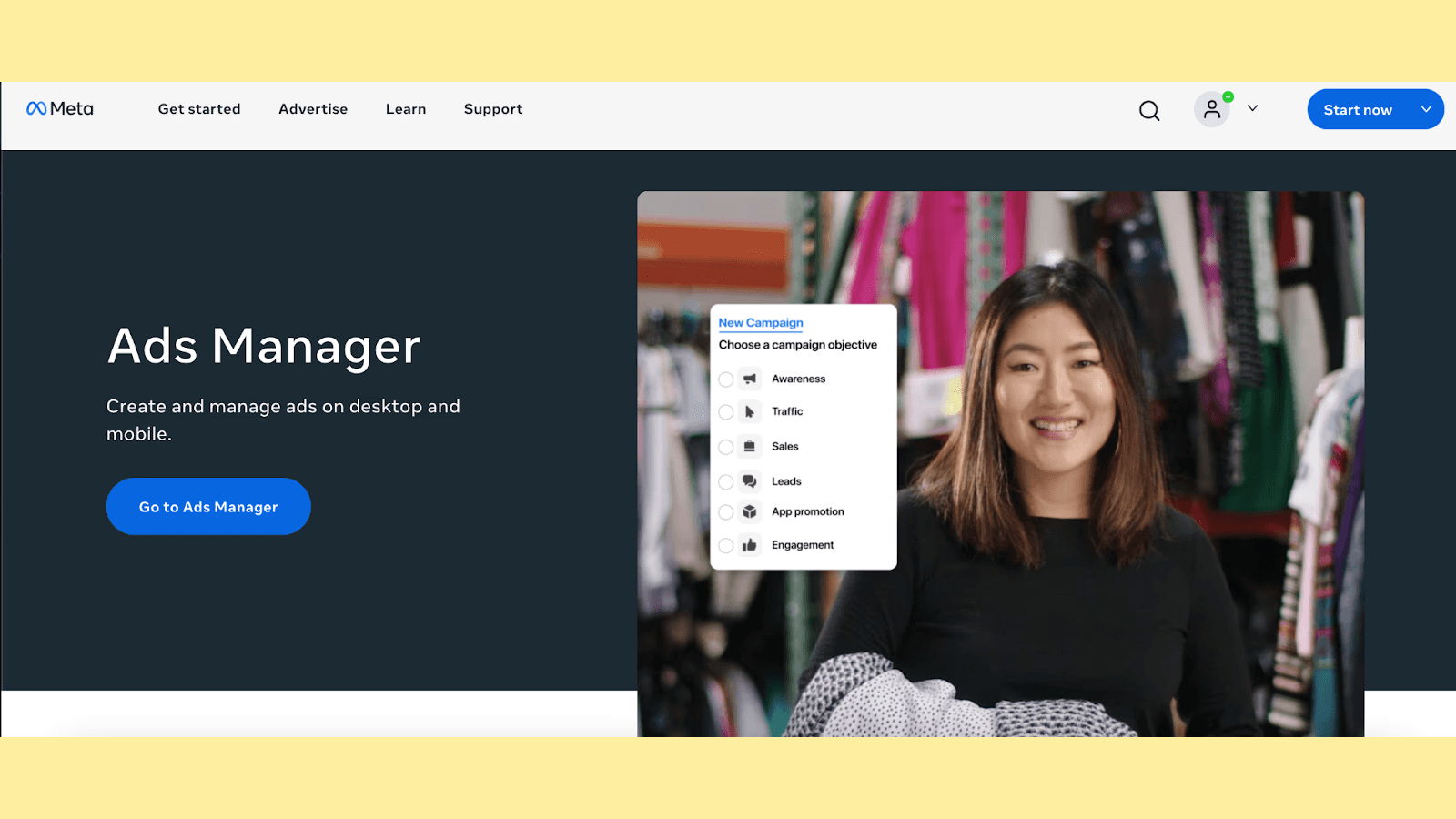
Visit the Facebook Ads Manager and click on "Go to Ads Manager" to access the Campaigns tab. This is your central hub for creating, managing, and analyzing your Facebook ad campaigns.
Step 2: Select a Campaign for Testing
You need an existing campaign to perform an A/B test. Select the ad campaign you want to test and click the "A/B Test" button at the top of the toolbar.
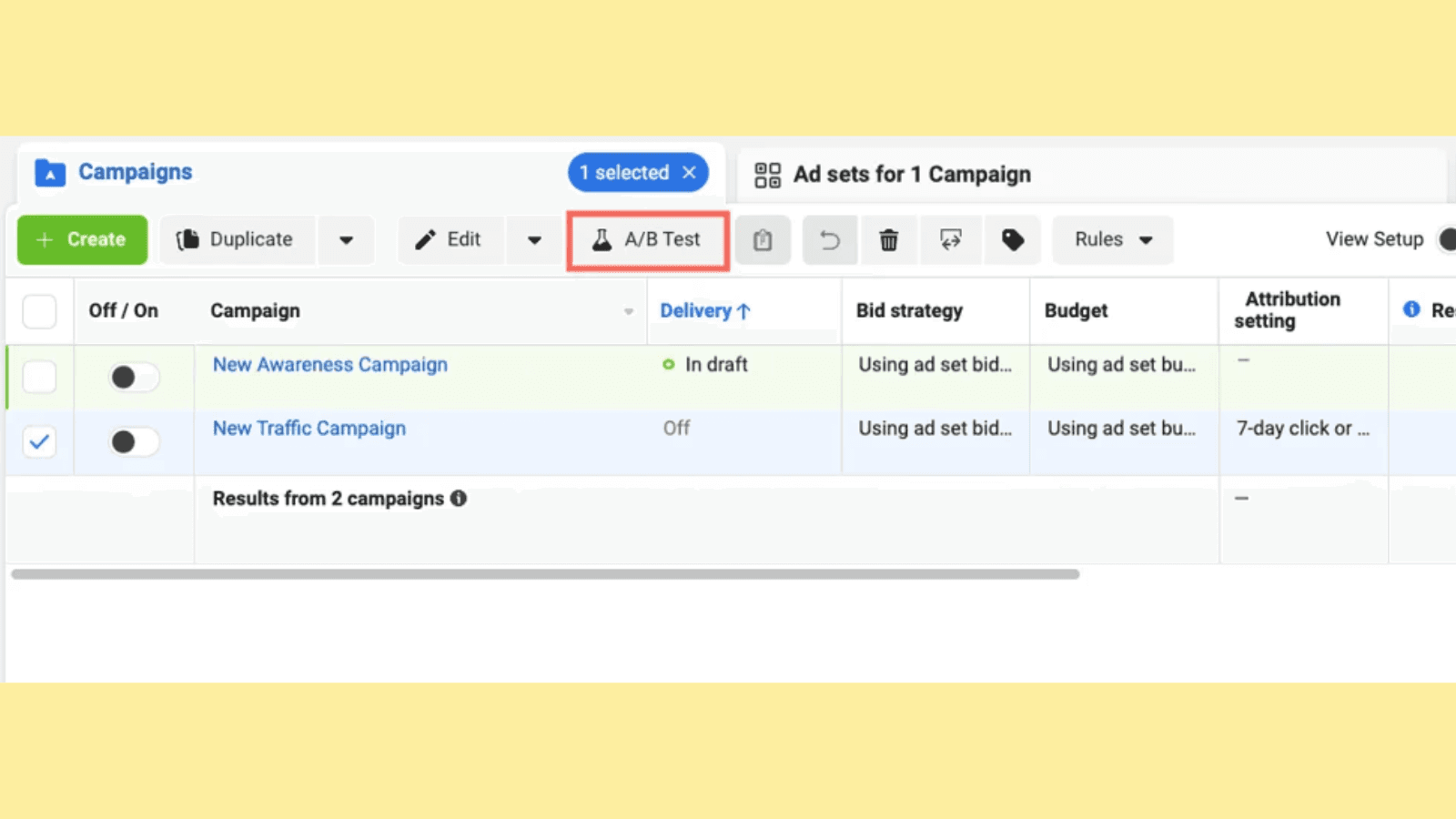
You can also opt to run a Meta A/B test when creating a new campaign by toggling the "Create A/B test" button under "Campaign Details."
Step 3: Set up the A/B Test
In the pop-up that appears, click on "Get Started."
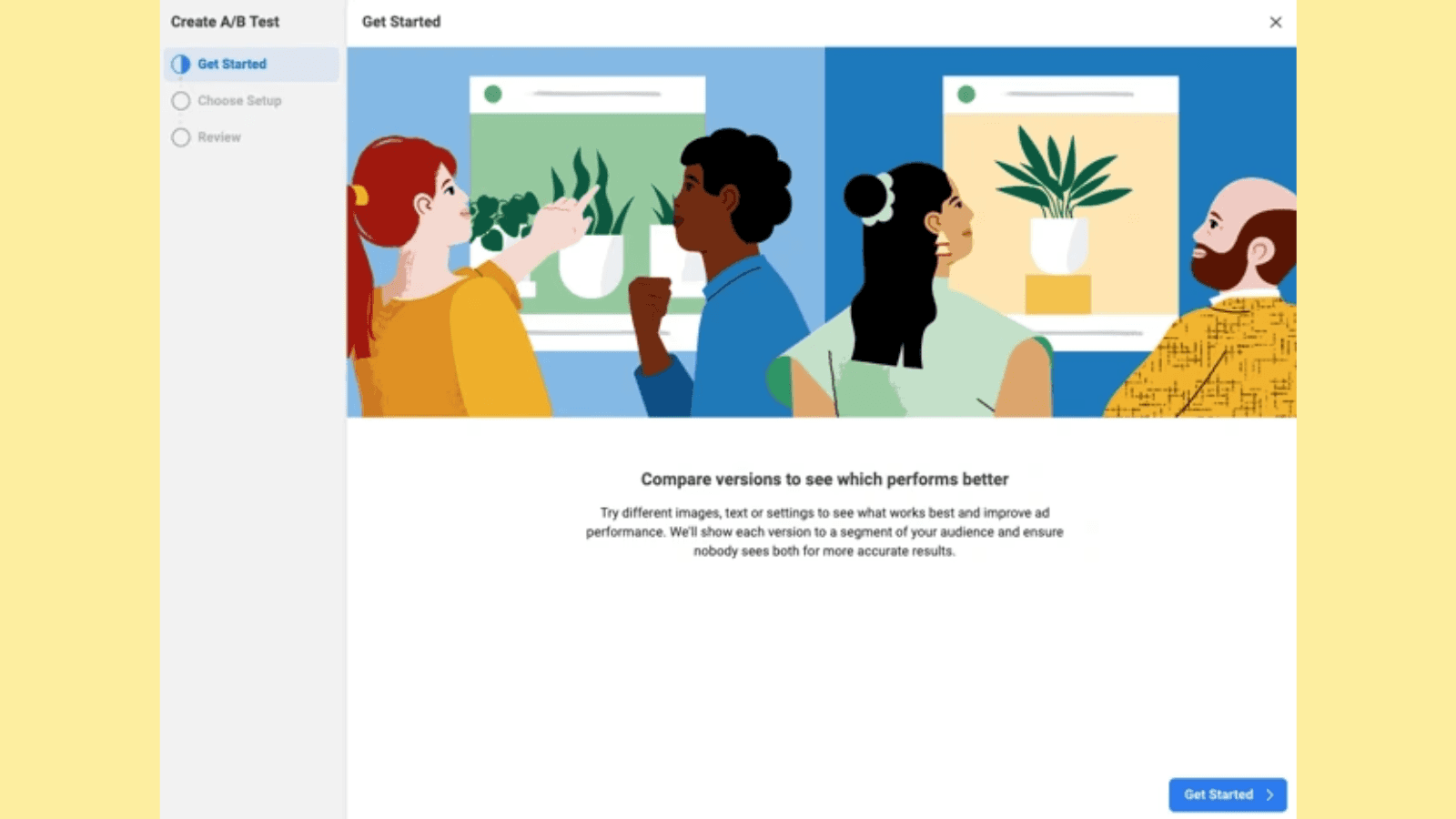
Now, you'll be able to select an ad (Version B) that you want to test against the one you initially picked (Version A). You can do this by creating a copy of the selected campaign or by choosing a different existing campaign. Make your choice and click "Next."
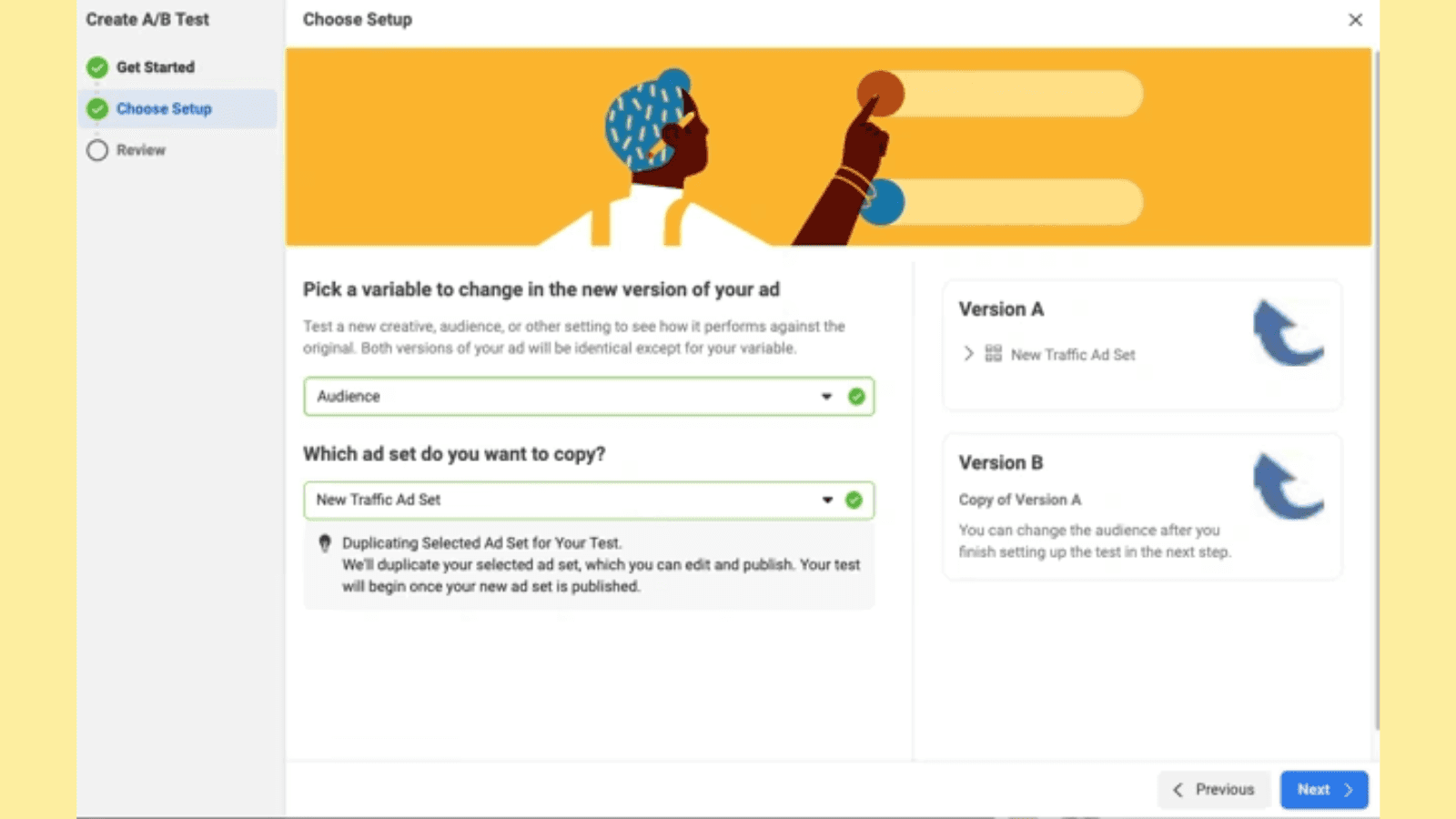
Next, select the parameter you are testing from creative, audience, delivery optimization, or placement.
Step 4: Set the Winning Criteria
To determine which version of your ad performs best, you need to set criteria on which the ads will be judged. Use the drop-down menu to select the winning criteria, such as cost per result, click-through rate, or conversion rate. You can also select the duration of your Meta A/B test.
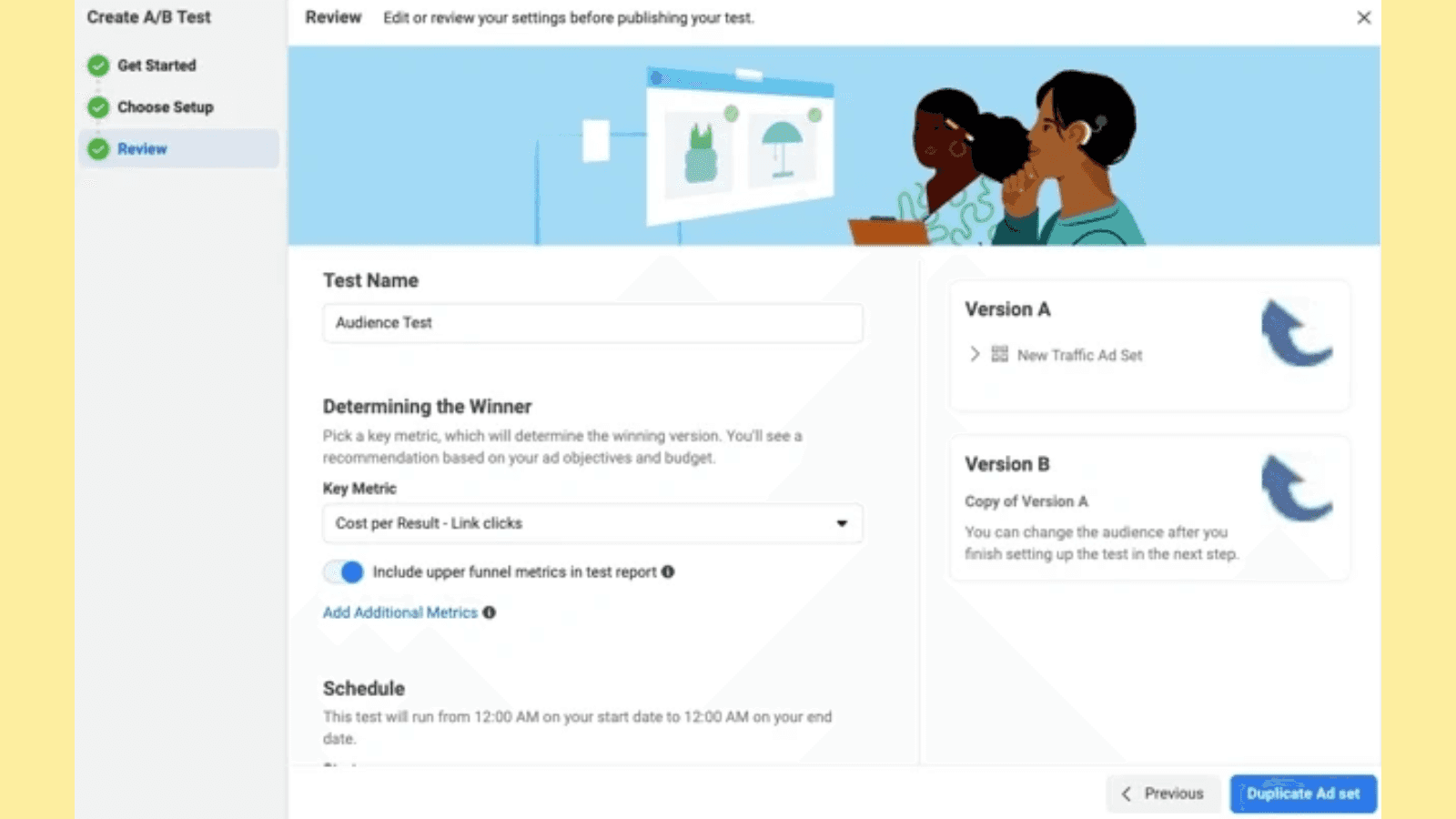
Once done, click "Duplicate Ad Set."
Step 5: Edit and Publish Your Test
You'll now be able to edit the alternate version of your ad. The best practice is to change only one variable at a time. For example, you can change the image, headline, or call-to-action button. This ensures that you can attribute any differences in performance to that specific change.
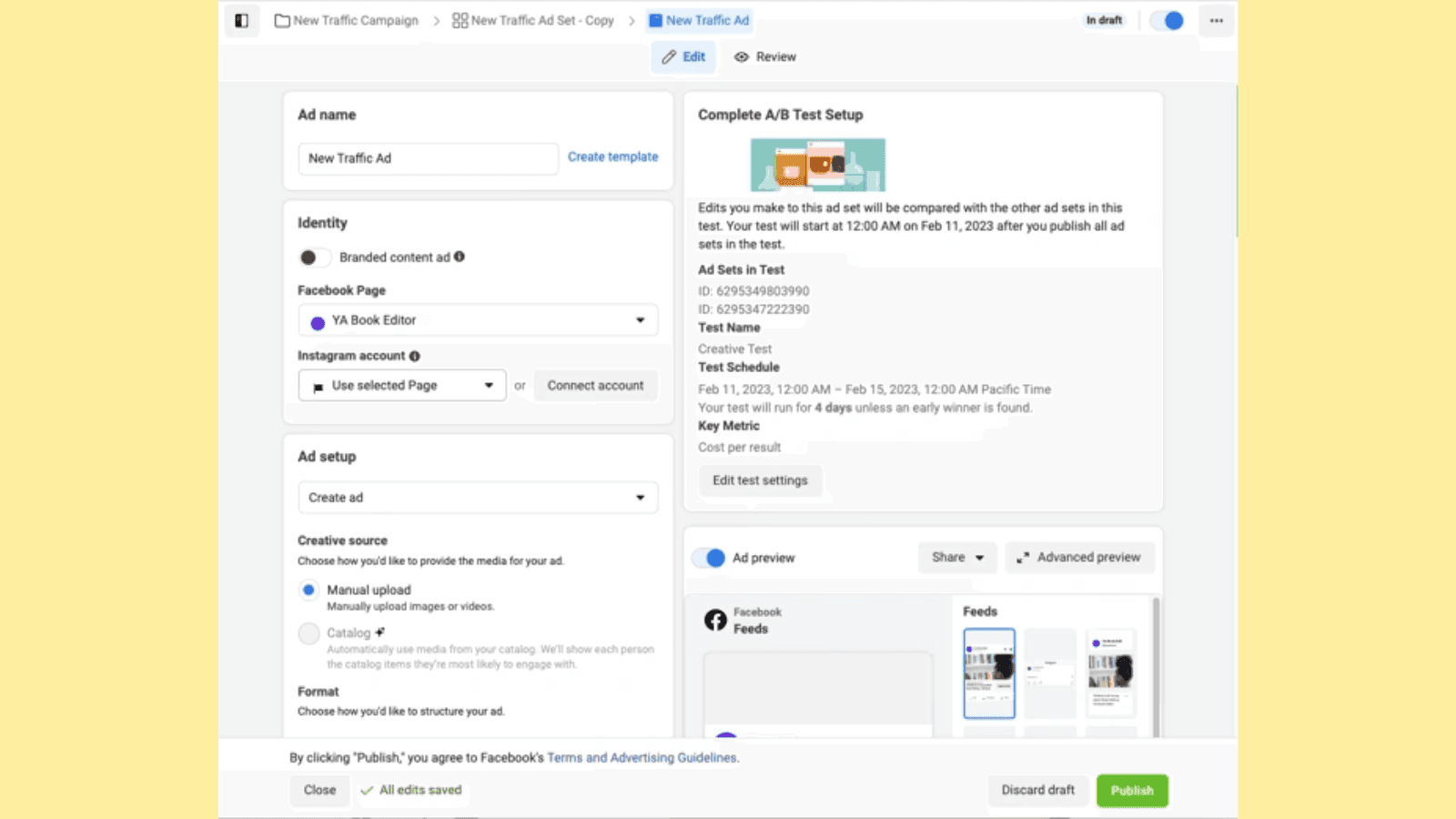
Once you are happy with the tweaks, click "Publish." Now, your A/B test on Facebook is up and running. Track the performance of both ad versions to determine which one is performing better.
Challenges To A/B Testing On Facebook
A/B tests on Facebook are effective only when you do them the right way. Let's look at some common challenges and mistakes you may encounter and solutions to overcome them.
Challenge 1: Testing Too Many Variables at Once
If you change multiple elements in your ad at the same time, it's difficult to pinpoint which change influenced the performance.
For instance, say you create two versions of an ad by changing the image, headline, and audience simultaneously. You run an A/B test and find that one version performs better, but you don't know which change made the actual difference.
Solution: Isolate a single variable for each A/B test. This way, you can confidently attribute any performance differences to that specific change. Limiting your variables leads to clearer insights and more effective optimizations.
Challenge 2: Unclear Hypothesis
Starting an A/B test without a clear hypothesis about what you're trying to achieve leads to aimless testing and inconclusive results. A clear hypothesis is an educated assumption about how a specific change will impact your ad performance. Without this, you do not have a benchmark against which to measure the success of any variation.
Solution: Define a clear hypothesis for the A/B test on Facebook. This gives your testing direction and helps you understand why a certain variation performs better.
Frame your hypothesis with a clear "if/then" statement and a rationale. For example: "If we change the headline to focus on the product benefits, then we believe the click-through rate will increase because it will better resonate with the audience's needs." You can then see if the variation you created with a different headline is actually better by checking if it increased your CTR.
Challenge 3: Small Audiences and Short Durations
Running tests with small audience sizes or short durations can lead to statistically insignificant results. Small sample sizes are prone to fluctuations, making it difficult to determine if performance differences are due to the variable being tested or just random chance.
Solution: Ensure your tests reach a sufficiently large audience and run for an adequate duration. Aim for a sample size that allows you to confidently draw conclusions and run the test long enough to account for any day-of-week or time-of-day variations in user behavior.
Challenge 4: Inadequate Budget
Allocating an insufficient budget to your A/B tests can limit their reach and duration, leading to inconclusive results. A small budget may restrict your ability to gather enough data for statistically significant results.
Solution: Allocate a sufficient budget to your A/B tests to ensure they reach a large enough audience and run for an adequate duration.
Challenge 5: Inconsistent Post-Click Experience
Focusing solely on the ad itself and neglecting the post-click experience can skew your A/B test results. If the landing page or website experience doesn't align with the ad's promise, it can lead to poor conversions, regardless of which ad variation is better.
For example, if your ad promotes a 50% off sale and then leads to a landing page with no mention of the sale or a confusing checkout process, it will likely result in low conversions, even if the ad variation itself is highly effective.
Solution: Make sure your landing pages are relevant to your ads, user-friendly, and optimized for conversions. This ensures that your A/B test results accurately reflect the effectiveness of your ad variations and not external factors.
Benefits Of A/B Testing On Facebook
1. Understand Your Audience Better
A/B testing allows you to experiment with different ad elements to observe which one your audience responds to. This gives you insights on how to:
Tailor your messaging to align your content with what your audience resonates with.
Identifying what types of tone, imagery, and other ad elements perform well.
Refine targeting by understanding which segments of your audience respond to what type of messaging.
2. Improve your ROI
Return on Investment (ROI) is a critical metric for any advertising campaign. A/B testing helps you maximize your ROI by ensuring that your ad spend is directed toward the most effective strategies.
With Meta A/B tests, you can identify high-performing ad variations and allocate your ad budgets to these. Testing can also lower your cost per result by focusing on ads that deliver better outcomes for the same or lower cost.
3. Boost Conversions
Ultimately, the goal of most advertising is to drive conversions, be it making a sale, generating a lead, or encouraging any desired action. A/B testing is instrumental in boosting conversions by fine-tuning your ads to match your audience's preferences.
Ads that resonate with your audience are more likely to capture attention and encourage interaction. Testing allows you to hone in on the messaging and creative elements that your audience finds most relevant. Identifying and removing elements that drive customers away, such as weak CTA or confusing language, helps create a frictionless path toward conversions.
Useful Tools For A/B Testing On Facebook
While Facebook itself provides several tools for A/B testing, there are additional resources you can use to improve your testing strategies further. Here are some of the most useful tools:
1. Facebook Ads Manager
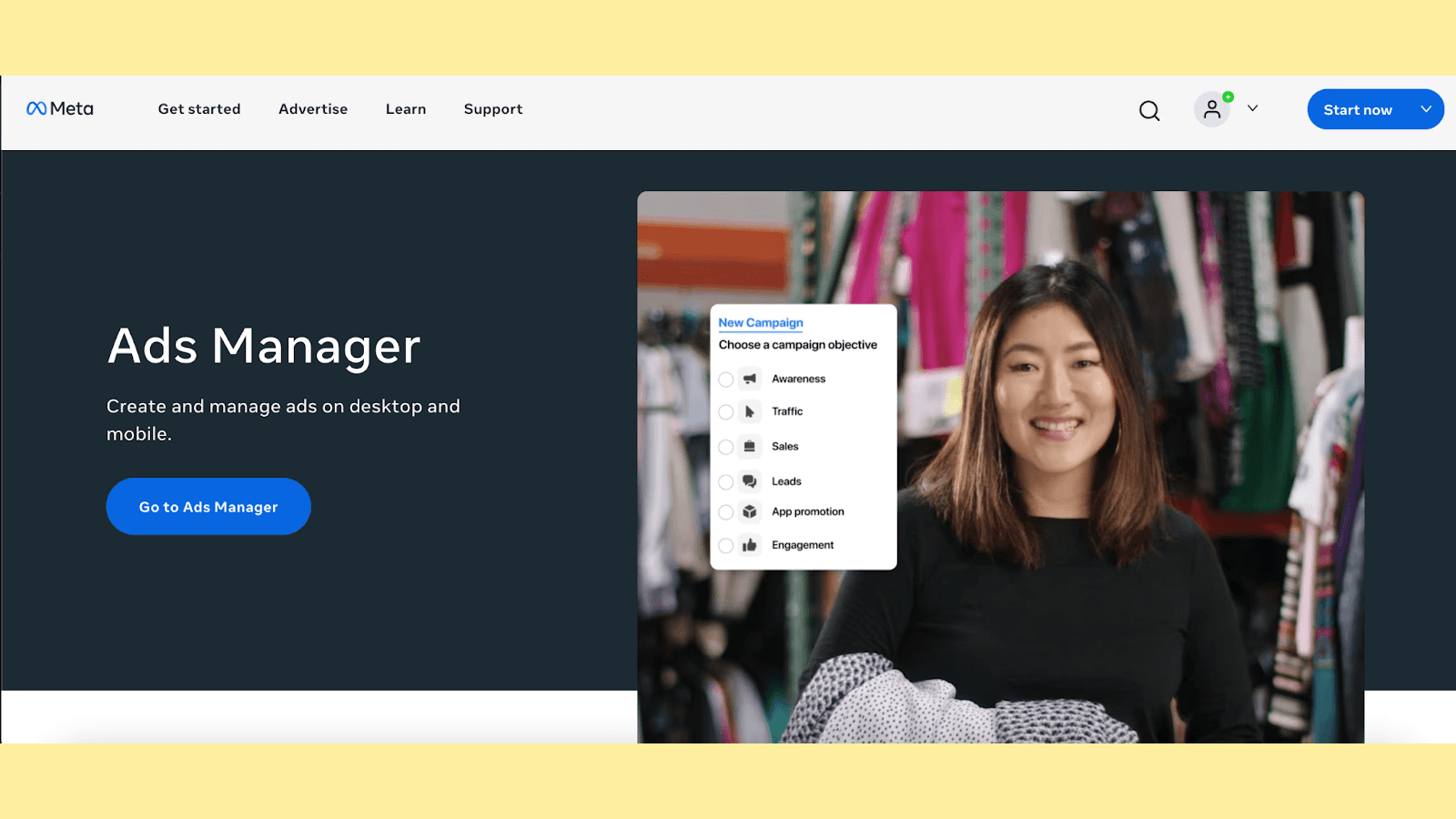
Facebook Ads Manager is a comprehensive platform where you can create, manage, and analyze your ad campaigns. It provides all the tools you need for A/B testing, including options to easily modify ads, track performance, and set up tests.
Beyond A/B testing, it offers features like audience insights, budget management, and detailed analytics. You can monitor real-time performance, adjust your strategies on the fly, and gain valuable insights into your campaigns.
2. Fibr.ai
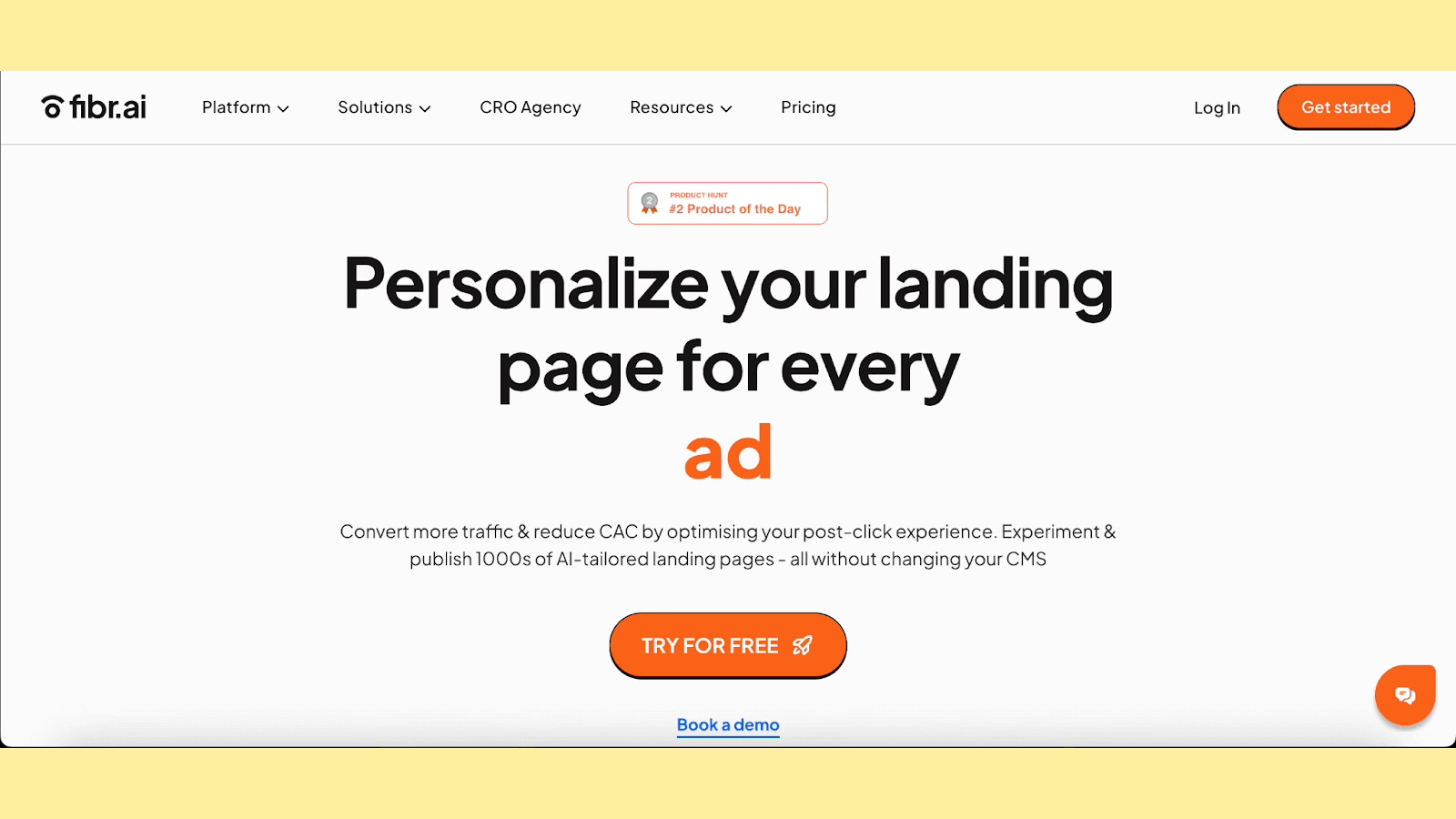
When creating Facebook ads, it's important to ensure that the landing pages align with your ad's messaging and creatives. Fibr.ai helps you easily bulk edit and create landing pages that perfectly match your brand using a WYSIWYG editor.
It integrates seamlessly with Meta Ads and is powered by AI to automate the process of landing page editing. This allows you to create multiple versions of landing pages that correspond to different versions of your ad campaigns.
Additionally, Fibr.ai offers a suite of tracking and analytics features that help you monitor how each version of your campaign is performing. You can then edit landing pages based on this data for continuous optimization.
The best part about Fibr.ai is that it integrates easily with your existing tech stack, and the intuitive interface makes onboarding quick and easy.
Expert Tip: A/B testing your landing pages in conjunction with your ads is a powerful strategy to optimize the entire user journey and maximize conversions. Fibr.ai gives you the tools necessary to A/B test your landing pages.
3. AdRoll
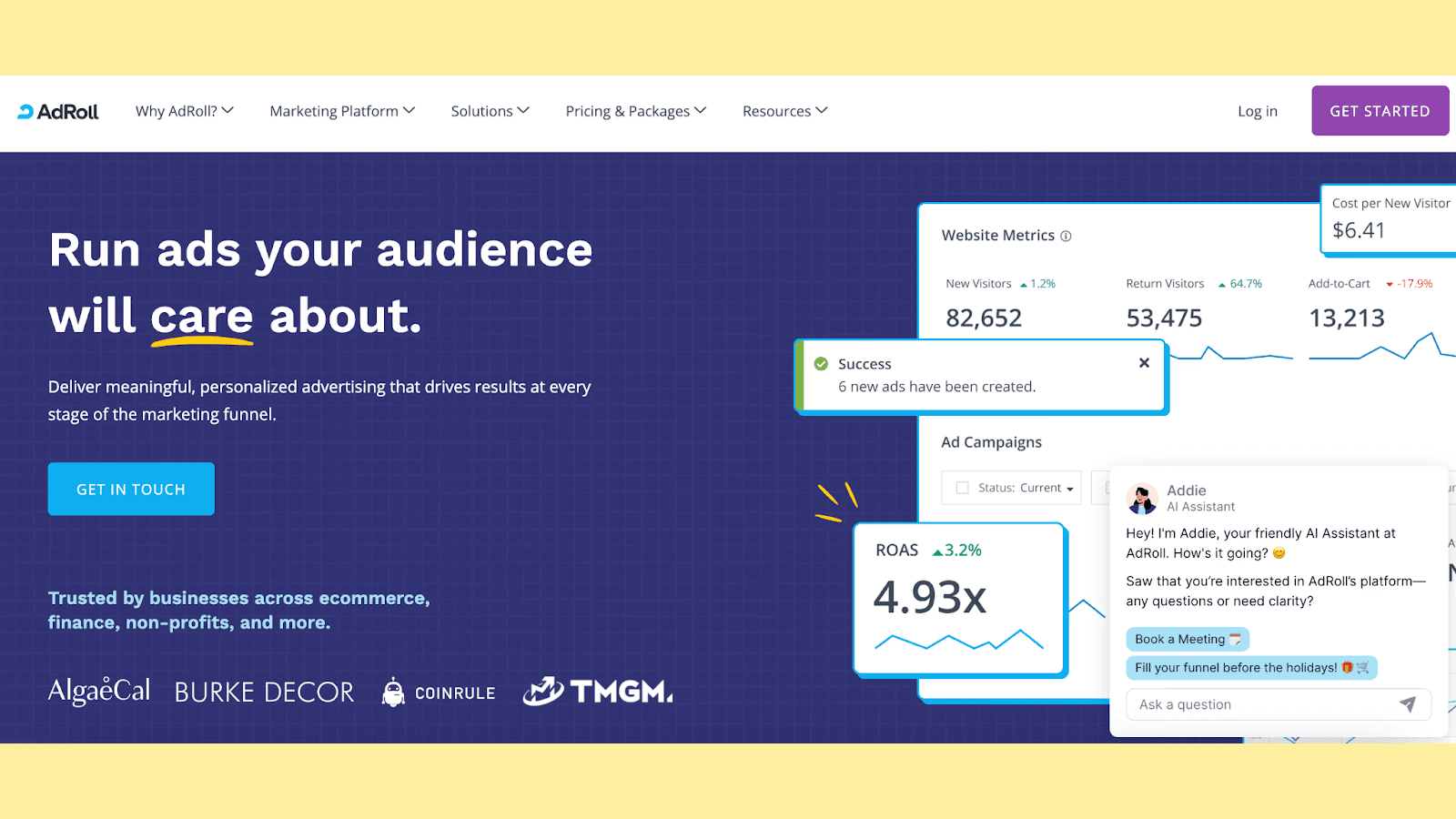
If you want to connect your Facebook ad campaigns to other forms of advertising, AdRoll is a comprehensive digital marketing platform that makes this possible. It allows you to manage and optimize ads across multiple channels, including display, social media, and email.
With AdRoll, you can retarget customers who have interacted with your brand, creating a cohesive and consistent marketing strategy. It also offers robust analytics and A/B testing capabilities, enabling you to gain insights across different platforms.
Wrapping Up: Increase ROI with Facebook A/B Testing
Facebook A/B testing removes the guesswork from your marketing strategy by providing concrete data on what works and what doesn't. By making data-driven decisions, you can optimize your ads to deliver better ROI, as your audience finds more value in your tailored and refined content.
However, crafting the perfect ad is only half the battle. It's equally important to ensure that the user experience remains ideal after the click. A well-designed and custom landing page that aligns with your ad's messaging can impact conversion rates.
This is where Fibr.ai comes into play. With its AI-powered features, Fibr.ai helps you easily align your landing pages with different versions of your ad, all using an intuitive WYSIWYG editor. This ensures that users have a consistent and engaging experience from the moment they see your ad to when they interact with your landing page.
By ensuring that your landing pages are as optimized as your ads, you create a harmonious user journey that encourages conversions and fosters customer loyalty. With Fibr.ai, you can watch as your conversion rates grow, leading to increased revenue and a higher return on your advertising investment.
Book a demo with Fibr.ai today and experience these benefits first-hand!
FAQs
1. How long should you run an AB test on Facebook?
It's recommended to run an A/B test on Facebook for at least 7 to 14 days. This time frame allows for enough duration to gather sufficient data across different days of the week and user behaviors, leading to more reliable and statistically significant results.
2. How do I check my AB test on Facebook?
You can check your A/B test results in the Facebook Ads Manager under the "Experiments" tab. Here, you'll find performance metrics for each variant, allowing you to compare results and identify the winning version based on your predefined criteria.
3. What is the primary consideration when interpreting a B test results on Facebook?
The primary consideration is statistical significance. Ensure that the differences in performance between variants are not due to random chance. Look at key metrics like conversion rate, cost per result, and confidence levels to make informed decisions based on the data.





Ankur Goyal
CEO @ Fibr AI
Ankur Goyal, a visionary entrepreneur, is the driving force behind Fibr, a groundbreaking AI co-pilot for websites. With a dual degree from Stanford University and IIT Delhi, Ankur brings a unique blend of technical prowess and business acumen to the table. This isn't his first rodeo; Ankur is a seasoned entrepreneur with a keen understanding of consumer behavior, web dynamics, and AI. Through Fibr, he aims to revolutionize the way websites engage with users, making digital interactions smarter and more intuitive.
Table of Content
Read summarized version with
Introduction
You launch two Facebook ad campaigns with the same target audience, budget, and ad copy. The only difference? The image. One features a sleek product shot on a white background, and the other is a lifestyle shot with people using your product.
You run the first ad, and......crickets. No engagement, no conversions.
Then, you launch the second ad with the lifestyle image. Suddenly, it's a different story. Likes, comments, clicks, you name it! Your ad is the hottest ticket in town.
But what if there was a way to predict which ad would bring in valuable conversions and which was doomed to fail? Well, you're in luck, there is a way!
Enter A/B testing, the tried-and-tested method that runs two slightly varying versions of something to determine which gives the best results.
In this article, we explore everything you need to know about Facebook and A/B testing. We cover why it's important, how to perform it, and some challenges and best practices to keep in mind so that you can start maximizing your Facebook ad ROI today.
What is Facebook A/B Testing?
An A/B test is a method of comparing two versions of something to figure out which performs better. A Facebook A/B test is when you compare two versions of a Facebook ad campaign to understand which one resonates with your audience better and drives more conversions.
Facebook A/B tests can be used in four different use cases when you want to test:
1. Creative
This is A/B testing different ad elements like images, videos, headlines, body text, and call-to-action buttons. By tweaking these components, you can identify which creative elements engage your audience the most.
2. Audience
This helps you understand which segment of your audience resonates with your ad the best. You can test factors like age, gender, interests, location, and behaviors.
For example, if you sell hiking gear, you might test your ad on two different audiences: one interested in "outdoor activities" and another interested in "camping and hiking" to see which group is more likely to purchase your products.
3. Delivery Optimization
Facebook Ads offers several optimization options like conversions, link clicks, or impressions. By testing different delivery optimizations, you can find out which setting delivers the best results for your campaign goals.
4. Placement
You can place your Facebook ads on various platforms such as Facebook News Feed, Instagram Stories, Messenger, or the Audience Network. You can also choose between devices like mobile or desktop. This test lets you find out where your ad performs best.
Why Do You Need Facebook A/B Testing?
Running ineffective ads is a waste of money, time, and resources. Facebook A/B testing gives you valuable data to help you understand what works and what doesn't early on in the process.
This allows you to optimize your campaigns for maximum impact and avoid wasting precious resources on strategies that simply don't resonate with your audience.
When you start relying on A/B tests to tell you which ad is more likely to perform better, you can make data-driven decisions rather than relying on guesswork. This leads to more efficient ad spending, better results from your campaigns, and ultimately increased ROI.
Who Is Facebook A/B Testing For?
Facebook A/B testing is essential for anyone who runs ads on the platform, regardless of the size or nature of their business. It provides actionable insights that can significantly enhance advertising effectiveness across various industries and sectors.
For example, small businesses can benefit from identifying the most impactful ad elements and optimizing their ads to ensure that every dollar is spent in a way that guarantees growth. This helps them reach their niche or local audience more effectively.
On the other hand, for larger companies where budget is not an issue, Facebook A/B testing helps optimize campaigns at scale and fine-tune their messaging for different audiences to maintain a competitive edge.
A/B Testing On Facebook - How To Do It Right?
Before learning how to A/B test Facebook ads, let's start by determining answers to these two questions:
1. What is your goal?
Are you trying to:
Increase brand awareness?
Drive website traffic?
Generate leads?
Boost sales?
Having a clear objective will guide your A/B testing strategy. The goal of your A/B test will help you focus on the most relevant metrics and make informed decisions.
2. What are you testing?
As mentioned earlier, you can test for four parameters using Facebook A/B tests: creative, audience, delivery optimization, and placement. Understand which one you are testing for and ensure that it aligns with your goals.
Once you have a clear picture of your A/B testing goals and parameters, it is time to actually set up the test and get it running.
Step 1: Log in to Facebook Ads Manager
Visit the Facebook Ads Manager and click on "Go to Ads Manager" to access the Campaigns tab. This is your central hub for creating, managing, and analyzing your Facebook ad campaigns.
Step 2: Select a Campaign for Testing
You need an existing campaign to perform an A/B test. Select the ad campaign you want to test and click the "A/B Test" button at the top of the toolbar.
You can also opt to run a Meta A/B test when creating a new campaign by toggling the "Create A/B test" button under "Campaign Details."
Step 3: Set up the A/B Test
In the pop-up that appears, click on "Get Started."
Now, you'll be able to select an ad (Version B) that you want to test against the one you initially picked (Version A). You can do this by creating a copy of the selected campaign or by choosing a different existing campaign. Make your choice and click "Next."
Next, select the parameter you are testing from creative, audience, delivery optimization, or placement.
Step 4: Set the Winning Criteria
To determine which version of your ad performs best, you need to set criteria on which the ads will be judged. Use the drop-down menu to select the winning criteria, such as cost per result, click-through rate, or conversion rate. You can also select the duration of your Meta A/B test.
Once done, click "Duplicate Ad Set."
Step 5: Edit and Publish Your Test
You'll now be able to edit the alternate version of your ad. The best practice is to change only one variable at a time. For example, you can change the image, headline, or call-to-action button. This ensures that you can attribute any differences in performance to that specific change.
Once you are happy with the tweaks, click "Publish." Now, your A/B test on Facebook is up and running. Track the performance of both ad versions to determine which one is performing better.
Challenges To A/B Testing On Facebook
A/B tests on Facebook are effective only when you do them the right way. Let's look at some common challenges and mistakes you may encounter and solutions to overcome them.
Challenge 1: Testing Too Many Variables at Once
If you change multiple elements in your ad at the same time, it's difficult to pinpoint which change influenced the performance.
For instance, say you create two versions of an ad by changing the image, headline, and audience simultaneously. You run an A/B test and find that one version performs better, but you don't know which change made the actual difference.
Solution: Isolate a single variable for each A/B test. This way, you can confidently attribute any performance differences to that specific change. Limiting your variables leads to clearer insights and more effective optimizations.
Challenge 2: Unclear Hypothesis
Starting an A/B test without a clear hypothesis about what you're trying to achieve leads to aimless testing and inconclusive results. A clear hypothesis is an educated assumption about how a specific change will impact your ad performance. Without this, you do not have a benchmark against which to measure the success of any variation.
Solution: Define a clear hypothesis for the A/B test on Facebook. This gives your testing direction and helps you understand why a certain variation performs better.
Frame your hypothesis with a clear "if/then" statement and a rationale. For example: "If we change the headline to focus on the product benefits, then we believe the click-through rate will increase because it will better resonate with the audience's needs." You can then see if the variation you created with a different headline is actually better by checking if it increased your CTR.
Challenge 3: Small Audiences and Short Durations
Running tests with small audience sizes or short durations can lead to statistically insignificant results. Small sample sizes are prone to fluctuations, making it difficult to determine if performance differences are due to the variable being tested or just random chance.
Solution: Ensure your tests reach a sufficiently large audience and run for an adequate duration. Aim for a sample size that allows you to confidently draw conclusions and run the test long enough to account for any day-of-week or time-of-day variations in user behavior.
Challenge 4: Inadequate Budget
Allocating an insufficient budget to your A/B tests can limit their reach and duration, leading to inconclusive results. A small budget may restrict your ability to gather enough data for statistically significant results.
Solution: Allocate a sufficient budget to your A/B tests to ensure they reach a large enough audience and run for an adequate duration.
Challenge 5: Inconsistent Post-Click Experience
Focusing solely on the ad itself and neglecting the post-click experience can skew your A/B test results. If the landing page or website experience doesn't align with the ad's promise, it can lead to poor conversions, regardless of which ad variation is better.
For example, if your ad promotes a 50% off sale and then leads to a landing page with no mention of the sale or a confusing checkout process, it will likely result in low conversions, even if the ad variation itself is highly effective.
Solution: Make sure your landing pages are relevant to your ads, user-friendly, and optimized for conversions. This ensures that your A/B test results accurately reflect the effectiveness of your ad variations and not external factors.
Benefits Of A/B Testing On Facebook
1. Understand Your Audience Better
A/B testing allows you to experiment with different ad elements to observe which one your audience responds to. This gives you insights on how to:
Tailor your messaging to align your content with what your audience resonates with.
Identifying what types of tone, imagery, and other ad elements perform well.
Refine targeting by understanding which segments of your audience respond to what type of messaging.
2. Improve your ROI
Return on Investment (ROI) is a critical metric for any advertising campaign. A/B testing helps you maximize your ROI by ensuring that your ad spend is directed toward the most effective strategies.
With Meta A/B tests, you can identify high-performing ad variations and allocate your ad budgets to these. Testing can also lower your cost per result by focusing on ads that deliver better outcomes for the same or lower cost.
3. Boost Conversions
Ultimately, the goal of most advertising is to drive conversions, be it making a sale, generating a lead, or encouraging any desired action. A/B testing is instrumental in boosting conversions by fine-tuning your ads to match your audience's preferences.
Ads that resonate with your audience are more likely to capture attention and encourage interaction. Testing allows you to hone in on the messaging and creative elements that your audience finds most relevant. Identifying and removing elements that drive customers away, such as weak CTA or confusing language, helps create a frictionless path toward conversions.
Useful Tools For A/B Testing On Facebook
While Facebook itself provides several tools for A/B testing, there are additional resources you can use to improve your testing strategies further. Here are some of the most useful tools:
1. Facebook Ads Manager
Facebook Ads Manager is a comprehensive platform where you can create, manage, and analyze your ad campaigns. It provides all the tools you need for A/B testing, including options to easily modify ads, track performance, and set up tests.
Beyond A/B testing, it offers features like audience insights, budget management, and detailed analytics. You can monitor real-time performance, adjust your strategies on the fly, and gain valuable insights into your campaigns.
2. Fibr.ai
When creating Facebook ads, it's important to ensure that the landing pages align with your ad's messaging and creatives. Fibr.ai helps you easily bulk edit and create landing pages that perfectly match your brand using a WYSIWYG editor.
It integrates seamlessly with Meta Ads and is powered by AI to automate the process of landing page editing. This allows you to create multiple versions of landing pages that correspond to different versions of your ad campaigns.
Additionally, Fibr.ai offers a suite of tracking and analytics features that help you monitor how each version of your campaign is performing. You can then edit landing pages based on this data for continuous optimization.
The best part about Fibr.ai is that it integrates easily with your existing tech stack, and the intuitive interface makes onboarding quick and easy.
Expert Tip: A/B testing your landing pages in conjunction with your ads is a powerful strategy to optimize the entire user journey and maximize conversions. Fibr.ai gives you the tools necessary to A/B test your landing pages.
3. AdRoll
If you want to connect your Facebook ad campaigns to other forms of advertising, AdRoll is a comprehensive digital marketing platform that makes this possible. It allows you to manage and optimize ads across multiple channels, including display, social media, and email.
With AdRoll, you can retarget customers who have interacted with your brand, creating a cohesive and consistent marketing strategy. It also offers robust analytics and A/B testing capabilities, enabling you to gain insights across different platforms.
Wrapping Up: Increase ROI with Facebook A/B Testing
Facebook A/B testing removes the guesswork from your marketing strategy by providing concrete data on what works and what doesn't. By making data-driven decisions, you can optimize your ads to deliver better ROI, as your audience finds more value in your tailored and refined content.
However, crafting the perfect ad is only half the battle. It's equally important to ensure that the user experience remains ideal after the click. A well-designed and custom landing page that aligns with your ad's messaging can impact conversion rates.
This is where Fibr.ai comes into play. With its AI-powered features, Fibr.ai helps you easily align your landing pages with different versions of your ad, all using an intuitive WYSIWYG editor. This ensures that users have a consistent and engaging experience from the moment they see your ad to when they interact with your landing page.
By ensuring that your landing pages are as optimized as your ads, you create a harmonious user journey that encourages conversions and fosters customer loyalty. With Fibr.ai, you can watch as your conversion rates grow, leading to increased revenue and a higher return on your advertising investment.
Book a demo with Fibr.ai today and experience these benefits first-hand!
FAQs
1. How long should you run an AB test on Facebook?
It's recommended to run an A/B test on Facebook for at least 7 to 14 days. This time frame allows for enough duration to gather sufficient data across different days of the week and user behaviors, leading to more reliable and statistically significant results.
2. How do I check my AB test on Facebook?
You can check your A/B test results in the Facebook Ads Manager under the "Experiments" tab. Here, you'll find performance metrics for each variant, allowing you to compare results and identify the winning version based on your predefined criteria.
3. What is the primary consideration when interpreting a B test results on Facebook?
The primary consideration is statistical significance. Ensure that the differences in performance between variants are not due to random chance. Look at key metrics like conversion rate, cost per result, and confidence levels to make informed decisions based on the data.
Ankur Goyal
CEO @ Fibr AI
Ankur Goyal, a visionary entrepreneur, is the driving force behind Fibr, a groundbreaking AI co-pilot for websites. With a dual degree from Stanford University and IIT Delhi, Ankur brings a unique blend of technical prowess and business acumen to the table. This isn't his first rodeo; Ankur is a seasoned entrepreneur with a keen understanding of consumer behavior, web dynamics, and AI. Through Fibr, he aims to revolutionize the way websites engage with users, making digital interactions smarter and more intuitive.


