Table of Content
Read summarized version with
Today, landing pages have become a necessity for most B2B businesses to nurture their leads and grow online. In fact, research shows that websites with 40+ landing pages are likely to generate 1200% more leads than those with just one landing page.
For instance, the average conversion rate for landing pages across industries is 2.35%, while the top websites achieve an average rate of 10% or higher. What sets this top website apart from the others? Regular audits, analysis, and continuous performance optimization.
So, if your landing page doesn’t have the expected conversion rate, or perhaps, despite having high traffic and a compelling offer, the visitors aren’t taking the desired action. Then, getting your landing page audited would be ideal.
Why Should You Audit Landing Page Performance Regularly?
Regular audits of the landing page performance are part of creating a strong and high-performing marketing strategy. Here are some reasons why regular landing page audit is essential and how it can help you improve performance and conversion rates:
Identifying Performance Gaps
Regular audits can easily reveal performance gaps like technical issues, content relevancy, and opportunities for SEO strategies. Technical issues like slow page loading time can increase the bounce rate for the page.
Additionally, regular audits ensure that your content is up-to-date and relevant to your audience. It can help find new search engine ranking opportunities, which can help drive more organic traffic to your page.
For example, the top conversion rate occurs within 1 to 2 seconds for e-commerce. The conversion rate at 1 second is around 3.05%, while it drops down to 0.67% at 4 second page load time.
Improving ROI
Optimized landing pages can bring high conversion rates, resulting in better ROI (return on investment). Auditing these pages can help identify issues with unclear call-to-action or the effectiveness of the design layout.
These checks are done by conducting A/B testing, having a clear call-to-action, and proper placement of design elements. Such efforts further make it possible for you to retain your visitor’s interest.
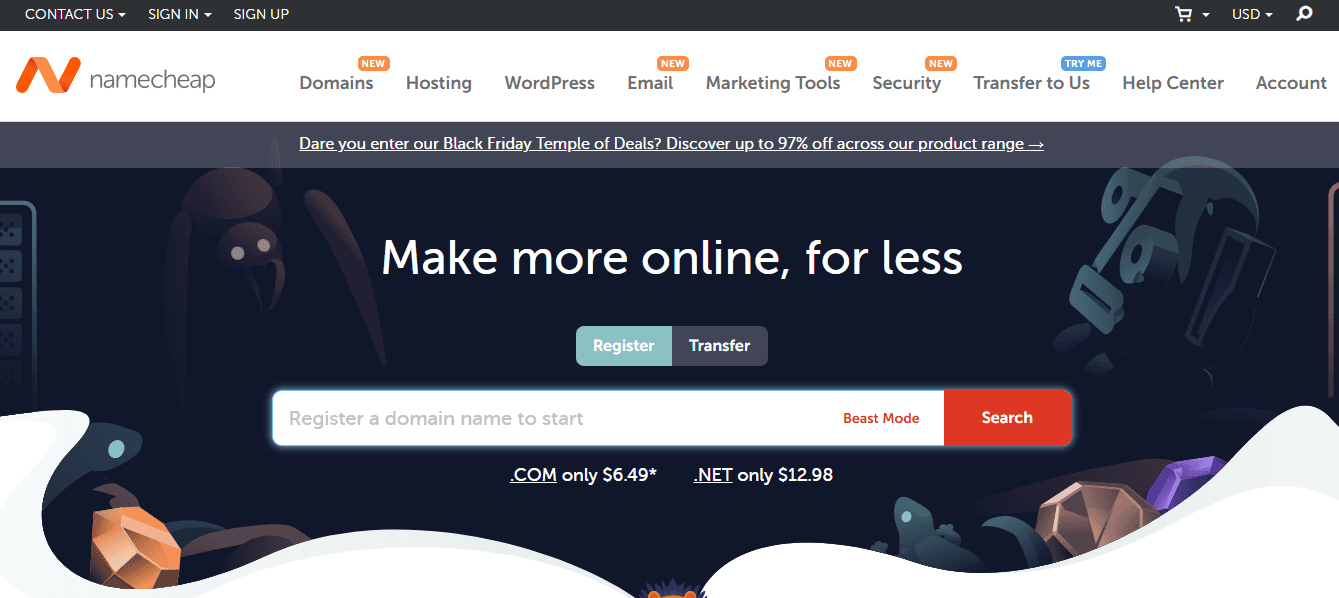
For example, a company named Namecheap conducted A/B testing for their landing page design using two different variants. The testing mainly focused on layout, illustrations, and content placement. They divided their traffic into half, with 50% heading to page A and 50% heading to page B.
With just a slight change of position of the search bar, they saw a lift of 7% in conversion rates on page B.
Conduct successful A/B Testing With Fibr AI
Create, run, and analyze your landing page without limits and boost your conversion with Fibr AI
Enhancing User Experience
Your potential customers use various devices. These visitors by devices can be classified as 44% from desktops, 40% from mobiles, 10% from tablets, and 5% unknown. Regular audits can help identify and fix navigational issues, load time, and broken links to improve overall user experience.
Additionally, your landing page needs to be responsive and user-friendly across all types of devices. The device-level performance of your landing page is analyzed based on how well your page is performing across different devices.
For example, Neil Patel emphasizes that mobile optimization is a necessary step for decreasing bounce rates and improving user experience. According to a survey, 60% of their respondents use mobile to view websites and pages. Two-thirds of their total respondents agreed that a responsive design is an essential factor when it comes to online experiences.
Staying Ahead Among Competitors
Regular landing page audits can help you identify trends and best practices in the industry. Your competitor might launch a new feature or improve their UX design to influence visitor's expectations.
Regular changes and updates in your landing pages also keep your visitors interested, and you can adapt to consumer behavior shifts.
Additionally, you can adopt new strategies, track changes, identify content gaps, and find strategies that are already working for your business.
For example, if you are doing a competitor audit, you can easily find out if your competitor introduced a more intuitive interface with added new features. By analyzing, you can quickly identify the gap in your landing page layout or content and make the necessary changes.
Key Metrics for Analyzing Landing Page Effectiveness
Conversion rate is the most important metric for landing page optimization, but there are several other key aspects to be considered for a successful audit. Some of these key metrics for analyzing landing page effectiveness are:
Bounce Rate
Bounce rate is the percentage of your target audience that visited your landing page but left without following the call-to-action. A high bounce rate suggests that the landing page is not compelling enough to engage the audience. This results in a lower conversion rate.
Typically, the bounce rate is calculated by analyzing the number of sessions involving only one page. The formula for calculating the bounce rate for a landing page is:

So, if 300 people leave your page without taking action out of 500 total visits, then your bounce rate will be 60%.
Page Views
Page views metrics measure how many pages are viewed/loaded in a session. This also includes pages viewed/loaded on repeat. It helps figure out the level of interest of visitors on your landing page. More page views indicate that the content is engaging and resonates well with the audience.
However, page views should be a standalone metric for analyzing the performance of the landing pages. Anytime a user visits a page, and that page is reloaded for any reason, it is counted as a page view. It can be best analyzed alongside unique visitors.
Session by Source
Session-by-source metrics help you understand where the traffic is coming from on your landing page. Most marketing campaigns involve multiple marketing channels, including display ads, social media ads, YouTube ads, blog posts, or email marketing. Thus, identifying the most effective one can improve your efficiency. This is where Google Analytics plays its role. It provides detailed information on your traffic sources.
For instance, most of your traffic comes from social media ads, and the least of your traffic comes from YouTube ads. You can optimize your strategy by increasing your spending on social media ads and cutting back on YouTube ads.
Cost per Conversion (CPC)
CPC is the cost you bear for achieving a specific action or conversion, like a purchase, form submission, signup, or download. Conversion rate is the percentage of people who take a desired action, while cost per conversion measures the expense of achieving those actions.
The formula for calculating CPC is
So, if you spend $1000 on a marketing campaign and get 50 conversions from it, then your CPC will be $20 per conversion.
Form Abandonment
The abandonment rate measures the percentage of people who have interacted, filled it halfway but did not complete it, and submitted it. A high form abandonment rate indicates that your landing page form needs to be optimized.
This can happen due to several reasons, including the form being too long or confusing, unclear call-to-action, issues with the form design, scrolling depth, or slow loading time.
Return vs. New Visitors
Return visitors are people who have visited your landing page before, while new visitors are the people who are interacting with it for the first time. Understanding them is necessary for bringing the right ratio between return and new visitors.
If you have a high volume of returning visitors, then you can look for the reasons why they did not convert the first time. However, if your new visitor's rate is low, you will have to take a look at the entire marketing campaign.
How to Calculate Landing Page Conversion Rate
Conversion rate is an essential metric for assessing your landing page’s performance. It tells you the percentage of visitors who are visiting your landing page and taking the desired action, like submitting a form, making a purchase, or signing up for a newsletter.
The formula for calculating the conversion rate is:
Conversion Rate = ( Total number of conversions ÷ Total Visitors ) x 100
So, if 50,000 people are visiting your landing page, out of which 1000 are taking action, then your conversion rate will be 2%.
There is no right or wrong set conversion rate; it is only continuous progress. If you started with a 2% conversion rate and it increased to 5% after landing page optimization, then it's a win. However, a low conversion rate indicates potential issues with CTA placement, user experience, or audience targeting.
Measuring Landing Page View Rate and Cost Per View
Effectively monitoring and optimizing your landing page view rate and cost per view can help you optimize your ad campaign creatives and ad spending. If you do not know what they are, here’s a detailed explanation for both.
Landing Page View Rate
The landing page view rate measures the percentage of clicks on a particular ad that resulted in the user actually viewing the landing page. It tells you how many people from those who clicked on the ad actually ended up engaging with the landing page.
A high landing page view rate indicates that your ad campaign creatives and message are attracting an audience. However, a low landing page view rate and page views can happen for various reasons, including issues with ad creatives, slow page loading time, technical glitches, broken links, or clicks by mistake.
For calculating the landing page view rate formula is as:
Landing Page View Rate = ( Landing Page View / Total Ad Clicks ) x 100
For instance, if your ads got 1000 clicks and the landing page view is 800, then your landing page view rate would be 80%.
Cost per View
Cost per view (CVP) is the cost you pay per view of your landing page. It helps you assess how much you are spending per visitor who viewed the landing page. However, CPV does not guarantee conversions because the viewers might view the page and leave without taking any action.
CPV is important for campaigns focused on awareness, traffic, or visibility. It can help measure the effectiveness of the ad campaign in generating views, even with no immediate conversion.
The cost per landing page view formula is:
Cost per View = Total Cost of Campaign / Landing Page Views
So, if your landing page campaign costs you $500 and your page gets 1000 views, then your cost per view would be $0.50 for each landing page view.
Steps to Conduct a Comprehensive Landing Page Audit
Carrying out a comprehensive landing page audit can be complex. Therefore, here is a step-by-step process of how you can approach the audit effectively:
Step 1: Define Your Goals
Before getting your landing page audited, you must define the primary purpose of the audit and what you want to achieve with the landing page. This will guide your focus on achieving a specific goal.
Wondering how you can do this? Ask yourself what actions you want your visitors to take when they visit your landing page. Then, simply list all the key performance indicators (KPIs) that can help you in achieving that action and analyze them. This could include metrics like:
Bounce rate
Conversion rate
Average time spent on a page
Landing page loading speed
Number of conversions
Number of unique visitors
Visitor-to-lead conversion rate
Moreover, analyze marketing channels (social media and search engines) and identify which sources are bringing the most and least conversions to your landing page. This will help you streamline your landing page optimization efforts and set correct goals.
Step 2: Analyze Audience Intent
Understanding your audience's intent is important for creating an effective landing page. This can help you personalize the landing page according to the needs and expectations of specific audiences.
Audience intent is what your visitors are expecting when they land on your page. It can generally be categorized into 3 types:
Navigational Intent: Users searching for a specific website or page.
Informational Intent: Users looking for information on a specific topic.
Transactional Intent: Users are ready to make a purchase or take an action.
Understanding audience intent can help align your landing page’s outlook, which consists of various elements like UI, UX, and content. If you are wondering how to analyze user behavior patterns, tools like Google Analytics and Content Square can be helpful.
To give you a real-life example, Turum-Burum, a UX design agency, collaborated with Intertop, a Ukrainian e-commerce shoe store, to address checkout form abandonment issues. They formed a strategy of using an exit-intent survey. They asked, “Why would you like to stop placing the order?” Out of 444 respondents, 48.6% answered that they couldn't complete the checkout form.

Based on the insight, they reduced the number of fields on the form, split the page structure for better navigation, and incorporated an autofill feature to save time for their visitors. As a result, their conversion rates increased by 54.68%, and revenue per user grew by 11.46%.
Step 3: Evaluate Headline Clarity
As per David Ogilvy, “On the average, five times as many people read the headline as read the body copy. When you have written your headline, you have spent eighty cents out of your dollar.”
Hence, evaluating your headline is essential as it is the first thing visitors see on the landing page. The headline of the landing page must keep the user hooked and encourage them to take action.
So, now, the biggest question you might have is how to write such a headline. Well, after evaluating 1000s of landing pages, our team was able to identify some of the common characteristics that a landing page headline must have. They are as follows:
Aim for short, relevant, and direct headlines, usually under 20 words.
Empathize with the pain points of your visitors with a solution.
Ensure your heading is relevant, aligns with the ads, and communicates the same message.
Add numbers or stats in the headline to bring more credibility.
Use industry-related keywords in the heading and avoid using jargon.
To sum it up, try crafting a benefit-focused headline that directly communicates to your visitors what's in it for them. It will not only entice your visitors but also motivate them to explore your products.
Want to know more about heading and how you can formulate the right one? Then, check out this blog on Landing Page Structure: Key Elements & Best Layout for Conversions.
For instance, the catchy headline on the HappSales landing page is "Accelerate Productivity, Performance, Predictability. Embrace AI-Powered Revenue Acceleration Software."
This heading clearly and concisely conveys the benefit to visitors: it helps boost the team's productivity and improve performance. Further, the CTA of "Book Demo" and awards and badges adds more value.
Image Courtesy via HappSales
Step 4: Check Visual Design Consistency
Did you know that adding images and visuals to your landing page increases the chances of visitors reading the content by 80%?
The visual design of the landing page is important for providing your visitors with an engaging experience. Thus, the design elements should be visually appealing and match your brand’s identity.
So, it would be advisable that you review and inspect the visual appeal of your landing page and ensure it is free of clutter or vague information. This involves checking if the design is clean, consistent, simple, gives a clear message, and is distraction-free
A best practice for ensuring this effectively is following a visual hierarchy. You can incorporate a top-down approach for intuitive element placement, starting with the most important information to give scannable and visually appealing content to the visitors. It will ensure your visitors have an effortless navigation experience and find all the key information effortlessly.
It is also recommended that you analyze competitor landing pages to find content gaps and opportunities. Moreover, try visiting your page as a first-time visitor. This will help you determine if the sales funnel's journey feels logical and if navigation is easy.
Step 5: Review Call-to-Action (CTA)
The call to action is one of the most important elements of your landing page because it directs your visitors to take action and turn them into customers. A clear CTA can increase conversion by 161%.
So, crafting a compelling and persuasive CTA is essential to ensure use to take action. Here are some of the things to check when reviewing your CTA:
Place the CTA where it is easily visible to the visitor. Use an above-the-fold strategy and place it where the users' eyes are drawn naturally.
CTA contains action-oriented language, such as “Get started,” “Download now,” or “Sign up for a 14-day free trial,” to encourage visitors to take immediate action.
Check if it is concise and jargon-free. Try writing it in the first POV. For example: "Start my trial today."
Ensure the color of the CTA button contrasts with the background and is clean and visually appealing.
The CTA button is clickable and visually appealing.
Ensure it is the right size and that it is not too big or too small.
Add ample whitespace around the CTA to make it clutter-free and increase its visibility.
Run A/B testing based on different wording, colors, and positioning, and identify the right CTA.
Step 6: Test Page Load Speed
Did you know that a 1-second delay in the page loading speed time can significantly drop the conversion rates by 7%. In fact, Google recommends a page load speed of 3 seconds for good user engagement.
Slower page load time can lead to higher bounce rates, as visitors tend to leave the page immediately out of frustration. This further impacts engagement with the page. You can use page load speed tools.
A Page Load Speed tool helps you identify a website's speed and provides recommendations on how to improve it. Some popular tools for page load speed are GTmetrix, Pingdom, Google PageSpeed Insights, Dareboost, and Uptrends.
These tools provide recommendations on which files and images require compression, which plugins are unnecessary and you need to remove, how to optimize server response time, and more.
Step 7: Ensure Mobile Responsiveness
The last thing you need is for your landing page not to be responsive for mobile-friendly users. As per a study, around 83% of users visit landing pages through mobile devices. Thus mobile responsiveness for your landing page is non-negotiable, or it may affect its bounce rates or user engagement adversely.
You can follow certain steps to check the mobile responsiveness of your landing page:
Manually test the landing page on multiple devices to ensure it is user-friendly and functional.
Use tools like Google Analytics and heatmaps to check user behavior and drop-offs on mobile. This can help you determine where your visitors are facing issues with mobile.
You can also use tools like BrowserStack to check how your landing page looks on different devices and screens.
To give a real-life example, The Good is an eCommerce Conversion Rate Optimization (CRO) expert who wanted to improve mobile conversion rates for Swiss Gear. It is a retailer specializing in outdoor, travel, and camping supplies. To start, they used Google Analytics to study user behavior patterns with heatmaps and by reviewing session recordings. They wanted to know where, when, and why their visitors were leaving their site.
After review, The Good hypothesized that users were getting confused by the mobile site's iconography and language, which led to an increase in bounce rates and dissatisfaction. To improve performance, they simplified the mobile interface and focused on creating a user-friendly and visually appealing menu for mobile users. As a result, their bounce rate dropped by 8%, and the time on site increased by 84%.
Step 8: Audit Trust Elements
Trust indicators can significantly affect decision-making and users' confidence in your landing page. By integrating trust signals, you can increase the user's confidence, engagement, and chances of the user taking the desired actions. Thus, it is recommended that you include the following trust elements to build trust with your audience:
Reviews
Customer testimonials
Badges
Guarantees
Certifications logos
Case studies
Additionally, you must also ensure your page has secure payment options and provide privacy assurance to make your visitors feel safe. You must also ensure you incorporate reliable payment badges and secured checkout badges. Some other often overlooked things that can help you ensure this are:
Avoiding pop-ups during the payment process
Including the company's contact information for customer queries
Keeping the message and overall look of the payment gateway consistent
Ultimately, this will help you build trust between your brand and your audience, which is important for increasing conversion rates.
Step 9: Streamline Forms
The path to conversion should be as simple as possible, with as few steps as possible. Studies show that asking for only important information in the forms can increase the conversion rate by up to 120%.
If you have a form on your landing page, ask for only the necessary details. Asking for too many details can frustrate the user, who might feel hesitant to share. So, simplify the process for your audience with relevant form fields and a visually engaging design.
This is exactly what re:member did. This Scandinavian credit card company knew something was wrong with its funnel as they were not getting as many responses as it expected. Thus, they used Google Analytics to analyze the problem. It showed that most of the qualified leads arrived through affiliate websites and quickly left before they signed up for a credit card.
So, re:member’s marketing specialists, they used click maps and session replays for the affiliate pages. They studied the behavioral trends and click patterns of users and accordingly concluded that the visitors were hesitant and needed more persuasion.
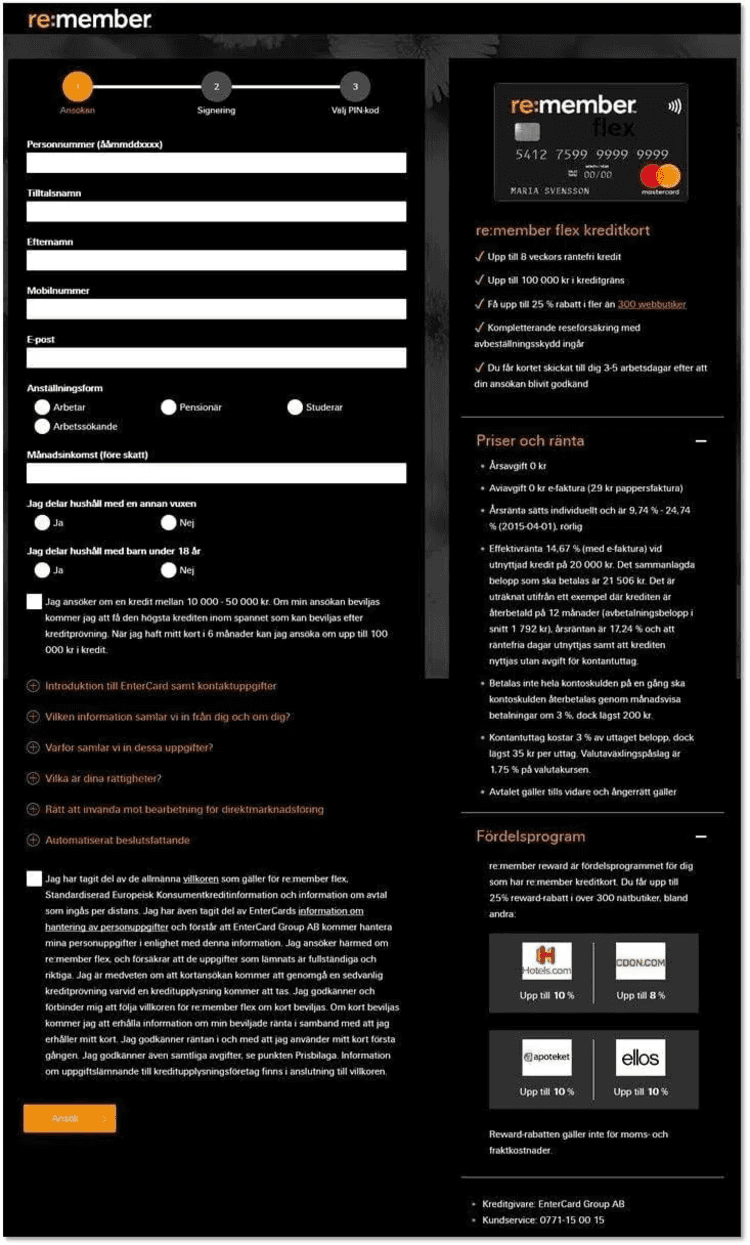
Ultimately, they used visual and web design hierarchy cues to redesign the form. These changes brought attention to their product’s features and benefits and helped them experience a 43% increase in responses.
Step 10: Analyze Conversion Metrics
Analyzing the conversion metrics is important for checking the effectiveness of your landing page and for finding areas of improvement. They can help analyze user behavior and find the issues that need improvement. Some of these conversion metrics you must analyze without fail are:
Bounce Rate
Time On Page
Click-Through Rate
Exit Rate
For example, if your bounce rate is higher but your conversion rate is low, it might suggest a discrepancy between user expectations and the content of your landing page. Optimizing the landing page content and appeal according to user expectations and the goal of your landing page can help improve conversion rates.
Step 11: Run A/B Tests
A/B testing plays an important role in figuring out what is working and for improving the performance of your landing page. This includes creating two or more variants of a landing page and testing them with different elements to find the one that performs better in terms of conversion rates. You can do this in the following ways:
Change the placement of the headings, images, content, and CTA to find the one that can bring maximum conversions.
Check if your content is optimized for search engine ranking with relevant keywords, meta title, description, internal links, and images alt text.
Test the content's navigational flow by trying different variations of content placement and finding the one that engages the most users.
For example, Clarins, a skincare and beauty brand, performed A/B testing to improve the effectiveness of its product description pages (PDPs). To provide more details to customers, it incorporated explanatory copy into the product images. It tested two variations: one without added copy and the other with added explanatory copy.

As a result, the PDPs with explanatory copy showed an increase in engagement, and their basket page view increased by 2.41%, indicating that more people were adding items to their carts.
If you want to run A/B testing of your landing pages, then use Fibr AI today!
Step 12: Check SEO Basics
Data suggest landing pages that are optimized in 6 months are more likely to show up on the first page of Google. Optimizing your landing page for search engine optimization is important for improving visibility and driving organic traffic. You can focus on the following to ensure your landing page reaches its full potential:
Target relevant and high-volume keywords.
Include informative meta titles and descriptions.
All images on the landing page have alt text with relevant keywords.
Ensure the URL is clean and descriptive.
Optimizing the landing page for SEO can increase your chances of attracting the right audience and improve the conversion rates.

For example, Apple uses a perfect SEO optimization approach to improve its product pages. They use short and easy-to-read keywords in their copy to ensure their pages rank higher in the search results. They also provide concise and clear descriptive phrases for their product features to help their audience understand the features easily. They ensure the use of high-quality pictures and an intuitive interface design for a seamless user experience.
All these strategies helped Apple rank higher and increase its conversion rates. By adopting similar strategies, businesses can improve their SEO ranking and ensure an engaging user experience for their visitors.
Step 13: Validate Navigation Flow
The navigation flow of your landing page is important for retaining customers and boosting its performance. An intuitive navigation system can help visitors navigate through the landing page seamlessly without getting confused or frustrated.
It significantly affects the user experience, increases bounce rates, and impacts conversions. To validate the navigation flow, you must do the following:
Prioritize important elements like CTA or key information at the top of the content.
Limit the number of options in your navigation interface by grouping them logically.
Conduct user testing and analysis regularly to determine where users are facing issues with the landing page's navigational flow.
All this is done to ensure your users have a smooth and engaging experience through the sales funnel. The idea here is quite simple, if users can find what they are looking for, they would be more likely to stay and engage with the landing page. This ultimately increases your chances of lead conversions.
Step 14: Test Functionality
Testing functionality is important to ensure all the elements of the landing page are working perfectly. This includes checking all the interactive elements present on the page. Key elements to consider while testing functionality are:
Verify the internal and external links direct the users to the right destination.
Ensure all the form fields accept valid inputs and get submitted properly.
The buttons should redirect the intended action, such as redirects, downloads, or form submissions.
Check if the landing page adapts seamlessly to different devices and screen sizes.
Check that multimedia elements like pictures, videos, and animations load quickly and work properly.
Do manual testing of the landing page functionality to ensure all the elements are functional and the links are not broken. Non-functioning elements can significantly impact the user experience and lower conversion rates.
Step 15: Incorporate Heatmaps
Did you know? 76% of consumers expect businesses to understand their needs and expectations. In fact, the bottom of the page is only seen by 20% of your visitors. You can use heatmaps and session recordings to understand your potential consumers.
Heatmaps are visual representations that can show you where your visitors click, scroll, and hover on your landing page. They can help you in:
Understanding the user intent
Identify problems areas
Boost conversion rates
Enhance user engagement
Incorporating heat maps in your landing page audit can help in gaining valuable insights into user behavior and how they interact with the landing page. It can help you pinpoint the places they engage with the most and those they get stuck at or lose interest in.
Use tools like Crazy Egg or Hotjar to monitor and analyze heat maps and session recordings. This can help you improve user engagement and user experience and increase conversion rates.
For example, Netflix used heatmaps to analyze and improve its user experience by understanding how viewers interact with their platform. During UX research, Netflix used heat maps to analyse key pages, such as listing pages and providing detailed views of a content series.

They studied where the users clicked, hovered, or scrolled to identify popular genres, preferred show types, and interaction patterns. Netflix personalized the recommendations for each viewer, which improved engagement and retention.
Tools for Analyzing Landing Page Performance
Analyzing loading page performance manually can be complex. However, you need not worry; there are various tools that can help you effectively throughout the process. Below, you will find a wide range of tools categorically divided according to the purpose they serve.
Landing Page Optimization and A/B Testing Tools
You can use these tools to test, build, and optimize different versions of your landing page. This helps in finding out which one is performing better in terms of conversions, clicks, and engagement. Some common tools are:
Fibr AI
Fibr AI is a very effective and convenient AI-powered tool for A/B testing and landing page optimization. It offers lifetime free A/B testing and lets you develop, test, and edit web pages. Its AI capabilities allow you to run limitless campaigns for each page and optimize your website's potential. It also allows you to tailor your landing page to the ads that you are running on Google and Meta.
Key Features
With WYSIWYG Editor, you can quickly construct code-free landing pages for testing. AI-powered recommendations let you make changes to headlines, CTAs, and other elements.
Assist you in performing A/B testing for a certain group of people according to their demographics, operating systems, device types, browsers, and more.This offers detailed insights.
Gives you the freedom to plan an A/B campaign for a desired duration.. You can halt the campaign during periods of low traffic and resume it during periods of strong traffic.
Enables you to distribute traffic across the page variations rather than sending all of the traffic to a single page.
Provides reports in an easily downloadable CSV file and distributes them to all parties involved.
Create landing pages with a visual editor that requires zero coding.
Select multiple ads from Google and Meta and personalize the landing pages for all these ads simultaneously.
Utilise Fibr's Bulk Create tool to streamline your audience personalization. Create many page variations simultaneously, and each one will be automatically synchronized with the audience set that corresponds to it, removing the need for manual page modifications.
Pricing
Free Plan: $0/month
Custom Plan: Get in touch with customer support to get a quote.
Agency Plan: Get in touch with customer support to get a quote.
Unbounce
Unbounce helps you build and run A/B testing on different versions to enhance conversion rates. The tools have features like drag-and-drop builder, A/B testing, pop-ups, dynamic text replacements, and sticky bars.
Optimizely
Optimizely is an advanced platform for A/B testing multiple variants of a landing page to improve its performance. It offers features like advanced experimentation and optimizer, visitor segmentation, and detailed reporting.
Web Analytics and Performance Tracking
You can use these tools to track the overall performance of your landing page and user behavior to analyze the effectiveness of the landing page. Some of the common tools that can help you with web analytics and performance tracking are:
Fathom Analytics
Fathom Analytics is a privacy-focused web analytics platform that offers clear metrics without the complexity and privacy concerns of traditional tools. It provides real-time stats, basic visitor tracking, and GDPR-compliant analysis.
Google Analytics
Google Analytics is the most popular tool for real-time tracking and analysis of basic visitor metrics. These visitor metrics are page views, bounce rate, audience insights, and traffic sources. Some other features of Google Analytics include behavior flow reports, page-performance metrics, goals, conversion tracking, etc.
SEO and Competition Analysis Tools
You can use these tools to optimize SEO for search engine ranking and analyze your competitors landing pages to boost traffic to your landing page. This includes keyword research, on-page SEO, off-page SEO, competitor analysis, etc.
SEMrush
SEMrush is an all-in-one marketing platform for PPC, SEO, content optimization, and competitor analysis. It also offers features like keyword research, backlink analysis, and site audit.
Ahrefs
Ahrefs is a comprehensive and detailed SEO tool that provides insights into keyword research, backlinks, and competitor analysis. It offers additional features like site audit, keyword explorer, backlink checker, and rank tracker.
Sales and Conversion Tools
You can use these tools to analyze your conversion rate and manage customer interactions. It also includes streamlining lead conversion funnels and improving the sales process. Some of these tools are:
Chili Piper
Chili Piper helps you schedule quick sales meetings, which makes it easier for your potential customer to book a meeting or appointment with your team. It offers features like automated meeting scheduling, calendar integration, and lead routing.
Intercom
Intercom is a real-time communication platform that allows businesses to communicate with their potential customers on their landing pages. It offers instant support and engagement with live chat, automated messaging, chatbots, and customer support.
Behavioral Analysis and Visitor Insights
You can use these tools to understand and analyze the user's behavior on the landing page. This includes analyzing where they click, how deep they scroll, and where they drop off. Common tools used for data-driven decision-making can use are:
Hotjar
Hotjar is a powerful tool that provides insights into user behavior. It offers features that can help you understand how the user is interacting with your landing page through heatmaps, user session recordings, feedback polls, and surveys.
Heap
Heap provides insights into user journeys and advanced analytics by automatically tracking every user interaction without manual tracking. It offers features like automatic event tracking, customer journey analysis, and cohort analysis.
To help you choose the ideal tools from the above suggestions, here is an overview table of pricing of basic and premium plans of the tools:


Common Issues Found in Landing Page Audits and How to Fix Them
Landing page audits cover a range of issues that can hinder the performance of a landing page. If you are going to get your landing page audited for the first time, here are some of the common issues and their solution:
Slow Page Loading Times
Slow page loading time or technical glitches can result in a high bounce rate. Most visitors will leave the page if it takes more than 3 seconds to load. You can identify and fix these issues by testing the page loading time with Google page Speed insights.
Unclear Call-to-Actions (CTAs)
For example, a travel company named Going refined the performance of its landing page by changing 3 words. They changed the CTA from “Sign up for free” to “Try for free,” and it boosted their conversions by 104%.

Too Much Text
Whenever a visitor sees too much text in one place, they immediately scroll past it or click the back button. Too much text can be overwhelming for the user, especially when they are written on a dark background with poor contrasting colors.
Additionally, use short paragraphs and bullet points for important information and links if you want to cover in-depth information.
Low Mobile Responsiveness
About half of the consumers feel that if the company lacks mobile responsiveness, then the company is not serious about its business. So, ensure your landing page is optimized for mobile responsiveness and other devices. You can use tools like BrowserStack to check the layout and responsiveness of the UX design.
Visual Distractions
Too many images, animations, motion, or other visuals can be overwhelming, especially if they distract the visitor from your CTA. Remove too many movements from your landing page, including rotating banners or pop-ups.
Additionally, the design should be kept simple and clean with minimum distractions to bring the focus on visitors to the main message and CTA.
Auditing a landing page is one thing; optimizing it efficiently can be much more complex. Here are some of the best practices that you can implement to maximize the impact of your landing page:
Use Social Proof
Using social proof helps you build trust and credibility with your visitors. To implement this, use testimonials, reviews, guarantees, certifications, or trust badges. Additionally, you can use real-life case studies to demonstrate the value of your product or services.
Understand your Audience
Understanding your target audience is crucial for building a relevant and personalized landing page. You can conduct user research to understand the demographics, pain points, and preferences of your target audience.
Focus on Above-the-fold Content
The above-the-fold section is the first thing your visitors see when they land on your landing page. So, ensure that the section is impactful with a clear CTA, clean design, and engaging content. You can also use bullet points or short paragraphs to emphasize why your product or services are valuable.
Prioritize Key Page Elements
Identify the elements of your landing page that carry more weight or are more important. You must prioritize these essential elements (headlines, subheadings, and CTA) at the top of the page. Moreover, you must ensure that they should be placed in a place that can grab attention and guide the user through the conversion funnel. Lastly, keep in mind that the forms on your landing page, if any, are simple and do not ask for too much information.
A/B Testing
Using A/B testing is the best way of finding the right strategy for your landing page. You can experiment with different variants of the landing page by changing only a single element that you want to analyze. Moreover, track their performance metrics to find the one that resonates well with your target audience.
Regular audits of landing pages are essential for analyzing performance and finding opportunities for improvement. Tracking the key performance metrics of your landing page can give you an overview of its performance and give you an idea of what can be changed to improve the outcomes.
Additionally, consistent optimization can help decrease bounce rates, improve user experience, and increase the landing page's conversion rates. However, you need not do this alone, as Fibr.AI can help you throughout the process.
Q1. What is a landing page audit?
A landing page audit is a detailed analysis of a landing page to find areas for improvements in design, functionality, user experience, and performance. It includes analyzing user behavior, engagements, page load speed time, device responsiveness, content, CTA, and key performance metrics.
Q2. How often should I audit my landing pages?
Most digital marketers suggest auditing your landing page regularly for optimum performance. The recommended frequency is quarterly for staying updated and performance metrics, before major campaigns for maximum conversions, and after updates in design, content, or if the algorithm changes.
Q3. What tools are best for landing page analysis?
The best tools for landing page analysis for analyzing user behavior, performance issues, and improvement opportunities are Hotjar, Crazy Egg, Unbounce, Google Analytics, Ahrefs, SEMrush, etc.
Q4. Can I perform a landing page audit without technical expertise?
Yes, of course you can. You can use beginner-friendly tools like Hotjar or Google Analytics with their intuitive user interface. Focus on key perforce metrics like bounce rate, conversion rate, traffic sources, etc., to analyze the performance of the landing page. However, for advanced technical SEO, you may need expert assistance.
Q5. What are the key elements of a high-converting landing page?
The key elements of a high-conversion landing page are fast loading time, clear and actionable CTA, mobile-friendly design, engaging content and visuals, and trust signals like testimonials, badges, and reviews.
Q6. How can I improve the load speed of my landing page?
You can improve the page loading speed for your landing page by taking several steps, including compressing images with a modern format like WebP, optimizing server response time, removing unnecessary plugins, minimizing HTTP requests, and using a content delivery network (CDN).





Ankur Goyal
CEO @ Fibr AI
Ankur Goyal, a visionary entrepreneur, is the driving force behind Fibr, a groundbreaking AI co-pilot for websites. With a dual degree from Stanford University and IIT Delhi, Ankur brings a unique blend of technical prowess and business acumen to the table. This isn't his first rodeo; Ankur is a seasoned entrepreneur with a keen understanding of consumer behavior, web dynamics, and AI. Through Fibr, he aims to revolutionize the way websites engage with users, making digital interactions smarter and more intuitive.
Table of Content
Read summarized version with
Today, landing pages have become a necessity for most B2B businesses to nurture their leads and grow online. In fact, research shows that websites with 40+ landing pages are likely to generate 1200% more leads than those with just one landing page.
For instance, the average conversion rate for landing pages across industries is 2.35%, while the top websites achieve an average rate of 10% or higher. What sets this top website apart from the others? Regular audits, analysis, and continuous performance optimization.
So, if your landing page doesn’t have the expected conversion rate, or perhaps, despite having high traffic and a compelling offer, the visitors aren’t taking the desired action. Then, getting your landing page audited would be ideal.
Why Should You Audit Landing Page Performance Regularly?
Regular audits of the landing page performance are part of creating a strong and high-performing marketing strategy. Here are some reasons why regular landing page audit is essential and how it can help you improve performance and conversion rates:
Identifying Performance Gaps
Regular audits can easily reveal performance gaps like technical issues, content relevancy, and opportunities for SEO strategies. Technical issues like slow page loading time can increase the bounce rate for the page.
Additionally, regular audits ensure that your content is up-to-date and relevant to your audience. It can help find new search engine ranking opportunities, which can help drive more organic traffic to your page.
For example, the top conversion rate occurs within 1 to 2 seconds for e-commerce. The conversion rate at 1 second is around 3.05%, while it drops down to 0.67% at 4 second page load time.
Improving ROI
Optimized landing pages can bring high conversion rates, resulting in better ROI (return on investment). Auditing these pages can help identify issues with unclear call-to-action or the effectiveness of the design layout.
These checks are done by conducting A/B testing, having a clear call-to-action, and proper placement of design elements. Such efforts further make it possible for you to retain your visitor’s interest.
For example, a company named Namecheap conducted A/B testing for their landing page design using two different variants. The testing mainly focused on layout, illustrations, and content placement. They divided their traffic into half, with 50% heading to page A and 50% heading to page B.
With just a slight change of position of the search bar, they saw a lift of 7% in conversion rates on page B.
Conduct successful A/B Testing With Fibr AI
Create, run, and analyze your landing page without limits and boost your conversion with Fibr AI
Enhancing User Experience
Your potential customers use various devices. These visitors by devices can be classified as 44% from desktops, 40% from mobiles, 10% from tablets, and 5% unknown. Regular audits can help identify and fix navigational issues, load time, and broken links to improve overall user experience.
Additionally, your landing page needs to be responsive and user-friendly across all types of devices. The device-level performance of your landing page is analyzed based on how well your page is performing across different devices.
For example, Neil Patel emphasizes that mobile optimization is a necessary step for decreasing bounce rates and improving user experience. According to a survey, 60% of their respondents use mobile to view websites and pages. Two-thirds of their total respondents agreed that a responsive design is an essential factor when it comes to online experiences.
Staying Ahead Among Competitors
Regular landing page audits can help you identify trends and best practices in the industry. Your competitor might launch a new feature or improve their UX design to influence visitor's expectations.
Regular changes and updates in your landing pages also keep your visitors interested, and you can adapt to consumer behavior shifts.
Additionally, you can adopt new strategies, track changes, identify content gaps, and find strategies that are already working for your business.
For example, if you are doing a competitor audit, you can easily find out if your competitor introduced a more intuitive interface with added new features. By analyzing, you can quickly identify the gap in your landing page layout or content and make the necessary changes.
Key Metrics for Analyzing Landing Page Effectiveness
Conversion rate is the most important metric for landing page optimization, but there are several other key aspects to be considered for a successful audit. Some of these key metrics for analyzing landing page effectiveness are:
Bounce Rate
Bounce rate is the percentage of your target audience that visited your landing page but left without following the call-to-action. A high bounce rate suggests that the landing page is not compelling enough to engage the audience. This results in a lower conversion rate.
Typically, the bounce rate is calculated by analyzing the number of sessions involving only one page. The formula for calculating the bounce rate for a landing page is:
So, if 300 people leave your page without taking action out of 500 total visits, then your bounce rate will be 60%.
Page Views
Page views metrics measure how many pages are viewed/loaded in a session. This also includes pages viewed/loaded on repeat. It helps figure out the level of interest of visitors on your landing page. More page views indicate that the content is engaging and resonates well with the audience.
However, page views should be a standalone metric for analyzing the performance of the landing pages. Anytime a user visits a page, and that page is reloaded for any reason, it is counted as a page view. It can be best analyzed alongside unique visitors.
Session by Source
Session-by-source metrics help you understand where the traffic is coming from on your landing page. Most marketing campaigns involve multiple marketing channels, including display ads, social media ads, YouTube ads, blog posts, or email marketing. Thus, identifying the most effective one can improve your efficiency. This is where Google Analytics plays its role. It provides detailed information on your traffic sources.
For instance, most of your traffic comes from social media ads, and the least of your traffic comes from YouTube ads. You can optimize your strategy by increasing your spending on social media ads and cutting back on YouTube ads.
Cost per Conversion (CPC)
CPC is the cost you bear for achieving a specific action or conversion, like a purchase, form submission, signup, or download. Conversion rate is the percentage of people who take a desired action, while cost per conversion measures the expense of achieving those actions.
The formula for calculating CPC is
So, if you spend $1000 on a marketing campaign and get 50 conversions from it, then your CPC will be $20 per conversion.
Form Abandonment
The abandonment rate measures the percentage of people who have interacted, filled it halfway but did not complete it, and submitted it. A high form abandonment rate indicates that your landing page form needs to be optimized.
This can happen due to several reasons, including the form being too long or confusing, unclear call-to-action, issues with the form design, scrolling depth, or slow loading time.
Return vs. New Visitors
Return visitors are people who have visited your landing page before, while new visitors are the people who are interacting with it for the first time. Understanding them is necessary for bringing the right ratio between return and new visitors.
If you have a high volume of returning visitors, then you can look for the reasons why they did not convert the first time. However, if your new visitor's rate is low, you will have to take a look at the entire marketing campaign.
How to Calculate Landing Page Conversion Rate
Conversion rate is an essential metric for assessing your landing page’s performance. It tells you the percentage of visitors who are visiting your landing page and taking the desired action, like submitting a form, making a purchase, or signing up for a newsletter.
The formula for calculating the conversion rate is:
Conversion Rate = ( Total number of conversions ÷ Total Visitors ) x 100
So, if 50,000 people are visiting your landing page, out of which 1000 are taking action, then your conversion rate will be 2%.
There is no right or wrong set conversion rate; it is only continuous progress. If you started with a 2% conversion rate and it increased to 5% after landing page optimization, then it's a win. However, a low conversion rate indicates potential issues with CTA placement, user experience, or audience targeting.
Measuring Landing Page View Rate and Cost Per View
Effectively monitoring and optimizing your landing page view rate and cost per view can help you optimize your ad campaign creatives and ad spending. If you do not know what they are, here’s a detailed explanation for both.
Landing Page View Rate
The landing page view rate measures the percentage of clicks on a particular ad that resulted in the user actually viewing the landing page. It tells you how many people from those who clicked on the ad actually ended up engaging with the landing page.
A high landing page view rate indicates that your ad campaign creatives and message are attracting an audience. However, a low landing page view rate and page views can happen for various reasons, including issues with ad creatives, slow page loading time, technical glitches, broken links, or clicks by mistake.
For calculating the landing page view rate formula is as:
Landing Page View Rate = ( Landing Page View / Total Ad Clicks ) x 100
For instance, if your ads got 1000 clicks and the landing page view is 800, then your landing page view rate would be 80%.
Cost per View
Cost per view (CVP) is the cost you pay per view of your landing page. It helps you assess how much you are spending per visitor who viewed the landing page. However, CPV does not guarantee conversions because the viewers might view the page and leave without taking any action.
CPV is important for campaigns focused on awareness, traffic, or visibility. It can help measure the effectiveness of the ad campaign in generating views, even with no immediate conversion.
The cost per landing page view formula is:
Cost per View = Total Cost of Campaign / Landing Page Views
So, if your landing page campaign costs you $500 and your page gets 1000 views, then your cost per view would be $0.50 for each landing page view.
Steps to Conduct a Comprehensive Landing Page Audit
Carrying out a comprehensive landing page audit can be complex. Therefore, here is a step-by-step process of how you can approach the audit effectively:
Step 1: Define Your Goals
Before getting your landing page audited, you must define the primary purpose of the audit and what you want to achieve with the landing page. This will guide your focus on achieving a specific goal.
Wondering how you can do this? Ask yourself what actions you want your visitors to take when they visit your landing page. Then, simply list all the key performance indicators (KPIs) that can help you in achieving that action and analyze them. This could include metrics like:
Bounce rate
Conversion rate
Average time spent on a page
Landing page loading speed
Number of conversions
Number of unique visitors
Visitor-to-lead conversion rate
Moreover, analyze marketing channels (social media and search engines) and identify which sources are bringing the most and least conversions to your landing page. This will help you streamline your landing page optimization efforts and set correct goals.
Step 2: Analyze Audience Intent
Understanding your audience's intent is important for creating an effective landing page. This can help you personalize the landing page according to the needs and expectations of specific audiences.
Audience intent is what your visitors are expecting when they land on your page. It can generally be categorized into 3 types:
Navigational Intent: Users searching for a specific website or page.
Informational Intent: Users looking for information on a specific topic.
Transactional Intent: Users are ready to make a purchase or take an action.
Understanding audience intent can help align your landing page’s outlook, which consists of various elements like UI, UX, and content. If you are wondering how to analyze user behavior patterns, tools like Google Analytics and Content Square can be helpful.
To give you a real-life example, Turum-Burum, a UX design agency, collaborated with Intertop, a Ukrainian e-commerce shoe store, to address checkout form abandonment issues. They formed a strategy of using an exit-intent survey. They asked, “Why would you like to stop placing the order?” Out of 444 respondents, 48.6% answered that they couldn't complete the checkout form.
Based on the insight, they reduced the number of fields on the form, split the page structure for better navigation, and incorporated an autofill feature to save time for their visitors. As a result, their conversion rates increased by 54.68%, and revenue per user grew by 11.46%.
Step 3: Evaluate Headline Clarity
As per David Ogilvy, “On the average, five times as many people read the headline as read the body copy. When you have written your headline, you have spent eighty cents out of your dollar.”
Hence, evaluating your headline is essential as it is the first thing visitors see on the landing page. The headline of the landing page must keep the user hooked and encourage them to take action.
So, now, the biggest question you might have is how to write such a headline. Well, after evaluating 1000s of landing pages, our team was able to identify some of the common characteristics that a landing page headline must have. They are as follows:
Aim for short, relevant, and direct headlines, usually under 20 words.
Empathize with the pain points of your visitors with a solution.
Ensure your heading is relevant, aligns with the ads, and communicates the same message.
Add numbers or stats in the headline to bring more credibility.
Use industry-related keywords in the heading and avoid using jargon.
To sum it up, try crafting a benefit-focused headline that directly communicates to your visitors what's in it for them. It will not only entice your visitors but also motivate them to explore your products.
Want to know more about heading and how you can formulate the right one? Then, check out this blog on Landing Page Structure: Key Elements & Best Layout for Conversions.
For instance, the catchy headline on the HappSales landing page is "Accelerate Productivity, Performance, Predictability. Embrace AI-Powered Revenue Acceleration Software."
This heading clearly and concisely conveys the benefit to visitors: it helps boost the team's productivity and improve performance. Further, the CTA of "Book Demo" and awards and badges adds more value.
Image Courtesy via HappSales
Step 4: Check Visual Design Consistency
Did you know that adding images and visuals to your landing page increases the chances of visitors reading the content by 80%?
The visual design of the landing page is important for providing your visitors with an engaging experience. Thus, the design elements should be visually appealing and match your brand’s identity.
So, it would be advisable that you review and inspect the visual appeal of your landing page and ensure it is free of clutter or vague information. This involves checking if the design is clean, consistent, simple, gives a clear message, and is distraction-free
A best practice for ensuring this effectively is following a visual hierarchy. You can incorporate a top-down approach for intuitive element placement, starting with the most important information to give scannable and visually appealing content to the visitors. It will ensure your visitors have an effortless navigation experience and find all the key information effortlessly.
It is also recommended that you analyze competitor landing pages to find content gaps and opportunities. Moreover, try visiting your page as a first-time visitor. This will help you determine if the sales funnel's journey feels logical and if navigation is easy.
Step 5: Review Call-to-Action (CTA)
The call to action is one of the most important elements of your landing page because it directs your visitors to take action and turn them into customers. A clear CTA can increase conversion by 161%.
So, crafting a compelling and persuasive CTA is essential to ensure use to take action. Here are some of the things to check when reviewing your CTA:
Place the CTA where it is easily visible to the visitor. Use an above-the-fold strategy and place it where the users' eyes are drawn naturally.
CTA contains action-oriented language, such as “Get started,” “Download now,” or “Sign up for a 14-day free trial,” to encourage visitors to take immediate action.
Check if it is concise and jargon-free. Try writing it in the first POV. For example: "Start my trial today."
Ensure the color of the CTA button contrasts with the background and is clean and visually appealing.
The CTA button is clickable and visually appealing.
Ensure it is the right size and that it is not too big or too small.
Add ample whitespace around the CTA to make it clutter-free and increase its visibility.
Run A/B testing based on different wording, colors, and positioning, and identify the right CTA.
Step 6: Test Page Load Speed
Did you know that a 1-second delay in the page loading speed time can significantly drop the conversion rates by 7%. In fact, Google recommends a page load speed of 3 seconds for good user engagement.
Slower page load time can lead to higher bounce rates, as visitors tend to leave the page immediately out of frustration. This further impacts engagement with the page. You can use page load speed tools.
A Page Load Speed tool helps you identify a website's speed and provides recommendations on how to improve it. Some popular tools for page load speed are GTmetrix, Pingdom, Google PageSpeed Insights, Dareboost, and Uptrends.
These tools provide recommendations on which files and images require compression, which plugins are unnecessary and you need to remove, how to optimize server response time, and more.
Step 7: Ensure Mobile Responsiveness
The last thing you need is for your landing page not to be responsive for mobile-friendly users. As per a study, around 83% of users visit landing pages through mobile devices. Thus mobile responsiveness for your landing page is non-negotiable, or it may affect its bounce rates or user engagement adversely.
You can follow certain steps to check the mobile responsiveness of your landing page:
Manually test the landing page on multiple devices to ensure it is user-friendly and functional.
Use tools like Google Analytics and heatmaps to check user behavior and drop-offs on mobile. This can help you determine where your visitors are facing issues with mobile.
You can also use tools like BrowserStack to check how your landing page looks on different devices and screens.
To give a real-life example, The Good is an eCommerce Conversion Rate Optimization (CRO) expert who wanted to improve mobile conversion rates for Swiss Gear. It is a retailer specializing in outdoor, travel, and camping supplies. To start, they used Google Analytics to study user behavior patterns with heatmaps and by reviewing session recordings. They wanted to know where, when, and why their visitors were leaving their site.
After review, The Good hypothesized that users were getting confused by the mobile site's iconography and language, which led to an increase in bounce rates and dissatisfaction. To improve performance, they simplified the mobile interface and focused on creating a user-friendly and visually appealing menu for mobile users. As a result, their bounce rate dropped by 8%, and the time on site increased by 84%.
Step 8: Audit Trust Elements
Trust indicators can significantly affect decision-making and users' confidence in your landing page. By integrating trust signals, you can increase the user's confidence, engagement, and chances of the user taking the desired actions. Thus, it is recommended that you include the following trust elements to build trust with your audience:
Reviews
Customer testimonials
Badges
Guarantees
Certifications logos
Case studies
Additionally, you must also ensure your page has secure payment options and provide privacy assurance to make your visitors feel safe. You must also ensure you incorporate reliable payment badges and secured checkout badges. Some other often overlooked things that can help you ensure this are:
Avoiding pop-ups during the payment process
Including the company's contact information for customer queries
Keeping the message and overall look of the payment gateway consistent
Ultimately, this will help you build trust between your brand and your audience, which is important for increasing conversion rates.
Step 9: Streamline Forms
The path to conversion should be as simple as possible, with as few steps as possible. Studies show that asking for only important information in the forms can increase the conversion rate by up to 120%.
If you have a form on your landing page, ask for only the necessary details. Asking for too many details can frustrate the user, who might feel hesitant to share. So, simplify the process for your audience with relevant form fields and a visually engaging design.
This is exactly what re:member did. This Scandinavian credit card company knew something was wrong with its funnel as they were not getting as many responses as it expected. Thus, they used Google Analytics to analyze the problem. It showed that most of the qualified leads arrived through affiliate websites and quickly left before they signed up for a credit card.
So, re:member’s marketing specialists, they used click maps and session replays for the affiliate pages. They studied the behavioral trends and click patterns of users and accordingly concluded that the visitors were hesitant and needed more persuasion.
Ultimately, they used visual and web design hierarchy cues to redesign the form. These changes brought attention to their product’s features and benefits and helped them experience a 43% increase in responses.
Step 10: Analyze Conversion Metrics
Analyzing the conversion metrics is important for checking the effectiveness of your landing page and for finding areas of improvement. They can help analyze user behavior and find the issues that need improvement. Some of these conversion metrics you must analyze without fail are:
Bounce Rate
Time On Page
Click-Through Rate
Exit Rate
For example, if your bounce rate is higher but your conversion rate is low, it might suggest a discrepancy between user expectations and the content of your landing page. Optimizing the landing page content and appeal according to user expectations and the goal of your landing page can help improve conversion rates.
Step 11: Run A/B Tests
A/B testing plays an important role in figuring out what is working and for improving the performance of your landing page. This includes creating two or more variants of a landing page and testing them with different elements to find the one that performs better in terms of conversion rates. You can do this in the following ways:
Change the placement of the headings, images, content, and CTA to find the one that can bring maximum conversions.
Check if your content is optimized for search engine ranking with relevant keywords, meta title, description, internal links, and images alt text.
Test the content's navigational flow by trying different variations of content placement and finding the one that engages the most users.
For example, Clarins, a skincare and beauty brand, performed A/B testing to improve the effectiveness of its product description pages (PDPs). To provide more details to customers, it incorporated explanatory copy into the product images. It tested two variations: one without added copy and the other with added explanatory copy.
As a result, the PDPs with explanatory copy showed an increase in engagement, and their basket page view increased by 2.41%, indicating that more people were adding items to their carts.
If you want to run A/B testing of your landing pages, then use Fibr AI today!
Step 12: Check SEO Basics
Data suggest landing pages that are optimized in 6 months are more likely to show up on the first page of Google. Optimizing your landing page for search engine optimization is important for improving visibility and driving organic traffic. You can focus on the following to ensure your landing page reaches its full potential:
Target relevant and high-volume keywords.
Include informative meta titles and descriptions.
All images on the landing page have alt text with relevant keywords.
Ensure the URL is clean and descriptive.
Optimizing the landing page for SEO can increase your chances of attracting the right audience and improve the conversion rates.
For example, Apple uses a perfect SEO optimization approach to improve its product pages. They use short and easy-to-read keywords in their copy to ensure their pages rank higher in the search results. They also provide concise and clear descriptive phrases for their product features to help their audience understand the features easily. They ensure the use of high-quality pictures and an intuitive interface design for a seamless user experience.
All these strategies helped Apple rank higher and increase its conversion rates. By adopting similar strategies, businesses can improve their SEO ranking and ensure an engaging user experience for their visitors.
Step 13: Validate Navigation Flow
The navigation flow of your landing page is important for retaining customers and boosting its performance. An intuitive navigation system can help visitors navigate through the landing page seamlessly without getting confused or frustrated.
It significantly affects the user experience, increases bounce rates, and impacts conversions. To validate the navigation flow, you must do the following:
Prioritize important elements like CTA or key information at the top of the content.
Limit the number of options in your navigation interface by grouping them logically.
Conduct user testing and analysis regularly to determine where users are facing issues with the landing page's navigational flow.
All this is done to ensure your users have a smooth and engaging experience through the sales funnel. The idea here is quite simple, if users can find what they are looking for, they would be more likely to stay and engage with the landing page. This ultimately increases your chances of lead conversions.
Step 14: Test Functionality
Testing functionality is important to ensure all the elements of the landing page are working perfectly. This includes checking all the interactive elements present on the page. Key elements to consider while testing functionality are:
Verify the internal and external links direct the users to the right destination.
Ensure all the form fields accept valid inputs and get submitted properly.
The buttons should redirect the intended action, such as redirects, downloads, or form submissions.
Check if the landing page adapts seamlessly to different devices and screen sizes.
Check that multimedia elements like pictures, videos, and animations load quickly and work properly.
Do manual testing of the landing page functionality to ensure all the elements are functional and the links are not broken. Non-functioning elements can significantly impact the user experience and lower conversion rates.
Step 15: Incorporate Heatmaps
Did you know? 76% of consumers expect businesses to understand their needs and expectations. In fact, the bottom of the page is only seen by 20% of your visitors. You can use heatmaps and session recordings to understand your potential consumers.
Heatmaps are visual representations that can show you where your visitors click, scroll, and hover on your landing page. They can help you in:
Understanding the user intent
Identify problems areas
Boost conversion rates
Enhance user engagement
Incorporating heat maps in your landing page audit can help in gaining valuable insights into user behavior and how they interact with the landing page. It can help you pinpoint the places they engage with the most and those they get stuck at or lose interest in.
Use tools like Crazy Egg or Hotjar to monitor and analyze heat maps and session recordings. This can help you improve user engagement and user experience and increase conversion rates.
For example, Netflix used heatmaps to analyze and improve its user experience by understanding how viewers interact with their platform. During UX research, Netflix used heat maps to analyse key pages, such as listing pages and providing detailed views of a content series.
They studied where the users clicked, hovered, or scrolled to identify popular genres, preferred show types, and interaction patterns. Netflix personalized the recommendations for each viewer, which improved engagement and retention.
Tools for Analyzing Landing Page Performance
Analyzing loading page performance manually can be complex. However, you need not worry; there are various tools that can help you effectively throughout the process. Below, you will find a wide range of tools categorically divided according to the purpose they serve.
Landing Page Optimization and A/B Testing Tools
You can use these tools to test, build, and optimize different versions of your landing page. This helps in finding out which one is performing better in terms of conversions, clicks, and engagement. Some common tools are:
Fibr AI
Fibr AI is a very effective and convenient AI-powered tool for A/B testing and landing page optimization. It offers lifetime free A/B testing and lets you develop, test, and edit web pages. Its AI capabilities allow you to run limitless campaigns for each page and optimize your website's potential. It also allows you to tailor your landing page to the ads that you are running on Google and Meta.
Key Features
With WYSIWYG Editor, you can quickly construct code-free landing pages for testing. AI-powered recommendations let you make changes to headlines, CTAs, and other elements.
Assist you in performing A/B testing for a certain group of people according to their demographics, operating systems, device types, browsers, and more.This offers detailed insights.
Gives you the freedom to plan an A/B campaign for a desired duration.. You can halt the campaign during periods of low traffic and resume it during periods of strong traffic.
Enables you to distribute traffic across the page variations rather than sending all of the traffic to a single page.
Provides reports in an easily downloadable CSV file and distributes them to all parties involved.
Create landing pages with a visual editor that requires zero coding.
Select multiple ads from Google and Meta and personalize the landing pages for all these ads simultaneously.
Utilise Fibr's Bulk Create tool to streamline your audience personalization. Create many page variations simultaneously, and each one will be automatically synchronized with the audience set that corresponds to it, removing the need for manual page modifications.
Pricing
Free Plan: $0/month
Custom Plan: Get in touch with customer support to get a quote.
Agency Plan: Get in touch with customer support to get a quote.
Unbounce
Unbounce helps you build and run A/B testing on different versions to enhance conversion rates. The tools have features like drag-and-drop builder, A/B testing, pop-ups, dynamic text replacements, and sticky bars.
Optimizely
Optimizely is an advanced platform for A/B testing multiple variants of a landing page to improve its performance. It offers features like advanced experimentation and optimizer, visitor segmentation, and detailed reporting.
Web Analytics and Performance Tracking
You can use these tools to track the overall performance of your landing page and user behavior to analyze the effectiveness of the landing page. Some of the common tools that can help you with web analytics and performance tracking are:
Fathom Analytics
Fathom Analytics is a privacy-focused web analytics platform that offers clear metrics without the complexity and privacy concerns of traditional tools. It provides real-time stats, basic visitor tracking, and GDPR-compliant analysis.
Google Analytics
Google Analytics is the most popular tool for real-time tracking and analysis of basic visitor metrics. These visitor metrics are page views, bounce rate, audience insights, and traffic sources. Some other features of Google Analytics include behavior flow reports, page-performance metrics, goals, conversion tracking, etc.
SEO and Competition Analysis Tools
You can use these tools to optimize SEO for search engine ranking and analyze your competitors landing pages to boost traffic to your landing page. This includes keyword research, on-page SEO, off-page SEO, competitor analysis, etc.
SEMrush
SEMrush is an all-in-one marketing platform for PPC, SEO, content optimization, and competitor analysis. It also offers features like keyword research, backlink analysis, and site audit.
Ahrefs
Ahrefs is a comprehensive and detailed SEO tool that provides insights into keyword research, backlinks, and competitor analysis. It offers additional features like site audit, keyword explorer, backlink checker, and rank tracker.
Sales and Conversion Tools
You can use these tools to analyze your conversion rate and manage customer interactions. It also includes streamlining lead conversion funnels and improving the sales process. Some of these tools are:
Chili Piper
Chili Piper helps you schedule quick sales meetings, which makes it easier for your potential customer to book a meeting or appointment with your team. It offers features like automated meeting scheduling, calendar integration, and lead routing.
Intercom
Intercom is a real-time communication platform that allows businesses to communicate with their potential customers on their landing pages. It offers instant support and engagement with live chat, automated messaging, chatbots, and customer support.
Behavioral Analysis and Visitor Insights
You can use these tools to understand and analyze the user's behavior on the landing page. This includes analyzing where they click, how deep they scroll, and where they drop off. Common tools used for data-driven decision-making can use are:
Hotjar
Hotjar is a powerful tool that provides insights into user behavior. It offers features that can help you understand how the user is interacting with your landing page through heatmaps, user session recordings, feedback polls, and surveys.
Heap
Heap provides insights into user journeys and advanced analytics by automatically tracking every user interaction without manual tracking. It offers features like automatic event tracking, customer journey analysis, and cohort analysis.
To help you choose the ideal tools from the above suggestions, here is an overview table of pricing of basic and premium plans of the tools:
Common Issues Found in Landing Page Audits and How to Fix Them
Landing page audits cover a range of issues that can hinder the performance of a landing page. If you are going to get your landing page audited for the first time, here are some of the common issues and their solution:
Slow Page Loading Times
Slow page loading time or technical glitches can result in a high bounce rate. Most visitors will leave the page if it takes more than 3 seconds to load. You can identify and fix these issues by testing the page loading time with Google page Speed insights.
Unclear Call-to-Actions (CTAs)
For example, a travel company named Going refined the performance of its landing page by changing 3 words. They changed the CTA from “Sign up for free” to “Try for free,” and it boosted their conversions by 104%.
Too Much Text
Whenever a visitor sees too much text in one place, they immediately scroll past it or click the back button. Too much text can be overwhelming for the user, especially when they are written on a dark background with poor contrasting colors.
Additionally, use short paragraphs and bullet points for important information and links if you want to cover in-depth information.
Low Mobile Responsiveness
About half of the consumers feel that if the company lacks mobile responsiveness, then the company is not serious about its business. So, ensure your landing page is optimized for mobile responsiveness and other devices. You can use tools like BrowserStack to check the layout and responsiveness of the UX design.
Visual Distractions
Too many images, animations, motion, or other visuals can be overwhelming, especially if they distract the visitor from your CTA. Remove too many movements from your landing page, including rotating banners or pop-ups.
Additionally, the design should be kept simple and clean with minimum distractions to bring the focus on visitors to the main message and CTA.
Content
Auditing a landing page is one thing; optimizing it efficiently can be much more complex. Here are some of the best practices that you can implement to maximize the impact of your landing page:
Use Social Proof
Using social proof helps you build trust and credibility with your visitors. To implement this, use testimonials, reviews, guarantees, certifications, or trust badges. Additionally, you can use real-life case studies to demonstrate the value of your product or services.
Understand your Audience
Understanding your target audience is crucial for building a relevant and personalized landing page. You can conduct user research to understand the demographics, pain points, and preferences of your target audience.
Focus on Above-the-fold Content
The above-the-fold section is the first thing your visitors see when they land on your landing page. So, ensure that the section is impactful with a clear CTA, clean design, and engaging content. You can also use bullet points or short paragraphs to emphasize why your product or services are valuable.
Prioritize Key Page Elements
Identify the elements of your landing page that carry more weight or are more important. You must prioritize these essential elements (headlines, subheadings, and CTA) at the top of the page. Moreover, you must ensure that they should be placed in a place that can grab attention and guide the user through the conversion funnel. Lastly, keep in mind that the forms on your landing page, if any, are simple and do not ask for too much information.
A/B Testing
Using A/B testing is the best way of finding the right strategy for your landing page. You can experiment with different variants of the landing page by changing only a single element that you want to analyze. Moreover, track their performance metrics to find the one that resonates well with your target audience.
Improving Business Outcomes With Regular Landing Page Audits
Regular audits of landing pages are essential for analyzing performance and finding opportunities for improvement. Tracking the key performance metrics of your landing page can give you an overview of its performance and give you an idea of what can be changed to improve the outcomes.
Additionally, consistent optimization can help decrease bounce rates, improve user experience, and increase the landing page's conversion rates. However, you need not do this alone, as Fibr.AI can help you throughout the process.
FAQs
Q1. What is a landing page audit?
A landing page audit is a detailed analysis of a landing page to find areas for improvements in design, functionality, user experience, and performance. It includes analyzing user behavior, engagements, page load speed time, device responsiveness, content, CTA, and key performance metrics.
Q2. How often should I audit my landing pages?
Most digital marketers suggest auditing your landing page regularly for optimum performance. The recommended frequency is quarterly for staying updated and performance metrics, before major campaigns for maximum conversions, and after updates in design, content, or if the algorithm changes.
Q3. What tools are best for landing page analysis?
The best tools for landing page analysis for analyzing user behavior, performance issues, and improvement opportunities are Hotjar, Crazy Egg, Unbounce, Google Analytics, Ahrefs, SEMrush, etc.
Q4. Can I perform a landing page audit without technical expertise?
Yes, of course you can. You can use beginner-friendly tools like Hotjar or Google Analytics with their intuitive user interface. Focus on key perforce metrics like bounce rate, conversion rate, traffic sources, etc., to analyze the performance of the landing page. However, for advanced technical SEO, you may need expert assistance.
Q5. What are the key elements of a high-converting landing page?
The key elements of a high-conversion landing page are fast loading time, clear and actionable CTA, mobile-friendly design, engaging content and visuals, and trust signals like testimonials, badges, and reviews.
Q6. How can I improve the load speed of my landing page?
You can improve the page loading speed for your landing page by taking several steps, including compressing images with a modern format like WebP, optimizing server response time, removing unnecessary plugins, minimizing HTTP requests, and using a content delivery network (CDN).
Ankur Goyal
CEO @ Fibr AI
Ankur Goyal, a visionary entrepreneur, is the driving force behind Fibr, a groundbreaking AI co-pilot for websites. With a dual degree from Stanford University and IIT Delhi, Ankur brings a unique blend of technical prowess and business acumen to the table. This isn't his first rodeo; Ankur is a seasoned entrepreneur with a keen understanding of consumer behavior, web dynamics, and AI. Through Fibr, he aims to revolutionize the way websites engage with users, making digital interactions smarter and more intuitive.