
Read summarized version with
Mistakes can be made but not when designing landing pages. Landing pages play a vital role in the conversion process. They serve as the gateway to a website, connecting your online business with your target audience and converting visitors into leads or customers.
Get your landing page wrong and you will experience:
Increased bounce rates
Wasted marketing budget and lost revenue
Reduced conversion rates and missed opportunities for data collection
Poor brand perception
Missed growth opportunities
We have some good news, though. As CRO experts who have helped with creating thousands of high-converting landing pages for our clients, we’ve seen marketers make grievous landing page design mistakes that cost them valuable opportunities. In this blog post, we’ll explore 15 of them and teach you how to fix them before they hinder your online success.
But before that:
What is a bad landing page?
A bad landing page confuses or frustrates visitors instead of guiding them to take action. It often suffers from cluttered design, slow load times, unclear messaging, or an overload of information.
A bad landing page has poor navigation, lack of a clear call-to-action, and irrelevant content which can drive users away.
Furthermore, the page doesn't match the visitor's expectations or fails to build trust, leading to high bounce rates and lost opportunities.
Here’s a good example of a bad landing page:

If you visited this page, you’re probably trying to find a credit card that suits your needs, which they have listed as you scroll down. However, at the far right as shown in the arrow above, there is a “Lean more” button directing users to their newest offers.
The page seems to have more than one goal—to provide a list of different credit cards and also introduce new offers. This can be overwhelming to users.
A bad landing page can have many issues, including:
Lack of focus
Poor user experience
Bad copy
Outdated design and layout
Broken links
Inconsistent design
That said, let’s explore the conversion-killing landing mistakes and how to avoid them.
15 Conversion-Killing Landing Page Mistakes (And How to Fix Them)
Here are the landing page mistakes that your website visitors won’t forgive you if you’re making them on your website.
1. Not Personalizing Based on Audience
Modern consumers want brands to personalize their online shopping experiences. In fact, 72% of brands say they will buy from brands that provide them with personalized experiences.
See it for yourself:

As such, using a one-size-fits-all approach can make your landing page feel generic and irrelevant, leading to lower engagement and conversions. Visitors are more likely to respond positively when your content resonates with their specific needs, preferences, or behaviors.
Here is how to avoid this landing page mistake:
Segment your audience: Use data to categorize your audience by demographics, interests, or behaviors, and tailor your landing pages to each group.
Use dynamic content: Implement tools that adjust headlines, images, or offers based on a visitor's location, industry, or past interactions.
Personalize CTAs: Customize calls-to-action to align with the visitor’s stage in the customer journey, such as “Learn More” for new users or “Upgrade Now” for returning customers.
Leverage behavioral triggers: Adapt your page based on user actions, like showing a relevant offer if someone views a specific product or service.
Personalization creates a more engaging and relevant experience for your visitors, increasing the likelihood of conversions and building stronger relationships with your audience.
Effortlessly Personalize Landing Pages with Fibr AI
Create high-converting landing pages by tailoring every landing page to match your audience with Fibr AI today.
2. Using only One Type of Landing Page
Relying on just one type of landing page is one of the common landing page mistakes that most marketers make but this limits your marketing success. Many businesses believe that a single landing page can address all their goals—whether it's lead generation, sales, or engagement.
This “one-size-fits-all” approach overlooks the diverse needs of visitors and the varied objectives of marketing campaigns.
For example, a generic landing page might not effectively persuade visitors to sign up for a newsletter, purchase a product, or download a resource. Each objective requires a tailored approach. Using only one type of page can dilute your message, confuse users, and lower conversion rates.
Here's how to fix this landing page mistake:
To avoid this mistake, you need to recognize that different types of landing pages serve different purposes. Here are a few examples of landing pages as well as their respective purposes:
Lead capture page: Designed for capturing visitor information. This page offers an incentive like an eBook or a discount in exchange for contact details. It is a crucial page for building email lists and nurturing leads through personalized follow-up campaigns.
Sales page: Designed to persuade visitors to make a purchase. This landing page emphasizes the product’s benefits, features, and value proposition. It is designed with compelling copy, stunning visuals, and testimonials to convert interest into a direct sale.
Click-through page: Serves as a bridge between promotional content and the next step in the sales funnel. This page provides additional details about a product or service before leading visitors to the next step, such as a checkout page. It guides users further down the conversion funnel.
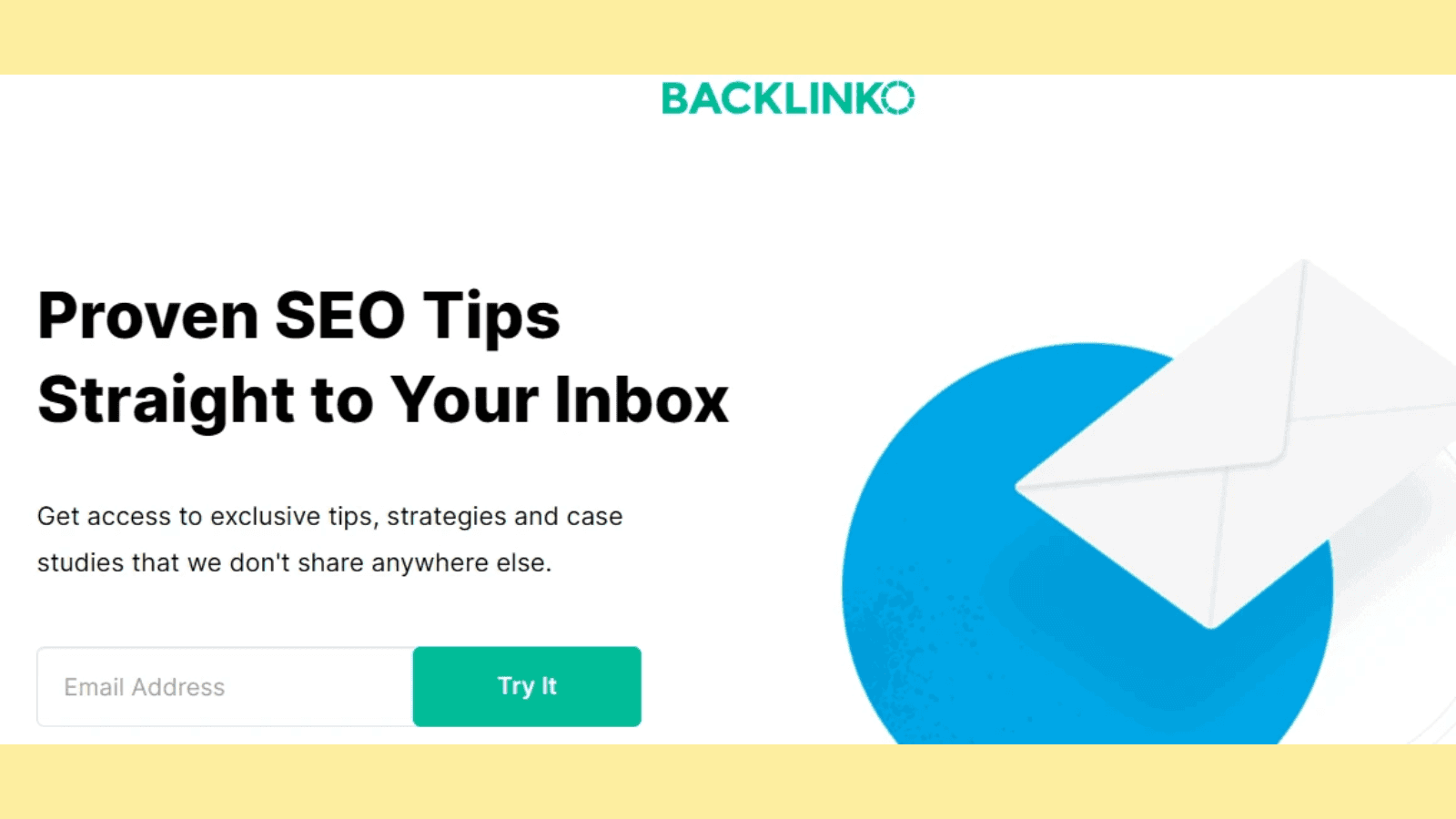
Squeeze page: Minimalistic and focused, these pages aim to quickly capture visitor information with a single call-to-action, like subscribing to a newsletter, signing up for a free trial, etc. Here is an example of a squeeze page by Backlinko:
Ideally, you can use as many types of landing pages as you can on your website provided they all have a specific purpose. According to HubSpot, businesses with 31 to 40 landing pages got 7 times more leads than those with only 1 to 5 landing pages.
3. Using Generic Images on the Landing Page
After working hard to drive traffic to your landing page, you wouldn’t want to see visitors bouncing back or not taking any action. But with generic images, you’re going to experience disappointments.
Relying on generic stock images can undermine your landing page's effectiveness. These visuals often fail to connect emotionally with visitors or convey your unique value, resulting in missed conversion opportunities. Additionally, poorly chosen images—whether too small, irrelevant, or overly distracting—can dilute your message and reduce audience engagement.
Here is how to avoid this mistake
Enhance your landing page by using authentic, purpose-driven visuals that resonate with your audience. Here’s how:
Provide real-life context: Showcase your product or service in action using demo videos or other custom-made visuals to help visitors visualize its value.
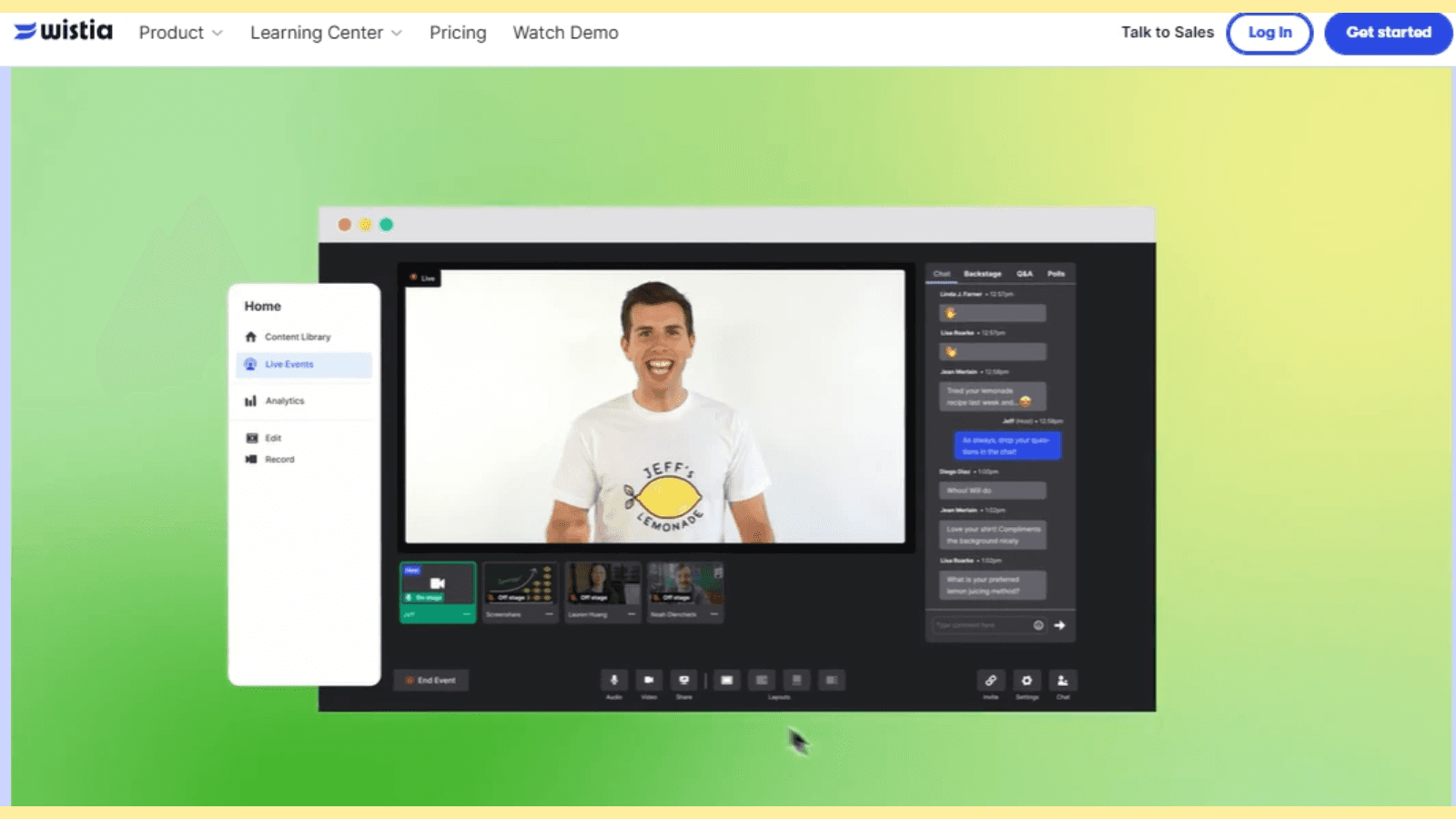
Wistia features a video showcasing how their video marketing platform works on their landing page as shown in the image below:
Include detailed visuals: For software or tools, incorporate screenshots or examples that clarify what users can expect.
Highlight results: Feature before-and-after visuals or transformative outcomes to illustrate your offering's impact.
Remember, images should complement your message—not compete with it. For better results, use real visuals. Marketing Experiments conducted an A/B test on a client website with a real image vs another with a stock photo The web page with the real photo had a nearly 35% higher conversion rate than the page with the stock photo.
4. Cluttered Design and Layout
This is one of the killer landing page design mistakes that can hurt user experience and kill website conversions.
A cluttered landing page design and layout overwhelms visitors, making it difficult for them to focus on your message or take the desired action. Including excessive text, competing visuals, or poorly organized elements can create confusion and frustration, leading potential customers to abandon your page.
Here are tips to fix landing page design mistakes:
A landing page with a clean, well-structured design enhances readability and user experience so visitors can quickly understand your value proposition and navigate your page effortlessly.
Prioritize simplicity: Embrace minimalism by using a clear hierarchy of information. Limit distractions and only include essential elements that drive action.
Utilize whitespace: Use whitespace strategically to ensure elements are well-spaced to improve readability and visual flow.
Focus on one CTA: Avoid cluttering the page with multiple calls to action. Stick to a single, prominent CTA that aligns with your primary goal.
Balance text and images: Ensure your visuals and text complement each other, maintaining a cohesive and uncluttered appearance.
Remember, a clean and simple landing page design not only improves usability but also builds trust and encourages conversions.
5. Including too Many CTAs Without a Clear Goal
Overloading your landing page with multiple calls-to-action (CTAs) can confuse visitors and dilute your primary objective. When faced with too many choices, users may feel overwhelmed or uncertain, which often results in higher bounce rates and reduced conversion.
Use these tips to fix this mistake:
Every landing page should guide users toward a single, well-defined goal. A single, clear CTA simplifies the user journey, reduces friction, and boosts conversion rates.
Define a clear objective: Determine the primary purpose of your landing page, such as collecting leads, promoting a product, or encouraging sign-ups. Then align all landing page elements to support this goal.
Stick to one main CTA: Feature a prominent and focused CTA that stands out visually and communicates the intended action clearly.
Eliminate competing actions: Remove secondary links or CTAs that may distract visitors from your primary conversion path.
Use consistent messaging: Ensure your CTA text reinforces your value proposition and resonates with the page content.
Onto the next item in our list of landing page mistakes to avoid…
6. Vague USP and Misleading Headlines
Your landing page must immediately convey its Unique Selling Proposition (USP) and maintain credibility through clear, honest headlines. A vague USP can fail to differentiate your offering, leaving visitors unsure why they should engage.
Misleading headlines, on the other hand, may grab attention initially but erode trust when the content doesn’t match expectations. This can lead to higher bounce rates. You don’t want this to happen.
Here is how to avoid this landing page mistake
A clear USP and truthful, impactful headlines can build trust, grab attention, and increase the likelihood of conversion.
Clarify your USP: Show what sets your product or service apart. Highlight specific benefits or solutions that directly address your audience’s pain points.
Write honest headlines: Ensure your headlines accurately reflect the page content. Avoid exaggeration or clickbait tactics that might frustrate visitors.
Make it benefit-focused: Frame your USP and headlines around the value your audience will gain while emphasizing outcomes rather than features.
Test variations: Use A/B testing to refine messaging and identify which headlines resonate best with your audience. Use Fibr’s free A/B testing tool to optimize for conversions.
7. Not Having a Thank You Page
A simple thank you message can establish a strong relationship with your visitor.
After a visitor takes action on your landing page—whether it’s signing up, making a purchase, or downloading a resource—it’s crucial to acknowledge their effort with a "Thank You" page.
Like this:

Failing to include this page can leave users feeling unappreciated or uncertain about what happens next, which may lead to a loss of engagement or trust.
Here is how to thank your visitors:
Express gratitude: A simple thank you page reinforces a positive user experience and shows appreciation for the visitor’s action.
Clarify next steps: Outline what users can expect next, whether it’s receiving a confirmation email, accessing their download, or awaiting further instructions.
Encourage further engagement: Use this page to introduce additional offers, share social media links, or invite users to explore more content on your website.
Track conversions: Implement tracking to measure the success of your landing page and understand user behavior post-conversion.
8. Ignoring User Experience (UX)
A poor user experience is one of the landing page design mistakes that can significantly hinder your landing page's success. Factors like slow page load times, difficult navigation, and non-responsive designs can frustrate visitors and drive them away before engaging with your content. Whether they are on desktop or mobile, provide a smooth, intuitive experience.
Here is how to fix this mistake:
Optimize for both mobile and desktop: Ensure your landing page is responsive across devices. Test on various screen sizes to guarantee usability.
Improve page load speed: According to a survey, when a page loads in 1 second, the average conversion rate is almost 40%. The conversion rate drops to 34% when the page loads in 2 seconds. A delay of even a few seconds can result in lost visitors. You need to improve the loading speed.
Compress images, minimize scripts, and leverage browser caching to speed up page loading times.
Simplify navigation: Remove unnecessary elements and focus on a clean layout that guides users naturally toward the conversion goal.
Test interactivity: Make sure buttons, forms, and links are easy to click or tap. Ensure they function correctly on both mobile and desktop. You can use A/B testing tools for this.
9. Not Including Social Proof
If you were driving by the road looking for a hotel to eat in and you see two hotels, one with people eating while another one with empty seats, which hotel would you eat from? You know the answer.
That’s how social proof works.
It is a powerful tool for building trust and credibility on your landing page. It helps people see how others have benefited by using your product or service, encouraging them to take the next step confidently. Without it, visitors may hesitate to take action, unsure if your product or service is reliable.
Here is how to avoid this mistake
Add testimonials: Showcase customer reviews or success stories that highlight the positive impact of your product or service. Like the way Landbot does on their landing page:

Display trust badges: Include logos of well-known brands you’ve worked with, certifications, or secure payment badges to boost credibility.
Feature case studies: Share detailed case studies that demonstrate real-world results and outcomes achieved by your customers.
Show user numbers: Display statistics, such as the number of customers, subscribers, or downloads, to show how many others have already benefited from your offering.
10. Including too Many External Links
Including too many external links on your landing page can distract visitors and lead them away from your primary goal. When users are constantly pulled in different directions, they may lose focus on your core message or call-to-action (CTA). This reduces conversion rates.
Here is how to avoid this mistake:
Limit external Links: Only include links that are absolutely necessary, such as links to your privacy policy or terms of service. Avoid any links that don’t directly support your CTA.
Make CTAs prominent: Ensure your primary CTA is the most obvious and appealing option while minimizing distractions from other links.
Open external links in a new tab: If you must include an external link, set it to open in a new tab. This allows visitors to explore without leaving the landing page.
Keep focused content: Concentrate your content on educating and guiding the visitor toward the action you want them to take, rather than providing too many choices.
Reducing the number of external links on your landing pages helps to keep your visitors engaged and focused on completing the desired action.
11. Boring Landing Page Copy
There is a reason why salespeople are required to be charismatic, fun, empathetic, and human. Would you buy something from a store with a boring salesperson?
Landing page copy that lacks energy or fails to engage can quickly cause visitors to lose interest.
If your messaging is dry, unclear, or uninspiring, it won’t capture attention or encourage users to take the next step. The tone, clarity, and relevance of your copy are crucial in driving conversions.
How to fix this mistake?
Write compelling headlines: Create attention-grabbing headlines that clearly communicate the value of your offering and spark curiosity.
Like the way ePIPE for water repairs landing page:

Focus on benefits, not features: Highlight the benefits of your product or service, showing how it solves your visitors' problems or improves their lives.
Use clear, concise language: Avoid jargon or overly complex language. Keep your copy simple, easy to understand, and user-focused.
Incorporate a conversational tone: Write in a friendly, approachable manner that resonates with your audience, making them feel understood and valued.
Use action-oriented phrases: Include strong, action-driven language in your CTAs, motivating visitors to take immediate steps, such as "Get Started," "Join Now," or "Claim Your Offer."
Engaging, well-crafted copy not only captures attention but also drives visitors to take action, ultimately boosting your conversion rates.
12. Too Many Distracting Animations
It’s a known fact: Animations can enhance user engagement. However, using too many of them can quickly overwhelm visitors, distracting them from your main message or call-to-action (CTA).
For instance, excessive movement can cause confusion, reduce focus, and even slow down page load times, negatively affecting user experience and conversion rates.
Here is how to avoid this mistake on your landing pages:
Limit animations: Use animations sparingly and only when they add value. Prioritize essential elements, like your CTA button or key visuals, to draw attention.
Ensure smooth transitions: Keep animations subtle and smooth. Avoid jarring movements or quick flashes that might annoy visitors or disrupt their browsing experience.
Prioritize speed: Ensure animations don’t slow down your page’s load time, as delays can frustrate users and lead to higher bounce rates.
Test user response: Conduct A/B testing to determine if animations improve user engagement or if they cause distractions.
Ideally, you should use animations purposefully and keep them minimal to enhance the user experience without detracting from your page’s conversion goals.
13. Not A/B Testing Regularly
How do you enhance the performance of your landing pages without testing to see what’s working and what’s not?
Neglecting A/B testing on your landing pages means you're missing out on opportunities to optimize and improve performance.
Without testing different variations of elements like headlines, CTAs, or images, you can’t know for sure what resonates best with your audience. This can result in missed conversions and an underperforming page.
Here is how to avoid this mistake:
Test key elements: Regularly test headlines, CTA placements, button colors, images, and copy to determine which combinations lead to higher conversion rates.
Implement one test at a time: To understand what drives results, change one element at a time in your A/B tests—whether it's the CTA text or the page layout.
Analyze data: Use analytics to track results, ensuring you understand why certain variations perform better than others.
Keep A/B testing: Even after finding a successful combination, continue to test periodically. User preferences and behaviors can change over time.
A/B testing allows you to continually optimize your landing page for higher conversions by making data-driven decisions, ensuring you're always improving the user experience.
14. Asking too Much Information from Top-of-funnel Customers
Requesting extensive personal details or excessive form fields from top-of-funnel customers can drive them away. These prospects are typically in the awareness or interest phase and aren’t ready to make a significant commitment. Overwhelming them with too many questions creates friction and reduces your chances of capturing their information.
Here is how to avoid this landing page mistake
Simplify forms: Limit your forms to essential fields, such as name and email, to reduce barriers for new visitors.
Use progressive profiling: Collect more detailed information gradually as customers move through the funnel and build trust with your brand.
Offer clear value: Make it clear what users gain in exchange for their information, such as a free resource, demo, or newsletter.
Test shorter forms: Conduct A/B tests to determine the optimal number of fields that maximize conversions without losing quality leads.
15. Not Matching Ad Campaigns with Landing Pages
A mismatch between your ad copy and landing page copy can confuse visitors and erode trust, ultimately leading to higher bounce rates and wasted ad spending. When the messaging, design, or promise in your ad doesn’t align with the landing page, visitors may feel misled and fail to convert.
How to fix this landing page mistake
Maintain consistent messaging: Ensure your landing page reflects the language, tone, and value proposition of your ad. If your ad promises a discount, it should be prominently featured on the landing page.
Align visual design: Use similar colors, images, and fonts on your landing page to create a cohesive experience that reassures visitors they’re in the right place.
Match intent: Tailor your landing page content to match the intent of the ad. For example, a product-specific ad should lead to a product-specific landing page, not a generic homepage.
Optimize for audience segments: Create multiple landing pages for different campaigns or target audiences to address specific needs and preferences.
Personalize Your Ad-to-Landing Page with Fibr AI
Use Fibr AI to tailor every landing page to match your ads today.
Avoid These Landing Page Conversion Killers
Your landing page is the cornerstone of your online marketing success. Creating a high-converting landing page is an art that requires following the landing page best practices and avoiding mistakes that could hinder your online success.
Avoiding these 15 landing page mistakes can mean the difference between missed opportunities and thriving conversions.
Start analyzing your landing pages today, and make the tweaks that turn visitors into loyal customers. With these fixes, your landing page can become a powerful tool for achieving your business goals!
FAQs
1. How can a bad landing page affect your business?
A poorly designed landing page can harm your business by driving potential customers away. Common landing page mistakes—such as slow load times, unclear messaging, and lack of a call-to-action—reduce user engagement and trust.
These issues lower conversion rates, increasing your customer acquisition cost and impacting revenue. Optimizing your landing page ensures better performance and user satisfaction.
2. What are common landing page mistakes that harm conversions?
Common mistakes include slow load times, cluttered designs, unclear calls-to-action (CTAs), and lack of mobile optimization. A poorly written headline or irrelevant content can also confuse visitors.
Failing to match the landing page to ads can lead to user mistrust, significantly reducing conversions.
Optimize these areas to avoid common landing page mistakes and improve user experience.
3. How does poor design impact landing page conversions?
Poor design, such as excessive clutter, hard-to-read fonts, or low-quality images, overwhelms visitors and distracts them from the main goal.
Missing visual hierarchy makes it harder for users to focus on CTAs as well. Implementing an effective design can eliminate these landing page mistakes by providing a clean, intuitive layout that highlights key actions and builds user trust for higher conversions.





Meenal Chirana
Content Marketing Manager
Meenal Chirana, Content Marketer at Fibr, brings five years of experience in the content field to the team. Her passion for creating engaging content is matched only by her expertise in writing, SEO and content marketing . Passionate about all things content and digital marketing, she is always on the lookout for innovative ways to connect with audiences and elevate brands.
Read summarized version with
Mistakes can be made but not when designing landing pages. Landing pages play a vital role in the conversion process. They serve as the gateway to a website, connecting your online business with your target audience and converting visitors into leads or customers.
Get your landing page wrong and you will experience:
Increased bounce rates
Wasted marketing budget and lost revenue
Reduced conversion rates and missed opportunities for data collection
Poor brand perception
Missed growth opportunities
We have some good news, though. As CRO experts who have helped with creating thousands of high-converting landing pages for our clients, we’ve seen marketers make grievous landing page design mistakes that cost them valuable opportunities. In this blog post, we’ll explore 15 of them and teach you how to fix them before they hinder your online success.
But before that:
What is a bad landing page?
A bad landing page confuses or frustrates visitors instead of guiding them to take action. It often suffers from cluttered design, slow load times, unclear messaging, or an overload of information.
A bad landing page has poor navigation, lack of a clear call-to-action, and irrelevant content which can drive users away.
Furthermore, the page doesn't match the visitor's expectations or fails to build trust, leading to high bounce rates and lost opportunities.
Here’s a good example of a bad landing page:
If you visited this page, you’re probably trying to find a credit card that suits your needs, which they have listed as you scroll down. However, at the far right as shown in the arrow above, there is a “Lean more” button directing users to their newest offers.
The page seems to have more than one goal—to provide a list of different credit cards and also introduce new offers. This can be overwhelming to users.
A bad landing page can have many issues, including:
Lack of focus
Poor user experience
Bad copy
Outdated design and layout
Broken links
Inconsistent design
That said, let’s explore the conversion-killing landing mistakes and how to avoid them.
15 Conversion-Killing Landing Page Mistakes (And How to Fix Them)
Here are the landing page mistakes that your website visitors won’t forgive you if you’re making them on your website.
1. Not Personalizing Based on Audience
Modern consumers want brands to personalize their online shopping experiences. In fact, 72% of brands say they will buy from brands that provide them with personalized experiences.
See it for yourself:
As such, using a one-size-fits-all approach can make your landing page feel generic and irrelevant, leading to lower engagement and conversions. Visitors are more likely to respond positively when your content resonates with their specific needs, preferences, or behaviors.
Here is how to avoid this landing page mistake:
Segment your audience: Use data to categorize your audience by demographics, interests, or behaviors, and tailor your landing pages to each group.
Use dynamic content: Implement tools that adjust headlines, images, or offers based on a visitor's location, industry, or past interactions.
Personalize CTAs: Customize calls-to-action to align with the visitor’s stage in the customer journey, such as “Learn More” for new users or “Upgrade Now” for returning customers.
Leverage behavioral triggers: Adapt your page based on user actions, like showing a relevant offer if someone views a specific product or service.
Personalization creates a more engaging and relevant experience for your visitors, increasing the likelihood of conversions and building stronger relationships with your audience.
Effortlessly Personalize Landing Pages with Fibr AI
Create high-converting landing pages by tailoring every landing page to match your audience with Fibr AI today.
2. Using only One Type of Landing Page
Relying on just one type of landing page is one of the common landing page mistakes that most marketers make but this limits your marketing success. Many businesses believe that a single landing page can address all their goals—whether it's lead generation, sales, or engagement.
This “one-size-fits-all” approach overlooks the diverse needs of visitors and the varied objectives of marketing campaigns.
For example, a generic landing page might not effectively persuade visitors to sign up for a newsletter, purchase a product, or download a resource. Each objective requires a tailored approach. Using only one type of page can dilute your message, confuse users, and lower conversion rates.
Here's how to fix this landing page mistake:
To avoid this mistake, you need to recognize that different types of landing pages serve different purposes. Here are a few examples of landing pages as well as their respective purposes:
Lead capture page: Designed for capturing visitor information. This page offers an incentive like an eBook or a discount in exchange for contact details. It is a crucial page for building email lists and nurturing leads through personalized follow-up campaigns.
Sales page: Designed to persuade visitors to make a purchase. This landing page emphasizes the product’s benefits, features, and value proposition. It is designed with compelling copy, stunning visuals, and testimonials to convert interest into a direct sale.
Click-through page: Serves as a bridge between promotional content and the next step in the sales funnel. This page provides additional details about a product or service before leading visitors to the next step, such as a checkout page. It guides users further down the conversion funnel.
Squeeze page: Minimalistic and focused, these pages aim to quickly capture visitor information with a single call-to-action, like subscribing to a newsletter, signing up for a free trial, etc. Here is an example of a squeeze page by Backlinko:
Ideally, you can use as many types of landing pages as you can on your website provided they all have a specific purpose. According to HubSpot, businesses with 31 to 40 landing pages got 7 times more leads than those with only 1 to 5 landing pages.
3. Using Generic Images on the Landing Page
After working hard to drive traffic to your landing page, you wouldn’t want to see visitors bouncing back or not taking any action. But with generic images, you’re going to experience disappointments.
Relying on generic stock images can undermine your landing page's effectiveness. These visuals often fail to connect emotionally with visitors or convey your unique value, resulting in missed conversion opportunities. Additionally, poorly chosen images—whether too small, irrelevant, or overly distracting—can dilute your message and reduce audience engagement.
Here is how to avoid this mistake
Enhance your landing page by using authentic, purpose-driven visuals that resonate with your audience. Here’s how:
Provide real-life context: Showcase your product or service in action using demo videos or other custom-made visuals to help visitors visualize its value.
Wistia features a video showcasing how their video marketing platform works on their landing page as shown in the image below:
Include detailed visuals: For software or tools, incorporate screenshots or examples that clarify what users can expect.
Highlight results: Feature before-and-after visuals or transformative outcomes to illustrate your offering's impact.
Remember, images should complement your message—not compete with it. For better results, use real visuals. Marketing Experiments conducted an A/B test on a client website with a real image vs another with a stock photo The web page with the real photo had a nearly 35% higher conversion rate than the page with the stock photo.
4. Cluttered Design and Layout
This is one of the killer landing page design mistakes that can hurt user experience and kill website conversions.
A cluttered landing page design and layout overwhelms visitors, making it difficult for them to focus on your message or take the desired action. Including excessive text, competing visuals, or poorly organized elements can create confusion and frustration, leading potential customers to abandon your page.
Here are tips to fix landing page design mistakes:
A landing page with a clean, well-structured design enhances readability and user experience so visitors can quickly understand your value proposition and navigate your page effortlessly.
Prioritize simplicity: Embrace minimalism by using a clear hierarchy of information. Limit distractions and only include essential elements that drive action.
Utilize whitespace: Use whitespace strategically to ensure elements are well-spaced to improve readability and visual flow.
Focus on one CTA: Avoid cluttering the page with multiple calls to action. Stick to a single, prominent CTA that aligns with your primary goal.
Balance text and images: Ensure your visuals and text complement each other, maintaining a cohesive and uncluttered appearance.
Remember, a clean and simple landing page design not only improves usability but also builds trust and encourages conversions.
5. Including too Many CTAs Without a Clear Goal
Overloading your landing page with multiple calls-to-action (CTAs) can confuse visitors and dilute your primary objective. When faced with too many choices, users may feel overwhelmed or uncertain, which often results in higher bounce rates and reduced conversion.
Use these tips to fix this mistake:
Every landing page should guide users toward a single, well-defined goal. A single, clear CTA simplifies the user journey, reduces friction, and boosts conversion rates.
Define a clear objective: Determine the primary purpose of your landing page, such as collecting leads, promoting a product, or encouraging sign-ups. Then align all landing page elements to support this goal.
Stick to one main CTA: Feature a prominent and focused CTA that stands out visually and communicates the intended action clearly.
Eliminate competing actions: Remove secondary links or CTAs that may distract visitors from your primary conversion path.
Use consistent messaging: Ensure your CTA text reinforces your value proposition and resonates with the page content.
Onto the next item in our list of landing page mistakes to avoid…
6. Vague USP and Misleading Headlines
Your landing page must immediately convey its Unique Selling Proposition (USP) and maintain credibility through clear, honest headlines. A vague USP can fail to differentiate your offering, leaving visitors unsure why they should engage.
Misleading headlines, on the other hand, may grab attention initially but erode trust when the content doesn’t match expectations. This can lead to higher bounce rates. You don’t want this to happen.
Here is how to avoid this landing page mistake
A clear USP and truthful, impactful headlines can build trust, grab attention, and increase the likelihood of conversion.
Clarify your USP: Show what sets your product or service apart. Highlight specific benefits or solutions that directly address your audience’s pain points.
Write honest headlines: Ensure your headlines accurately reflect the page content. Avoid exaggeration or clickbait tactics that might frustrate visitors.
Make it benefit-focused: Frame your USP and headlines around the value your audience will gain while emphasizing outcomes rather than features.
Test variations: Use A/B testing to refine messaging and identify which headlines resonate best with your audience. Use Fibr’s free A/B testing tool to optimize for conversions.
7. Not Having a Thank You Page
A simple thank you message can establish a strong relationship with your visitor.
After a visitor takes action on your landing page—whether it’s signing up, making a purchase, or downloading a resource—it’s crucial to acknowledge their effort with a "Thank You" page.
Like this:
Failing to include this page can leave users feeling unappreciated or uncertain about what happens next, which may lead to a loss of engagement or trust.
Here is how to thank your visitors:
Express gratitude: A simple thank you page reinforces a positive user experience and shows appreciation for the visitor’s action.
Clarify next steps: Outline what users can expect next, whether it’s receiving a confirmation email, accessing their download, or awaiting further instructions.
Encourage further engagement: Use this page to introduce additional offers, share social media links, or invite users to explore more content on your website.
Track conversions: Implement tracking to measure the success of your landing page and understand user behavior post-conversion.
8. Ignoring User Experience (UX)
A poor user experience is one of the landing page design mistakes that can significantly hinder your landing page's success. Factors like slow page load times, difficult navigation, and non-responsive designs can frustrate visitors and drive them away before engaging with your content. Whether they are on desktop or mobile, provide a smooth, intuitive experience.
Here is how to fix this mistake:
Optimize for both mobile and desktop: Ensure your landing page is responsive across devices. Test on various screen sizes to guarantee usability.
Improve page load speed: According to a survey, when a page loads in 1 second, the average conversion rate is almost 40%. The conversion rate drops to 34% when the page loads in 2 seconds. A delay of even a few seconds can result in lost visitors. You need to improve the loading speed.
Compress images, minimize scripts, and leverage browser caching to speed up page loading times.
Simplify navigation: Remove unnecessary elements and focus on a clean layout that guides users naturally toward the conversion goal.
Test interactivity: Make sure buttons, forms, and links are easy to click or tap. Ensure they function correctly on both mobile and desktop. You can use A/B testing tools for this.
9. Not Including Social Proof
If you were driving by the road looking for a hotel to eat in and you see two hotels, one with people eating while another one with empty seats, which hotel would you eat from? You know the answer.
That’s how social proof works.
It is a powerful tool for building trust and credibility on your landing page. It helps people see how others have benefited by using your product or service, encouraging them to take the next step confidently. Without it, visitors may hesitate to take action, unsure if your product or service is reliable.
Here is how to avoid this mistake
Add testimonials: Showcase customer reviews or success stories that highlight the positive impact of your product or service. Like the way Landbot does on their landing page:
Display trust badges: Include logos of well-known brands you’ve worked with, certifications, or secure payment badges to boost credibility.
Feature case studies: Share detailed case studies that demonstrate real-world results and outcomes achieved by your customers.
Show user numbers: Display statistics, such as the number of customers, subscribers, or downloads, to show how many others have already benefited from your offering.
10. Including too Many External Links
Including too many external links on your landing page can distract visitors and lead them away from your primary goal. When users are constantly pulled in different directions, they may lose focus on your core message or call-to-action (CTA). This reduces conversion rates.
Here is how to avoid this mistake:
Limit external Links: Only include links that are absolutely necessary, such as links to your privacy policy or terms of service. Avoid any links that don’t directly support your CTA.
Make CTAs prominent: Ensure your primary CTA is the most obvious and appealing option while minimizing distractions from other links.
Open external links in a new tab: If you must include an external link, set it to open in a new tab. This allows visitors to explore without leaving the landing page.
Keep focused content: Concentrate your content on educating and guiding the visitor toward the action you want them to take, rather than providing too many choices.
Reducing the number of external links on your landing pages helps to keep your visitors engaged and focused on completing the desired action.
11. Boring Landing Page Copy
There is a reason why salespeople are required to be charismatic, fun, empathetic, and human. Would you buy something from a store with a boring salesperson?
Landing page copy that lacks energy or fails to engage can quickly cause visitors to lose interest.
If your messaging is dry, unclear, or uninspiring, it won’t capture attention or encourage users to take the next step. The tone, clarity, and relevance of your copy are crucial in driving conversions.
How to fix this mistake?
Write compelling headlines: Create attention-grabbing headlines that clearly communicate the value of your offering and spark curiosity.
Like the way ePIPE for water repairs landing page:
Focus on benefits, not features: Highlight the benefits of your product or service, showing how it solves your visitors' problems or improves their lives.
Use clear, concise language: Avoid jargon or overly complex language. Keep your copy simple, easy to understand, and user-focused.
Incorporate a conversational tone: Write in a friendly, approachable manner that resonates with your audience, making them feel understood and valued.
Use action-oriented phrases: Include strong, action-driven language in your CTAs, motivating visitors to take immediate steps, such as "Get Started," "Join Now," or "Claim Your Offer."
Engaging, well-crafted copy not only captures attention but also drives visitors to take action, ultimately boosting your conversion rates.
12. Too Many Distracting Animations
It’s a known fact: Animations can enhance user engagement. However, using too many of them can quickly overwhelm visitors, distracting them from your main message or call-to-action (CTA).
For instance, excessive movement can cause confusion, reduce focus, and even slow down page load times, negatively affecting user experience and conversion rates.
Here is how to avoid this mistake on your landing pages:
Limit animations: Use animations sparingly and only when they add value. Prioritize essential elements, like your CTA button or key visuals, to draw attention.
Ensure smooth transitions: Keep animations subtle and smooth. Avoid jarring movements or quick flashes that might annoy visitors or disrupt their browsing experience.
Prioritize speed: Ensure animations don’t slow down your page’s load time, as delays can frustrate users and lead to higher bounce rates.
Test user response: Conduct A/B testing to determine if animations improve user engagement or if they cause distractions.
Ideally, you should use animations purposefully and keep them minimal to enhance the user experience without detracting from your page’s conversion goals.
13. Not A/B Testing Regularly
How do you enhance the performance of your landing pages without testing to see what’s working and what’s not?
Neglecting A/B testing on your landing pages means you're missing out on opportunities to optimize and improve performance.
Without testing different variations of elements like headlines, CTAs, or images, you can’t know for sure what resonates best with your audience. This can result in missed conversions and an underperforming page.
Here is how to avoid this mistake:
Test key elements: Regularly test headlines, CTA placements, button colors, images, and copy to determine which combinations lead to higher conversion rates.
Implement one test at a time: To understand what drives results, change one element at a time in your A/B tests—whether it's the CTA text or the page layout.
Analyze data: Use analytics to track results, ensuring you understand why certain variations perform better than others.
Keep A/B testing: Even after finding a successful combination, continue to test periodically. User preferences and behaviors can change over time.
A/B testing allows you to continually optimize your landing page for higher conversions by making data-driven decisions, ensuring you're always improving the user experience.
14. Asking too Much Information from Top-of-funnel Customers
Requesting extensive personal details or excessive form fields from top-of-funnel customers can drive them away. These prospects are typically in the awareness or interest phase and aren’t ready to make a significant commitment. Overwhelming them with too many questions creates friction and reduces your chances of capturing their information.
Here is how to avoid this landing page mistake
Simplify forms: Limit your forms to essential fields, such as name and email, to reduce barriers for new visitors.
Use progressive profiling: Collect more detailed information gradually as customers move through the funnel and build trust with your brand.
Offer clear value: Make it clear what users gain in exchange for their information, such as a free resource, demo, or newsletter.
Test shorter forms: Conduct A/B tests to determine the optimal number of fields that maximize conversions without losing quality leads.
15. Not Matching Ad Campaigns with Landing Pages
A mismatch between your ad copy and landing page copy can confuse visitors and erode trust, ultimately leading to higher bounce rates and wasted ad spending. When the messaging, design, or promise in your ad doesn’t align with the landing page, visitors may feel misled and fail to convert.
How to fix this landing page mistake
Maintain consistent messaging: Ensure your landing page reflects the language, tone, and value proposition of your ad. If your ad promises a discount, it should be prominently featured on the landing page.
Align visual design: Use similar colors, images, and fonts on your landing page to create a cohesive experience that reassures visitors they’re in the right place.
Match intent: Tailor your landing page content to match the intent of the ad. For example, a product-specific ad should lead to a product-specific landing page, not a generic homepage.
Optimize for audience segments: Create multiple landing pages for different campaigns or target audiences to address specific needs and preferences.
Personalize Your Ad-to-Landing Page with Fibr AI
Use Fibr AI to tailor every landing page to match your ads today.
Avoid These Landing Page Conversion Killers
Your landing page is the cornerstone of your online marketing success. Creating a high-converting landing page is an art that requires following the landing page best practices and avoiding mistakes that could hinder your online success.
Avoiding these 15 landing page mistakes can mean the difference between missed opportunities and thriving conversions.
Start analyzing your landing pages today, and make the tweaks that turn visitors into loyal customers. With these fixes, your landing page can become a powerful tool for achieving your business goals!
FAQs
1. How can a bad landing page affect your business?
A poorly designed landing page can harm your business by driving potential customers away. Common landing page mistakes—such as slow load times, unclear messaging, and lack of a call-to-action—reduce user engagement and trust.
These issues lower conversion rates, increasing your customer acquisition cost and impacting revenue. Optimizing your landing page ensures better performance and user satisfaction.
2. What are common landing page mistakes that harm conversions?
Common mistakes include slow load times, cluttered designs, unclear calls-to-action (CTAs), and lack of mobile optimization. A poorly written headline or irrelevant content can also confuse visitors.
Failing to match the landing page to ads can lead to user mistrust, significantly reducing conversions.
Optimize these areas to avoid common landing page mistakes and improve user experience.
3. How does poor design impact landing page conversions?
Poor design, such as excessive clutter, hard-to-read fonts, or low-quality images, overwhelms visitors and distracts them from the main goal.
Missing visual hierarchy makes it harder for users to focus on CTAs as well. Implementing an effective design can eliminate these landing page mistakes by providing a clean, intuitive layout that highlights key actions and builds user trust for higher conversions.
Meenal Chirana
Content Marketing Manager
Meenal Chirana, Content Marketer at Fibr, brings five years of experience in the content field to the team. Her passion for creating engaging content is matched only by her expertise in writing, SEO and content marketing . Passionate about all things content and digital marketing, she is always on the lookout for innovative ways to connect with audiences and elevate brands.



