

Read summarized version with
Is your sign-up form driving conversions or driving visitors away? Many marketers focus on attracting traffic but overlook one critical factor: form conversion. A poorly designed form with unnecessary fields can lead to high abandonment rates and cost you valuable leads. Strategic form optimization can significantly boost sign-ups.
So, how do you create high-converting sign-up forms that turn visitors into engaged users? In this guide, we’ll break down everything you need to know, from calculating conversion rates to uncovering the hidden factors that impact the performance of your forms.
You’ll also learn how to design high-converting sign-up forms and more.
Whether you're struggling with drop-offs or aiming to refine your approach, you’ll discover actionable techniques that drive real results.
Let’s dive in.
Key Takeaways
Form conversion occurs when a user completes a form on your website, such as signing up, subscribing, or requesting information to become a lead or customer.
To calculate form conversion rate, divide the number of form submissions by the total number of visitors who viewed the form, then multiply by 100 to get the
Form conversion matters for a couple of reasons. Higher form conversion rates mean more leads, better ROI, and improved user engagement, directly impacting your business growth.
Factors that influence form conversion rate include form length, design, clarity, trust signals, mobile-friendliness, and the value proposition offered to users.
To create a high-converting sign-up form, keep forms short, use clear CTAs, optimize for mobile, add trust badges, and highlight benefits to encourage submissions.
What is Form Conversion?
Form conversion is when a website visitor turns into a lead or customer by successfully completing and submitting a form. The form could be a contact form or sign-up form from a landing page or any other website pages.
To measure the percentage of visitors who complete a form, you evaluate the form conversion rate.
This metric helps marketers evaluate the effectiveness of their forms and identify areas for improvement through form optimization strategies like simplifying fields, improving design, or adding compelling call-to-action.
How to Calculate Form Conversion Rate?
You need to calculate the form conversion rate to determine the effectiveness of your sign-up forms.
To calculate form conversion rate, divide the number of successful form submissions by the total number of visitors who viewed the form, then multiply by 100 to get a percentage. The formula is:
Use the following formula:

For example, if 50 submissions occur from 1,000 visitors, the conversion rate is 5%.
Why Does Form Conversion Matter?
Form conversion is a critical metric for marketers because it directly reflects the effectiveness of their strategies in turning potential leads into actionable outcomes.
Whether it’s capturing email addresses, generating sales inquiries, or encouraging sign-ups, form conversions are a tangible measure of how well a marketing campaign resonates with its target audience. Here are key reasons why form conversion matters for marketers:
Enhances Lead Generation
Marketers rely on forms to capture valuable leads that fuel their sales pipelines.
According to Ruler Analytics, 84% of marketers use form submissions to generate leads.

When visitors fill out a form, they provide contact details and insights that allow marketers to engage with them with marketing promotions and other business communications. Thus, they become potential leads.
High-converting forms reduce bounce rates and encourage users to share their information. Without optimized form conversion, businesses risk losing potential customers before they even enter the sales funnel.
Lead generation is not just about quantity but also quality though. Well-structured forms filter out unqualified leads by including relevant fields that help marketers assess potential customers’ interests and readiness to buy.
Additionally, using multi-step forms, conditional logic, and progressive profiling techniques can improve lead quality by ensuring that only genuinely interested users complete the form, reducing time wasted on leads that are unlikely to convert.
Boosts Sales and Revenue
Form conversions have a direct impact on sales and revenue generation. When more users complete forms, businesses can nurture those leads through targeted marketing campaigns, eventually converting them into paying customers.
Whether the form is designed for a free trial, product demo, or newsletter subscription, each successful submission brings potential revenue opportunities.
Higher conversion rates mean a greater number of leads progressing through the sales funnel, leading to increased sales and profitability.
To maximize revenue potential, marketers should integrate their forms with customer relationship management (CRM) systems and email automation tools.
This enables personalized follow-ups and segmentation based on user behavior, ensuring that prospects receive relevant content and offers at the right time.
Marketers can also provide incentives such as exclusive discounts, free resources, or early access to new products to encourage more form completions and lead to higher revenue growth.
To get people to sign up Oyo Skincare offers a deal on their sign-up popup form:

Apart from the good deal, they feature a stunning photo of the deal
Improves Customer Acquisition Costs (CAC)
A low-converting form leads to wasted marketing spend as fewer visitors take the desired action. By improving form conversion rates, marketers can lower their customer acquisition cost (CAC) while maximizing the return on investment (ROI) from their marketing efforts.
A well-designed form minimizes friction, making it easier for users to complete submissions. Ultimately, this increases efficiency in acquiring new customers without inflating marketing expenses.
One way to achieve this is through A/B testing different form designs, field lengths, and placements to identify what works best. Marketers can also implement lead scoring to prioritize high-value leads and ensure that marketing resources are allocated efficiently.
Additionally, using automation tools to follow up with form submissions promptly increases engagement and improves conversion rates, further reducing CAC over time.
Provides Actionable Data for Marketing Strategies
Forms serve as a crucial data collection tool for marketers. Marketers can analyze form submissions to gain insights into customer preferences, behaviors, and pain points.
This data enables marketers to tailor their campaigns, personalize communication, and refine their messaging to better resonate with their target audience.
High conversion rates ensure a steady flow of data, helping marketers make informed decisions and optimize their marketing strategies for better engagement and higher conversions.
Strengthens Email Marketing and Retargeting Efforts
Email marketing remains one of the most effective channels for nurturing leads and driving conversions. A high-converting form provides a steady influx of new email subscribers, allowing marketers to send personalized offers, updates, and promotional content.
Additionally, form conversions help marketers build retargeting audiences and re-engage potential customers who have shown interest through targeted ads and follow-up communications. Efficient form conversion strengthens these marketing efforts and maximizes customer retention.
Furthermore, marketers can improve email marketing success by incorporating preference-based forms, that allow users to select the type of content they wish to receive.
Maximizes ROI on Marketing Campaigns
Every marketing campaign, whether through social media, pay-per-click (PPC) advertising, or content marketing focuses on driving users to take specific actions, often through online forms. If forms are not converting well, marketing efforts yield little to no return.
Marketers can optimize form conversion to ensure that marketing dollars are well spent by capturing and converting as many qualified leads as possible. High-performing sign-up forms reduce wasted ad spend as well, making marketing campaigns more efficient and results-driven.
To maximize ROI, marketers should continuously monitor form performance metrics, run A/B tests, and implement artificial intelligence (AI) tools for predictive analytics.
They can also implement AI-driven form optimizations such as smart autofill, chatbot-assisted forms, and real-time error validation to further streamline the user journey and increase submission rates.
What Impacts Form Conversion Rate?
Ever wondered why some forms get a flood of responses while others are abandoned midway? Form conversion rate is influenced by multiple factors, each playing a critical role in how users interact with and complete the form.
A high conversion rate means your form is doing its job well, while a low rate indicates room for improvement.
Here are a couple of factors influencing form conversion rates.
Form Length and Complexity
The length and complexity of a form are among the most significant factors affecting conversion rates. In fact, according to research, form length is among the top reasons people abandon online forms.

A shorter, simpler form is generally more appealing to users because it requires less effort to complete.
For example, asking for just a name and email address is far less intimidating than requesting a full address, phone number, and company details.
Ideally, shorter forms that only ask for essential information keep users engaged, reduce friction, and make it easier for users to complete the process quickly. This is especially effective for lead generation forms or newsletter sign-ups, where the goal is to capture basic information.
Here is a good example of a short lead capture form by Salesmate:

They only ask for your email address to sign up for their free trial.
Equally, overly long and complex forms intimidate users which can increase abandonment rates.
When people see too many fields, they may decide it's not worth their time. Unnecessary or redundant fields can make users question why you're collecting so much information, raising privacy concerns and causing them to leave.
Mobile-Friendliness & UX
With the majority of internet users accessing websites via mobile devices, marketers need to create mobile-optimized forms. A form that isn’t easy to fill out on mobile can frustrate users and lead to lower conversion rates.
Besides, forms that require excessive scrolling, have tiny input fields or don’t auto-adjust for mobile screens can lead to high drop-off rates.
Marketers should create responsive form designs that adapt to different screen sizes with large, tappable buttons, easy-to-read fonts, and properly spaced fields to make it easier for users to complete sign-up forms.
Form Design and Usability
The visual design and usability of a form play a crucial role in how users perceive it. A cluttered or confusing form layout can deter users, while a clean, intuitive form design encourages completion.
Technically, a well-designed form with clear labels, logical field ordering, and visual hierarchy guides users through the process effortlessly. For example, grouping related fields (like personal information and contact details) makes the form feel more organized.
On the contrary, poorly designed sign-up forms with cluttered layouts, unclear labels, or inconsistent formatting confuse users. If users struggle to locate fields or understand what’s required, they’re likely to abandon the form.
Overuse of dropdowns, excessive checkboxes, or a lack of clear instructions can also frustrate users and drive them away.
Call to Action (CTA)
The call to action is the final prompt that encourages users to submit the form. A weak or unclear CTA can leave users unsure of what to do next.
A compelling, action-driven CTA encourages users to complete the form. Phrases like “Download Now,” “Claim Your Free Trial,” or “Sign Up Now” communicate value which makes the process feel rewarding.
On the other hand, a generic or unclear CTA, such as “Submit” or “Click Here,” lacks motivation. If users don’t understand what happens after they complete the form, they may hesitate to fill it out. Additionally, if the CTA button blends into the background or is poorly positioned, users might miss it altogether which can hinder form conversion rates.
Loading Speed
Imagine submitting a form that takes forever to complete.
The speed at which your form loads is critical. Slow-loading forms can frustrate users and lead to higher abandonment rates.
Typically, fast-loading forms keep users engaged. If a form loads instantly and responds quickly to user inputs, it creates a smooth experience.
On the other hand, slow-loading sign-up forms test users’ patience. If a form takes more than a couple of seconds to load, users might abandon it before even starting.
Similarly, if clicking the “Submit” button results in lag or delays, users may assume the form is broken and leave without completing it.
Field Validation and Error Handling
Form field validation ensures that users enter data in the correct format, while error handling provides feedback when mistakes are made. Both are essential for a positive user experience.
A sign-up form that provides clear, real-time validation helps users correct mistakes immediately to prevent errors before submission. If a form provides instant feedback when a field is incorrectly filled (e.g., highlighting errors in red and providing explanations like “please enter a valid phone number”), users are more likely to complete the process. Smart validation also prevents frustration by ensuring users don’t have to start over.
On the other hand, poor form validation, such as vague error messages like “Invalid Input,” can confuse users. If a form doesn’t specify what needs to be corrected or forces users to redo entire sections, they may give up.
Additionally, overly strict validation (e.g., requiring exact formatting for phone numbers) can frustrate users and deter them from completing the form.
Trust and Credibility
Trust is a major factor in whether users feel comfortable submitting a form. If they don’t trust your website or the purpose of the form, they’re unlikely to complete it.
Users will likely complete a form if they trust the organization collecting their data. Display trust signals like security badges, privacy policies, or testimonials to reassure users that their information is safe.
To nudge users to sign up for their free trial, Salesmate displays customer testimonials on their sign-up form as shown below:

Also, provide clear explanations about why data is being collected and how it will be used to further increase trust.
See how HubSpot highlights their privacy policy prominent on their sign-up form for downloading free guides:

HubSpot
If users feel unsure about the legitimacy of a form, they may hesitate to share personal information. For instance, forms that lack branding, have suspicious-looking URLs or don’t provide a privacy statement can raise red flags.
Furthermore, forms with unnecessary requests for sensitive information, like social security numbers or excessive permissions, can also make users hesitate to fill them out.
How to Create a High-Converting Sign-Up Forms
While sign-up forms are a valuable tool for lead capture, simply placing them on your website isn’t enough. You need to implement strategic form optimization tactics to improve conversion rates.
Here are practical tips to create sign-up forms that convert efficiently.
1. Minimize the Number of Fields in Your Forms
The number of fields in your form directly impacts its completion rate.
Did you know? Removing just one field from your sign-up form can increase conversions by almost half. In a study, Dan Zarrella at HubSpot found out that by reducing the number of form fields from 4 to 3, you can increase form conversion rates by 50%.

The more fields you include, the higher the likelihood of user abandonment. This is because including too many fields may overwhelm users which can make the process feel tedious. Furthermore, users are often reluctant to share too much personal information at once.
Here are actionable tips to minimize your sign-up form fields:
Ask for crucial information only. Start with the bare minimum—name and email address. If you must collect multiple details, consider using a progressive profiling approach, where you collect more data over time based on user interactions.
If you must include more fields, prioritize them based on importance. Use form analytics to identify which fields users are most likely to skip or abandon.
A/B test different field combinations to find the optimal balance between data collection and user convenience.
Dropbox’s sign-up form is a classic example of simplicity. When signing up for a free account, the form only asks for three fields: First Name, Last Name, Email Address, and Password.

Users can also sign up using their Google accounts.
2. Make Sign-up Forms Mobile-Friendly
With mobile devices accounting for over 60% of global web traffic, if your sign-up forms aren’t easy to fill out on mobile devices, you’re driving away potential leads. A form that isn’t optimized for mobile can frustrate users and lead to lost opportunities for lead generation and sales.
Here’s why? Mobile users expect forms to be easy to navigate with easy input.
Here are actionable tips to design mobile-responsive sign-up forms:
Use responsive design to make your sign-up forms adjust to different screen sizes and orientations.
Keep form fields and buttons large enough to tap easily on smaller screens.
Use dropdowns, checkboxes, and date pickers to simplify input on mobile keyboards.
Test your form on various devices and browsers to ensure compatibility.
3. Optimize CTAs
Your call-to-action (CTA) is the final push that convinces users to complete your form. A well-crafted CTA can significantly improve conversions. Equally, a poorly designed or worded CTA can significantly reduce your form conversion rate.
When it comes to CTAs, users need to understand what they’re signing up for. Instead of generic phrases like "Submit" or "Sign Up," use action-driven language like "Sign up For a Free Trial" or "Download the Ebook Now."
Here are practical tips to craft compelling form CTAs:
Highlight the value by clearly communicating what users will gain by completing the form.
Use contrasting colors and ample whitespace to make your CTA button stand out from the background.
Position your CTAs above the fold and make them the most noticeable elements on the form to drive engagement.
HubSpot’s CTA for their free CRM sign-up form is highly effective. Instead of a generic “Submit” button, they use action-oriented language like “Get Free CRM”.
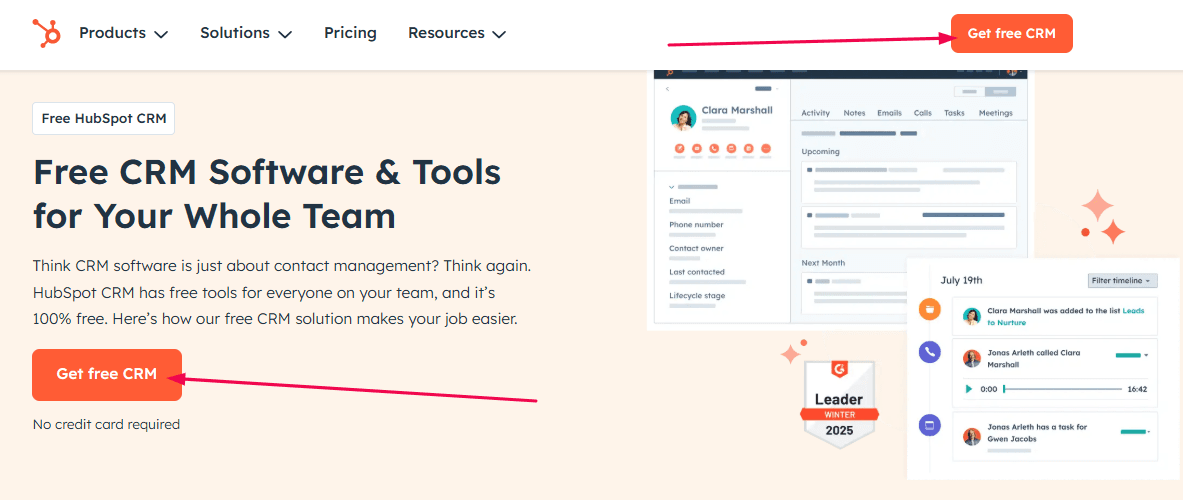
The button is bright orange, contrasting with the rest of the page.
4. Keep Sign-Up Forms Attractive
A beautiful sign-up form can catch user’s attention, boost engagement and build trust. On the contrary, an ugly form can make your brand appear unprofessional. This is because users judge your brand based on the form’s appearance. So you need to keep your forms visually appealing.
Here is how to do it:
Use consistent branding by incorporating your brand’s colors, fonts, and logo.
Add visual elements like icons, illustrations, or images to make the form more attractive and engaging.
Use ample whitespace and a clean layout to avoid clutter and excessive elements that can distract users.
Use contrasting colors, clear fonts, and a clean design.
Maintain consistency with your font size, button style, and color scheme to enhance usability and overall appeal.
Slack’s sign-up form is visually appealing and on-brand. The form features a clean, modern design with ample whitespace and Slack’s signature purple color scheme.

They also include a subtle illustration of their mascot, which adds a touch of personality without distracting from the form itself. This attractive design enhances user trust and engagement.
5. Diversify Your Sign-Up Form Types
Different users interact with forms in different ways. Besides, different form types work better in different scenarios plus users are more likely to engage with a form that fits their browsing behavior. Diversifying your form types can cater to various user preferences and contexts.
To maximize conversions, experiment with various sign-up form types, such as:
Pop-ups: Attention-grabbing but should be timed appropriately.
Inline forms: Embedded within content for a seamless user experience.
Slide-ins: Appear subtly from the side without disrupting the user experience.
Gamified forms: Interactive elements like spin-to-win wheels can increase engagement.
Diversifying your forms can help you capture leads at different touchpoints and improve overall form analytics.
Here are actionable tips to diversify your form types:
Experiment with formats. Try pop-ups, inline forms, slide-ins, and exit-intent forms.
Use different form types for different contexts. Use pop-up forms for promotional offers and inline forms for blog subscriptions.
A/B testing different form types can help determine which works best for your audience.
6. Offer a Benefit
Apart from establishing credibility, offering a benefit gives users a reason to take action. People are more likely to complete a form if they perceive immediate value. Hence you need to offer a benefit on your sign-up forms.
Here is how to do it:
Highlight the benefit by clearly communicating what users will gain by signing up to boost your form conversion rate. Place the value proposition prominently above or within the form.
Offer incentives such as free resources, discounts, or exclusive content in exchange for form submissions.
Be specific: Instead of “Sign up for our premium plans,” say “Upgrade to our premium plans to unlock advanced features.”
Consider using social proof, such as testimonials or subscriber counts, to reinforce credibility.
Varnish & Vine, a US-based ecommerce store for premium cactuses and tropical plants has mastered the art of offering a benefit to nudge people to subscribe:

Their sign-up popup form offers a 40% discount to their users.
7. Use Multi-Step Forms Instead of Single Page Forms
Long forms can be intimidating. Multi-step forms break down the sign-up process into smaller, manageable steps which reduces cognitive load and improves completion rates.
For example, instead of requesting all details on one page, the first step could ask for an email address, followed by personal details in the next step.
Studies show that multi-step forms reduce abandonment rates and increase conversions by 86% as users are more likely to complete short, sequential actions.
Here are actionable tips for using multi-step sign-up forms:
Group related fields into steps (e.g., Step 1: Contact Info, Step 2: Preferences).
Use a progress indicator to show users how far they’ve come and how much is left in their form submissions.
Keep each step concise and avoid unnecessary fields to maintain engagement throughout the process.
HubSpot uses multi-step sign-up forms for their free resources. Here is an example of their form for their free guide to email subject line:

In the example above, HubSpot breaks the sign-up process into simple steps.
8. Implement Conditional Logic
Conditional logic allows forms to dynamically change based on user responses. This personalization improves the user experience and prevents unnecessary fields from being displayed.
For instance, if a user selects "Business Owner" as their role, they only see fields that apply to them. Apart from reducing clutter and improving usability, this targeted approach enhances form conversion rates by keeping forms relevant and concise.
Besides, smart forms that adapt based on user input create a more intuitive experience and minimize frustration.
Here are practical tips for implementing conditional logic:
Display additional form fields based on previous answers.
Pre-fill fields based on user data or behavior.
Ensure the logic works seamlessly across all devices.
Using conditional logic on sign-up forms can also help segment users for better follow-up marketing strategies.
9. Minimize Friction in and Around the Form
Friction refers to anything that makes it harder for users to complete your form. This includes unnecessary fields, confusing instructions, or slow-loading pages.
Reducing friction improves the user experience and directly impacts your form conversion rate by increasing the likelihood of users filling it out.
Here’s how to minimize friction in your sign-up forms.
Avoid unnecessary CAPTCHAs unless absolutely necessary.
Ensure the form loads quickly.
Eliminate distractions around the form, such as excessive ads or intrusive pop-ups.
Provide inline validation to help users correct errors in real time.
10. Use a Single-Column Layout
A single-column form layout is easier to follow and prevents users from missing any fields. It also improves readability and usability.
Besides, a single-column structure ensures users can move seamlessly from one field to the next without unnecessary cognitive load. This simple yet effective design principle improves overall usability and boosts conversions.
Forms with multiple columns, on the other hand, can confuse users and disrupt the flow of information.
Here are handy tips for using a single-column form layout
Arrange form fields vertically. Place all fields in a single column.
Group related fields. Use headings or spacing to organize sections.
Test for clarity to ensure the layout is intuitive and easy to navigate.
Jotform uses a single-column form layout.

The sign-up form also uses minimal fields to improve form conversion rate.
11. Leverage A/B Testing
Form optimization is an ongoing process. Even small tweaks/changes to your form design can lead to significant improvements in your form conversion rate.
How do you unlock the secret? Through A/B testing.
Ideally, A/B testing allows you to compare different versions, copy, and layouts of your sign-up form to determine which performs best. It removes guesswork and provides actionable insights.
You can run A/B testing for the following elements:
CTA wording and placement
Form field labels
Design elements (colors, fonts, button sizes)
Form placement (pop-up vs. inline)
Multi-step vs. single-page formats
Some tips to help you with your A/B testing effort include:
Test one variable at a time: Focus on elements like CTA text, color, or form length.
Use form analytics. Track metrics like completion rate, abandonment rate, and time spent.
Iterate based on results. Implement winning variations and continue testing.
For better A/B testing results, utilize tools like Fibr AI.
The tool uses the power of AI to create, run, and analyze A/B tests efficiently.
How to Create a High-Converting Sign-Up Forms
1.How do I increase my sign-up form conversion?
To boost sign-up form conversions, keep the form simple with minimal fields, use clear and compelling copy, and highlight benefits.
You can also add trust signals like testimonials or security badges. Ensure you optimize for mobile as well, and include a strong call-to-action, and use A/B testing to refine design and messaging. Another idea is to offer incentives such as discounts or free trials to encourage sign-ups.
2.What is a good sign-up form conversion rate?
A good sign-up form conversion rate varies by industry but typically ranges between 20% to 30%. High-performing forms can exceed 50%.
Factors like audience targeting, form complexity, and value proposition influence rates. Regularly analyze your metrics and benchmark against industry standards to identify areas for improvement and ensure your form performs competitively.
3.What should be included in a sign-up form? Key elements
A sign-up form should include essential fields like name, email, and password, but avoid overwhelming users.
Remember to use a clear headline, concise instructions, and a strong call to action. Include trust elements like privacy assurances and error validation. You can also include optional fields to gather additional information but prioritize simplicity.





Meenal Chirana
Content Marketing Manager
Meenal Chirana, Content Marketer at Fibr, brings five years of experience in the content field to the team. Her passion for creating engaging content is matched only by her expertise in writing, SEO and content marketing . Passionate about all things content and digital marketing, she is always on the lookout for innovative ways to connect with audiences and elevate brands.
Read summarized version with
Is your sign-up form driving conversions or driving visitors away? Many marketers focus on attracting traffic but overlook one critical factor: form conversion. A poorly designed form with unnecessary fields can lead to high abandonment rates and cost you valuable leads. Strategic form optimization can significantly boost sign-ups.
So, how do you create high-converting sign-up forms that turn visitors into engaged users? In this guide, we’ll break down everything you need to know, from calculating conversion rates to uncovering the hidden factors that impact the performance of your forms.
You’ll also learn how to design high-converting sign-up forms and more.
Whether you're struggling with drop-offs or aiming to refine your approach, you’ll discover actionable techniques that drive real results.
Let’s dive in.
Key Takeaways
Form conversion occurs when a user completes a form on your website, such as signing up, subscribing, or requesting information to become a lead or customer.
To calculate form conversion rate, divide the number of form submissions by the total number of visitors who viewed the form, then multiply by 100 to get the
Form conversion matters for a couple of reasons. Higher form conversion rates mean more leads, better ROI, and improved user engagement, directly impacting your business growth.
Factors that influence form conversion rate include form length, design, clarity, trust signals, mobile-friendliness, and the value proposition offered to users.
To create a high-converting sign-up form, keep forms short, use clear CTAs, optimize for mobile, add trust badges, and highlight benefits to encourage submissions.
What is Form Conversion?
Form conversion is when a website visitor turns into a lead or customer by successfully completing and submitting a form. The form could be a contact form or sign-up form from a landing page or any other website pages.
To measure the percentage of visitors who complete a form, you evaluate the form conversion rate.
This metric helps marketers evaluate the effectiveness of their forms and identify areas for improvement through form optimization strategies like simplifying fields, improving design, or adding compelling call-to-action.
How to Calculate Form Conversion Rate?
You need to calculate the form conversion rate to determine the effectiveness of your sign-up forms.
To calculate form conversion rate, divide the number of successful form submissions by the total number of visitors who viewed the form, then multiply by 100 to get a percentage. The formula is:
Use the following formula:
For example, if 50 submissions occur from 1,000 visitors, the conversion rate is 5%.
Why Does Form Conversion Matter?
Form conversion is a critical metric for marketers because it directly reflects the effectiveness of their strategies in turning potential leads into actionable outcomes.
Whether it’s capturing email addresses, generating sales inquiries, or encouraging sign-ups, form conversions are a tangible measure of how well a marketing campaign resonates with its target audience. Here are key reasons why form conversion matters for marketers:
Enhances Lead Generation
Marketers rely on forms to capture valuable leads that fuel their sales pipelines.
According to Ruler Analytics, 84% of marketers use form submissions to generate leads.
When visitors fill out a form, they provide contact details and insights that allow marketers to engage with them with marketing promotions and other business communications. Thus, they become potential leads.
High-converting forms reduce bounce rates and encourage users to share their information. Without optimized form conversion, businesses risk losing potential customers before they even enter the sales funnel.
Lead generation is not just about quantity but also quality though. Well-structured forms filter out unqualified leads by including relevant fields that help marketers assess potential customers’ interests and readiness to buy.
Additionally, using multi-step forms, conditional logic, and progressive profiling techniques can improve lead quality by ensuring that only genuinely interested users complete the form, reducing time wasted on leads that are unlikely to convert.
Boosts Sales and Revenue
Form conversions have a direct impact on sales and revenue generation. When more users complete forms, businesses can nurture those leads through targeted marketing campaigns, eventually converting them into paying customers.
Whether the form is designed for a free trial, product demo, or newsletter subscription, each successful submission brings potential revenue opportunities.
Higher conversion rates mean a greater number of leads progressing through the sales funnel, leading to increased sales and profitability.
To maximize revenue potential, marketers should integrate their forms with customer relationship management (CRM) systems and email automation tools.
This enables personalized follow-ups and segmentation based on user behavior, ensuring that prospects receive relevant content and offers at the right time.
Marketers can also provide incentives such as exclusive discounts, free resources, or early access to new products to encourage more form completions and lead to higher revenue growth.
To get people to sign up Oyo Skincare offers a deal on their sign-up popup form:
Apart from the good deal, they feature a stunning photo of the deal
Improves Customer Acquisition Costs (CAC)
A low-converting form leads to wasted marketing spend as fewer visitors take the desired action. By improving form conversion rates, marketers can lower their customer acquisition cost (CAC) while maximizing the return on investment (ROI) from their marketing efforts.
A well-designed form minimizes friction, making it easier for users to complete submissions. Ultimately, this increases efficiency in acquiring new customers without inflating marketing expenses.
One way to achieve this is through A/B testing different form designs, field lengths, and placements to identify what works best. Marketers can also implement lead scoring to prioritize high-value leads and ensure that marketing resources are allocated efficiently.
Additionally, using automation tools to follow up with form submissions promptly increases engagement and improves conversion rates, further reducing CAC over time.
Provides Actionable Data for Marketing Strategies
Forms serve as a crucial data collection tool for marketers. Marketers can analyze form submissions to gain insights into customer preferences, behaviors, and pain points.
This data enables marketers to tailor their campaigns, personalize communication, and refine their messaging to better resonate with their target audience.
High conversion rates ensure a steady flow of data, helping marketers make informed decisions and optimize their marketing strategies for better engagement and higher conversions.
Strengthens Email Marketing and Retargeting Efforts
Email marketing remains one of the most effective channels for nurturing leads and driving conversions. A high-converting form provides a steady influx of new email subscribers, allowing marketers to send personalized offers, updates, and promotional content.
Additionally, form conversions help marketers build retargeting audiences and re-engage potential customers who have shown interest through targeted ads and follow-up communications. Efficient form conversion strengthens these marketing efforts and maximizes customer retention.
Furthermore, marketers can improve email marketing success by incorporating preference-based forms, that allow users to select the type of content they wish to receive.
Maximizes ROI on Marketing Campaigns
Every marketing campaign, whether through social media, pay-per-click (PPC) advertising, or content marketing focuses on driving users to take specific actions, often through online forms. If forms are not converting well, marketing efforts yield little to no return.
Marketers can optimize form conversion to ensure that marketing dollars are well spent by capturing and converting as many qualified leads as possible. High-performing sign-up forms reduce wasted ad spend as well, making marketing campaigns more efficient and results-driven.
To maximize ROI, marketers should continuously monitor form performance metrics, run A/B tests, and implement artificial intelligence (AI) tools for predictive analytics.
They can also implement AI-driven form optimizations such as smart autofill, chatbot-assisted forms, and real-time error validation to further streamline the user journey and increase submission rates.
What Impacts Form Conversion Rate?
Ever wondered why some forms get a flood of responses while others are abandoned midway? Form conversion rate is influenced by multiple factors, each playing a critical role in how users interact with and complete the form.
A high conversion rate means your form is doing its job well, while a low rate indicates room for improvement.
Here are a couple of factors influencing form conversion rates.
Form Length and Complexity
The length and complexity of a form are among the most significant factors affecting conversion rates. In fact, according to research, form length is among the top reasons people abandon online forms.
A shorter, simpler form is generally more appealing to users because it requires less effort to complete.
For example, asking for just a name and email address is far less intimidating than requesting a full address, phone number, and company details.
Ideally, shorter forms that only ask for essential information keep users engaged, reduce friction, and make it easier for users to complete the process quickly. This is especially effective for lead generation forms or newsletter sign-ups, where the goal is to capture basic information.
Here is a good example of a short lead capture form by Salesmate:
They only ask for your email address to sign up for their free trial.
Equally, overly long and complex forms intimidate users which can increase abandonment rates.
When people see too many fields, they may decide it's not worth their time. Unnecessary or redundant fields can make users question why you're collecting so much information, raising privacy concerns and causing them to leave.
Mobile-Friendliness & UX
With the majority of internet users accessing websites via mobile devices, marketers need to create mobile-optimized forms. A form that isn’t easy to fill out on mobile can frustrate users and lead to lower conversion rates.
Besides, forms that require excessive scrolling, have tiny input fields or don’t auto-adjust for mobile screens can lead to high drop-off rates.
Marketers should create responsive form designs that adapt to different screen sizes with large, tappable buttons, easy-to-read fonts, and properly spaced fields to make it easier for users to complete sign-up forms.
Form Design and Usability
The visual design and usability of a form play a crucial role in how users perceive it. A cluttered or confusing form layout can deter users, while a clean, intuitive form design encourages completion.
Technically, a well-designed form with clear labels, logical field ordering, and visual hierarchy guides users through the process effortlessly. For example, grouping related fields (like personal information and contact details) makes the form feel more organized.
On the contrary, poorly designed sign-up forms with cluttered layouts, unclear labels, or inconsistent formatting confuse users. If users struggle to locate fields or understand what’s required, they’re likely to abandon the form.
Overuse of dropdowns, excessive checkboxes, or a lack of clear instructions can also frustrate users and drive them away.
Call to Action (CTA)
The call to action is the final prompt that encourages users to submit the form. A weak or unclear CTA can leave users unsure of what to do next.
A compelling, action-driven CTA encourages users to complete the form. Phrases like “Download Now,” “Claim Your Free Trial,” or “Sign Up Now” communicate value which makes the process feel rewarding.
On the other hand, a generic or unclear CTA, such as “Submit” or “Click Here,” lacks motivation. If users don’t understand what happens after they complete the form, they may hesitate to fill it out. Additionally, if the CTA button blends into the background or is poorly positioned, users might miss it altogether which can hinder form conversion rates.
Loading Speed
Imagine submitting a form that takes forever to complete.
The speed at which your form loads is critical. Slow-loading forms can frustrate users and lead to higher abandonment rates.
Typically, fast-loading forms keep users engaged. If a form loads instantly and responds quickly to user inputs, it creates a smooth experience.
On the other hand, slow-loading sign-up forms test users’ patience. If a form takes more than a couple of seconds to load, users might abandon it before even starting.
Similarly, if clicking the “Submit” button results in lag or delays, users may assume the form is broken and leave without completing it.
Field Validation and Error Handling
Form field validation ensures that users enter data in the correct format, while error handling provides feedback when mistakes are made. Both are essential for a positive user experience.
A sign-up form that provides clear, real-time validation helps users correct mistakes immediately to prevent errors before submission. If a form provides instant feedback when a field is incorrectly filled (e.g., highlighting errors in red and providing explanations like “please enter a valid phone number”), users are more likely to complete the process. Smart validation also prevents frustration by ensuring users don’t have to start over.
On the other hand, poor form validation, such as vague error messages like “Invalid Input,” can confuse users. If a form doesn’t specify what needs to be corrected or forces users to redo entire sections, they may give up.
Additionally, overly strict validation (e.g., requiring exact formatting for phone numbers) can frustrate users and deter them from completing the form.
Trust and Credibility
Trust is a major factor in whether users feel comfortable submitting a form. If they don’t trust your website or the purpose of the form, they’re unlikely to complete it.
Users will likely complete a form if they trust the organization collecting their data. Display trust signals like security badges, privacy policies, or testimonials to reassure users that their information is safe.
To nudge users to sign up for their free trial, Salesmate displays customer testimonials on their sign-up form as shown below:
Also, provide clear explanations about why data is being collected and how it will be used to further increase trust.
See how HubSpot highlights their privacy policy prominent on their sign-up form for downloading free guides:
HubSpot
If users feel unsure about the legitimacy of a form, they may hesitate to share personal information. For instance, forms that lack branding, have suspicious-looking URLs or don’t provide a privacy statement can raise red flags.
Furthermore, forms with unnecessary requests for sensitive information, like social security numbers or excessive permissions, can also make users hesitate to fill them out.
How to Create a High-Converting Sign-Up Forms
While sign-up forms are a valuable tool for lead capture, simply placing them on your website isn’t enough. You need to implement strategic form optimization tactics to improve conversion rates.
Here are practical tips to create sign-up forms that convert efficiently.
1. Minimize the Number of Fields in Your Forms
The number of fields in your form directly impacts its completion rate.
Did you know? Removing just one field from your sign-up form can increase conversions by almost half. In a study, Dan Zarrella at HubSpot found out that by reducing the number of form fields from 4 to 3, you can increase form conversion rates by 50%.
The more fields you include, the higher the likelihood of user abandonment. This is because including too many fields may overwhelm users which can make the process feel tedious. Furthermore, users are often reluctant to share too much personal information at once.
Here are actionable tips to minimize your sign-up form fields:
Ask for crucial information only. Start with the bare minimum—name and email address. If you must collect multiple details, consider using a progressive profiling approach, where you collect more data over time based on user interactions.
If you must include more fields, prioritize them based on importance. Use form analytics to identify which fields users are most likely to skip or abandon.
A/B test different field combinations to find the optimal balance between data collection and user convenience.
Dropbox’s sign-up form is a classic example of simplicity. When signing up for a free account, the form only asks for three fields: First Name, Last Name, Email Address, and Password.
Users can also sign up using their Google accounts.
2. Make Sign-up Forms Mobile-Friendly
With mobile devices accounting for over 60% of global web traffic, if your sign-up forms aren’t easy to fill out on mobile devices, you’re driving away potential leads. A form that isn’t optimized for mobile can frustrate users and lead to lost opportunities for lead generation and sales.
Here’s why? Mobile users expect forms to be easy to navigate with easy input.
Here are actionable tips to design mobile-responsive sign-up forms:
Use responsive design to make your sign-up forms adjust to different screen sizes and orientations.
Keep form fields and buttons large enough to tap easily on smaller screens.
Use dropdowns, checkboxes, and date pickers to simplify input on mobile keyboards.
Test your form on various devices and browsers to ensure compatibility.
3. Optimize CTAs
Your call-to-action (CTA) is the final push that convinces users to complete your form. A well-crafted CTA can significantly improve conversions. Equally, a poorly designed or worded CTA can significantly reduce your form conversion rate.
When it comes to CTAs, users need to understand what they’re signing up for. Instead of generic phrases like "Submit" or "Sign Up," use action-driven language like "Sign up For a Free Trial" or "Download the Ebook Now."
Here are practical tips to craft compelling form CTAs:
Highlight the value by clearly communicating what users will gain by completing the form.
Use contrasting colors and ample whitespace to make your CTA button stand out from the background.
Position your CTAs above the fold and make them the most noticeable elements on the form to drive engagement.
HubSpot’s CTA for their free CRM sign-up form is highly effective. Instead of a generic “Submit” button, they use action-oriented language like “Get Free CRM”.
The button is bright orange, contrasting with the rest of the page.
4. Keep Sign-Up Forms Attractive
A beautiful sign-up form can catch user’s attention, boost engagement and build trust. On the contrary, an ugly form can make your brand appear unprofessional. This is because users judge your brand based on the form’s appearance. So you need to keep your forms visually appealing.
Here is how to do it:
Use consistent branding by incorporating your brand’s colors, fonts, and logo.
Add visual elements like icons, illustrations, or images to make the form more attractive and engaging.
Use ample whitespace and a clean layout to avoid clutter and excessive elements that can distract users.
Use contrasting colors, clear fonts, and a clean design.
Maintain consistency with your font size, button style, and color scheme to enhance usability and overall appeal.
Slack’s sign-up form is visually appealing and on-brand. The form features a clean, modern design with ample whitespace and Slack’s signature purple color scheme.
They also include a subtle illustration of their mascot, which adds a touch of personality without distracting from the form itself. This attractive design enhances user trust and engagement.
5. Diversify Your Sign-Up Form Types
Different users interact with forms in different ways. Besides, different form types work better in different scenarios plus users are more likely to engage with a form that fits their browsing behavior. Diversifying your form types can cater to various user preferences and contexts.
To maximize conversions, experiment with various sign-up form types, such as:
Pop-ups: Attention-grabbing but should be timed appropriately.
Inline forms: Embedded within content for a seamless user experience.
Slide-ins: Appear subtly from the side without disrupting the user experience.
Gamified forms: Interactive elements like spin-to-win wheels can increase engagement.
Diversifying your forms can help you capture leads at different touchpoints and improve overall form analytics.
Here are actionable tips to diversify your form types:
Experiment with formats. Try pop-ups, inline forms, slide-ins, and exit-intent forms.
Use different form types for different contexts. Use pop-up forms for promotional offers and inline forms for blog subscriptions.
A/B testing different form types can help determine which works best for your audience.
6. Offer a Benefit
Apart from establishing credibility, offering a benefit gives users a reason to take action. People are more likely to complete a form if they perceive immediate value. Hence you need to offer a benefit on your sign-up forms.
Here is how to do it:
Highlight the benefit by clearly communicating what users will gain by signing up to boost your form conversion rate. Place the value proposition prominently above or within the form.
Offer incentives such as free resources, discounts, or exclusive content in exchange for form submissions.
Be specific: Instead of “Sign up for our premium plans,” say “Upgrade to our premium plans to unlock advanced features.”
Consider using social proof, such as testimonials or subscriber counts, to reinforce credibility.
Varnish & Vine, a US-based ecommerce store for premium cactuses and tropical plants has mastered the art of offering a benefit to nudge people to subscribe:
Their sign-up popup form offers a 40% discount to their users.
7. Use Multi-Step Forms Instead of Single Page Forms
Long forms can be intimidating. Multi-step forms break down the sign-up process into smaller, manageable steps which reduces cognitive load and improves completion rates.
For example, instead of requesting all details on one page, the first step could ask for an email address, followed by personal details in the next step.
Studies show that multi-step forms reduce abandonment rates and increase conversions by 86% as users are more likely to complete short, sequential actions.
Here are actionable tips for using multi-step sign-up forms:
Group related fields into steps (e.g., Step 1: Contact Info, Step 2: Preferences).
Use a progress indicator to show users how far they’ve come and how much is left in their form submissions.
Keep each step concise and avoid unnecessary fields to maintain engagement throughout the process.
HubSpot uses multi-step sign-up forms for their free resources. Here is an example of their form for their free guide to email subject line:
In the example above, HubSpot breaks the sign-up process into simple steps.
8. Implement Conditional Logic
Conditional logic allows forms to dynamically change based on user responses. This personalization improves the user experience and prevents unnecessary fields from being displayed.
For instance, if a user selects "Business Owner" as their role, they only see fields that apply to them. Apart from reducing clutter and improving usability, this targeted approach enhances form conversion rates by keeping forms relevant and concise.
Besides, smart forms that adapt based on user input create a more intuitive experience and minimize frustration.
Here are practical tips for implementing conditional logic:
Display additional form fields based on previous answers.
Pre-fill fields based on user data or behavior.
Ensure the logic works seamlessly across all devices.
Using conditional logic on sign-up forms can also help segment users for better follow-up marketing strategies.
9. Minimize Friction in and Around the Form
Friction refers to anything that makes it harder for users to complete your form. This includes unnecessary fields, confusing instructions, or slow-loading pages.
Reducing friction improves the user experience and directly impacts your form conversion rate by increasing the likelihood of users filling it out.
Here’s how to minimize friction in your sign-up forms.
Avoid unnecessary CAPTCHAs unless absolutely necessary.
Ensure the form loads quickly.
Eliminate distractions around the form, such as excessive ads or intrusive pop-ups.
Provide inline validation to help users correct errors in real time.
10. Use a Single-Column Layout
A single-column form layout is easier to follow and prevents users from missing any fields. It also improves readability and usability.
Besides, a single-column structure ensures users can move seamlessly from one field to the next without unnecessary cognitive load. This simple yet effective design principle improves overall usability and boosts conversions.
Forms with multiple columns, on the other hand, can confuse users and disrupt the flow of information.
Here are handy tips for using a single-column form layout
Arrange form fields vertically. Place all fields in a single column.
Group related fields. Use headings or spacing to organize sections.
Test for clarity to ensure the layout is intuitive and easy to navigate.
Jotform uses a single-column form layout.
The sign-up form also uses minimal fields to improve form conversion rate.
11. Leverage A/B Testing
Form optimization is an ongoing process. Even small tweaks/changes to your form design can lead to significant improvements in your form conversion rate.
How do you unlock the secret? Through A/B testing.
Ideally, A/B testing allows you to compare different versions, copy, and layouts of your sign-up form to determine which performs best. It removes guesswork and provides actionable insights.
You can run A/B testing for the following elements:
CTA wording and placement
Form field labels
Design elements (colors, fonts, button sizes)
Form placement (pop-up vs. inline)
Multi-step vs. single-page formats
Some tips to help you with your A/B testing effort include:
Test one variable at a time: Focus on elements like CTA text, color, or form length.
Use form analytics. Track metrics like completion rate, abandonment rate, and time spent.
Iterate based on results. Implement winning variations and continue testing.
For better A/B testing results, utilize tools like Fibr AI.
The tool uses the power of AI to create, run, and analyze A/B tests efficiently.
How to Create a High-Converting Sign-Up Forms
1.How do I increase my sign-up form conversion?
To boost sign-up form conversions, keep the form simple with minimal fields, use clear and compelling copy, and highlight benefits.
You can also add trust signals like testimonials or security badges. Ensure you optimize for mobile as well, and include a strong call-to-action, and use A/B testing to refine design and messaging. Another idea is to offer incentives such as discounts or free trials to encourage sign-ups.
2.What is a good sign-up form conversion rate?
A good sign-up form conversion rate varies by industry but typically ranges between 20% to 30%. High-performing forms can exceed 50%.
Factors like audience targeting, form complexity, and value proposition influence rates. Regularly analyze your metrics and benchmark against industry standards to identify areas for improvement and ensure your form performs competitively.
3.What should be included in a sign-up form? Key elements
A sign-up form should include essential fields like name, email, and password, but avoid overwhelming users.
Remember to use a clear headline, concise instructions, and a strong call to action. Include trust elements like privacy assurances and error validation. You can also include optional fields to gather additional information but prioritize simplicity.
Meenal Chirana
Content Marketing Manager
Meenal Chirana, Content Marketer at Fibr, brings five years of experience in the content field to the team. Her passion for creating engaging content is matched only by her expertise in writing, SEO and content marketing . Passionate about all things content and digital marketing, she is always on the lookout for innovative ways to connect with audiences and elevate brands.


