The 16 Conversion Rate Optimization Metrics That Matter Most, Updated for 2026


Read summarized version with
Introduction
Starting right from the awareness stage, where a visitor gets to know about your business to making a purchase, there are a ton of KPIs you can track. But that doesn’t mean you should track them all. Well, you can do that if you want to feel overwhelmed;)
Ideally, you should only track the KPIs that are directly linked to and support your business goals and objectives. And this article is there to help.
Below, we have listed the top 15 KPIs that’ll help you track the performance of your conversion rate optimization (CRO) campaigns. Also, you’ll find practical tips to improve each KPI to achieve your business goals.
And by the time you’re done reading this blog, you’ll have everything to determine
Why are your visitors not converting?
Where are they dropping off?
How can you fix this?
Overview
Here’s a brief overview of all the key conversion rate optimization metrics:
Primary Metrics
Conversion Rate: Percentage of visitors completing a desired action (e.g., purchases, form submissions).
Click-Through Rate (CTR): Percentage of users who click on your ads or links.
Lead Conversion Rate: Percentage of visitors who become leads by submitting a form.
Supporting Metrics
Bounce Rate: Percentage of visitors who leave your site immediately after landing on a page.
Exit Rate: Percentage of visitors who leave your site from a specific page.
Average Session Duration: Average time visitors spend on your website per session.
Pages per Session: Average number of pages a visitor views during a single session.
Time on Page: Average time spent by visitors on a specific page.
Customer Engagement
Scroll Depth: Percentage of a page that visitors scroll through.
Interactions per Visit: Number of interactions (clicks, hovers, etc.) a visitor has with your website.
Revenue-Focused Metrics
Average Order Value (AOV): Average amount spent by customers per purchase.
Customer Lifetime Value (CLV): Total revenue generated from a single customer over their entire relationship with your business.
Return on Ad Spend (ROAS): Revenue generated per dollar spent on advertising.
Customer Acquisition Cost (CAC): Cost of acquiring a new customer.
Consider Behavioral and User Experience
Form Completion Rate: Percentage of users who submitted a form successfully against the users who started a form but did not complete.
Cart Abandonment Rate: Percentage of users who add items to their cart but do not complete the purchase.
To learn about the above metrics in detail, dive right in.
What are CRO metrics?
Conversion rate is a crucial CRO KPI that measures the percentage of users who completed a desired action.
Here’s an example:
If the conversion rate (for newsletter signups) is 30% and previously it was 20%. What do these metrics indicate? They indicate that out of every 100 visitors, 30 are signing up for the newsletter instead of 20. It means your CRO efforts are headed in the right direction.
However, if we reverse the situation, i.e., the conversion rate reduces from 30% to 20%, it means something is wrong. And how did you get to know this?
While you still need to dig deep to find the cause behind the drop in conversions, you got your initial hint because you’re tracking CRO metrics.
Is it even necessary to track CRO metrics?
Say your goal is to increase conversions (a key performance indicator for CRO).
To achieve this goal, you’ll have to track the metrics associated with conversions. Otherwise, how would you know which metric you need to tweak to boost conversions?
Imagine you want to boost conversions for your landing page. You choose not to track any metric and start optimizing random elements. Would it make sense? Of course not.
On the other hand, if you track important (relevant) metrics like exit rate, bounce rate, click-through rate, you’ll get to know:
Where is the issue in your marketing funnel?
What should you experiment with?
What tests should you run?
Once you’re tracking the right metrics, you can narrow down your options and identify the potential issues. And this can further help you make the right optimizations and run the right tests.
Top CRO metrics and KPIs you need to measure performance
Here are some of the most common and important CRO metrics and KPIs marketers should focus on while experimenting:
Primary metrics for evaluating CRO
1. Conversion rate
Conversion rate is an important (and broad) metric that tells you the percentage of visitors that took a desired action. It could be anything from subscribing to your newsletter, filling out a form, or even making a purchase.
Purpose: A higher or growing conversion rate indicates more visitors are taking the desired action, giving a boost to your bottom line. And a lower conversion rate indicates potential issues (which you can identify by A/B testing) and a negative impact on your bottom line.
Imagine your goal is generating leads. However, you find that the majority of visitors are not filling out the form, i.e., the form conversion rate is poor. And if you aren’t generating enough leads, who will you nurture and convert into paying customers?
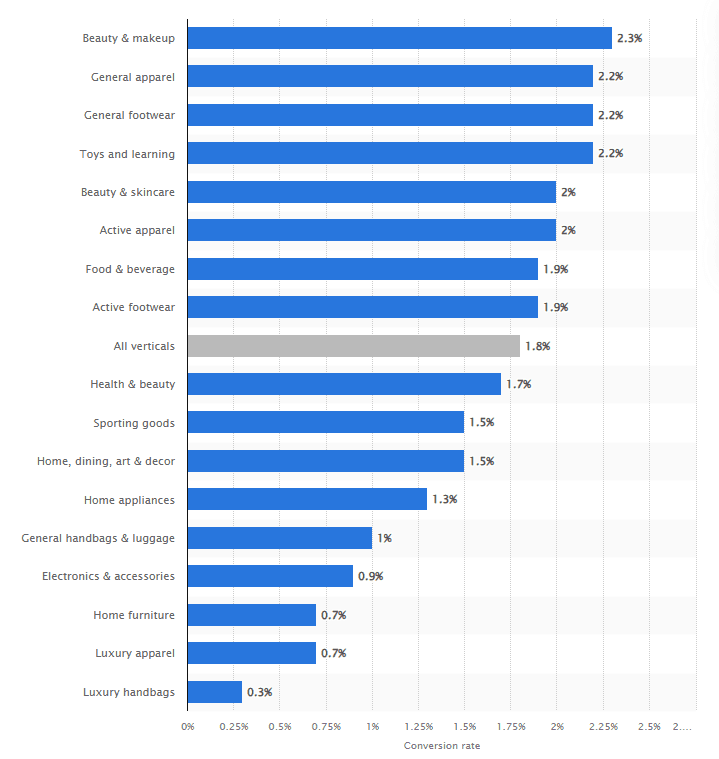
The conversion rate varies from industry to industry. Here’s an infographic from Statista to help you understand better:
Formula for conversion rate = (number of conversions / total number of conversions) * 100
How to improve conversion rate:
A/B tests your landing pages to identify potential issues.
Make the necessary optimizations in your landing page elements and test again.
Create better landing pages that follow the right design and structure principles.
Offer discounts, lead magnets, or free trials to drive conversions.
2. Click-through rate (CTR)
The click-through rate gives you the percentage of users who clicked on your ad or link after seeing it.
Similar to the conversion rate, the click-through rate also varies from industry to industry, says Word Stream:
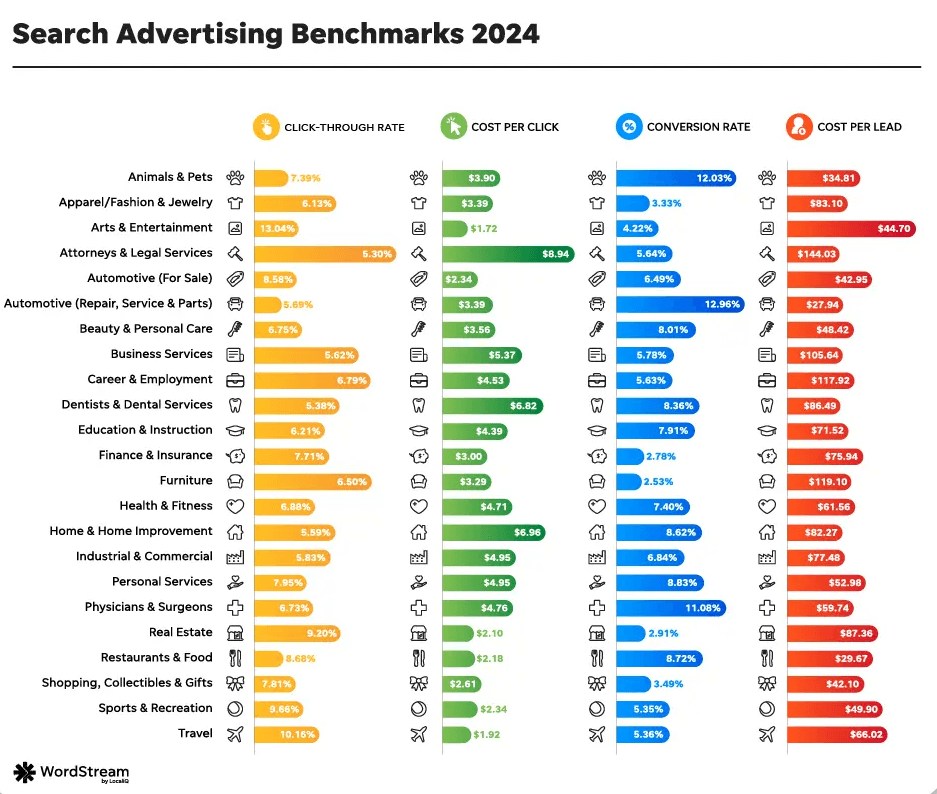
Purpose: CTR tells you whether your ads, emails, or CTAs were up to the mark according to your audience. If your CTR is higher than your industry average, it means your content is engaging and people are taking the desired action. And a lower CTR indicates problems with your copy, CTA, or graphics.
Formula for click-through rate = (number of clicks / total number of impressions) * 100
How to improve conversion rate:
Create copies that are relevant to your target audience and resonate with them.
Optimize your CTAs by choosing the right words, colors, or design.
Personalize your ads and landing page copies to encourage clicks.
P.S. We know a great tool that’d help you personalize your landing pages based on your ads and drive better results.
3. Lead conversion rate
Lead conversion rate or LCR tells you the percentage of visitors who completed an action (submitting a lead gen form) and became a lead.
Purpose: A higher LCR indicates your forms, landing pages, and offers are hitting the right spot for your visitors. And a lower value means your form, messaging, or the overall design could use some improvement.
Formula for lead conversion rate (LCR) = (number of leads/total number of visitors) * 100
How to improve lead conversion rate:
Optimize your lead form, making it easier for the users to complete.
Make sure there’s a sync between your ad copy and the landing page.
Personalize forms using tools like Fibr AI to make them more relatable.
Supporting metrics to help analyze conversion rate optimization
4. Bounce rate
The bounce rate tells you the percentage of visitors who land on your page and bounce off or leave your site without visiting any other page.
According to a 2022 survey conducted by Shopify, the average bounce rate of visitors landing on a page through Google search is 41.1%.
Purpose: Primarily, a high bounce rate means visitors are not engaging with your content. And this could further mean:
Your content is not engaging enough
Or they’re not getting what they need
Formula to calculate bounce rate: Use Google Analytics.
How to improve bounce rate:
Try to identify what is pushing users away.
Potential reasons could be the content, UX, or audience mismatch.
Create a hypothesis and run A/B tests.
5. Exit rate
While the exit rate may sound similar to the bounce rate, there’s a major difference. Exit rate is the percentage of visitors who leave your site from a particular page after viewing it. In exit rate, users visit 1 or more pages other than the landing page before they leave your site from a particular page.
Purpose: This metric helps you identify potential issues on particular pages of your website that might be pushing visitors away. Also, the exit rate makes one thing clear: there is no audience mismatch. Otherwise, why would they visit another page?
But it also indicates a problem with the page they left.
Note. A good exit rate is usually less than 40-50%, according to Agency Analytics.
Formula to calculate: Use Google Analytics.
How to improve exit rate:
Analyze your landing pages that have a high exit rate and point out usability or content issues.
Make it easy for your visitors to take the next step.
Solve technical issues like poor loading speed, mobile responsiveness, etc.
6. Average session duration
Average session duration is a metric that tells you the average time visitors spend on your website per session.
Purpose: If the average session duration of your website is higher than the industry average, it means visitors like engaging with your content, and they find it valuable. However, a lower average session duration could indicate problems with your website.
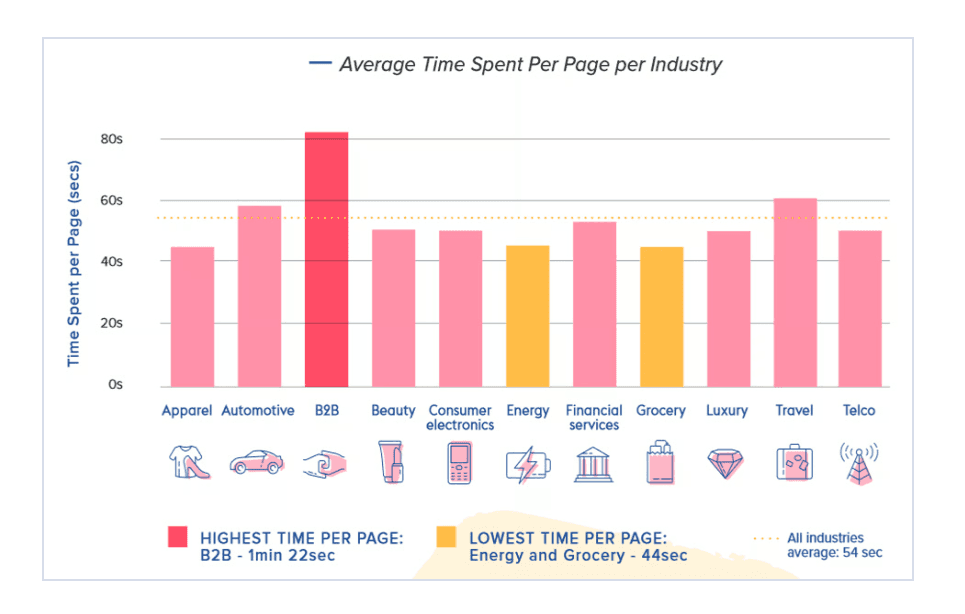
This infographic tells you the average time spent per page per industry:
Formula to calculate: Use Google Analytics.
How to improve average session duration:
Make the content more engaging and interactive by including videos or even short quizzes.
Add new content and optimize existing ones.
Make your content more readable by using the right font, bullet points, and subheads.
Content should address the pain points of your target audience to add relevance.
Make your CTAs clearer and more powerful. (“Start your Free Trial” instead of “Sign up Now”)
Improve the loading speed
7. Pages per session
Pages per session tell you the number of pages your visitors interact with on your website per session.
Purpose: A higher number of pages interacted with per session indicates engaging content, well-placed CTAs, and optimized other elements. And this eventually points to more conversions. The opposite, however, indicates problems like poor navigation, low-quality content, etc.
Formula to calculate: Use Google Analytics.
How to improve pages per session:
Make sure your content is relevant to your visitors.
Add ample internal links and streamline the navigation.
Work on improving the user experience.
Design
Loading speed
Mobile optimization.
8. Time on page
This metric tells you the time visitors spend on a landing page before moving to another page on your website. Make sure you know that if visitors quit your website, no time on the page will be calculated.
Purpose: Longer time on the page indicates higher engagement, i.e., visitors love your content and find it valuable. A shorter time span indicates poor engagement, which can impact conversions.
Formula to calculate: Use Google Analytics.
P.S. A good average time on a page, according to OptinMonster, is 50-60 seconds.
How to improve time on page:
Create content that immediately grabs the attention of users.
Get right to the point and offer readers what they need.
Integrate quizzes, polls, and videos to make your content interactive and engaging.
Improve readability by using easy language, bullet points, subheadings, etc.
Improve your navigation
Optimize the page for mobile
Customer engagement metrics for deeper insights
9. Scroll depth
Scroll depth is yet another important metric that tells you how far down a page visitors scroll.
Purpose: The average scroll depth is around 60-80%. A scroll depth in this range indicates your page is able to engage the visitors. On the flip side, a lower average scroll depth indicates issues like poor content readability, engagement, relevance, etc.
Formula to calculate: Use Google Analytics.
How to improve scroll depth:
Optimize for mobile.
Improve content quality, engagement, and readability.
Tweak your content layout to ensure readers don’t miss out on important info.
10. Interactions per visit
This user engagement metric tells you the number of interactions users per user per site visit.
Purpose: Interactions per visit help you better understand user behavior. You can learn how many interactions the visitors are making and see what elements they’re interacting with.
Say the interactions are higher, but the conversion rate is still poor. This may happen because visitors are unable to find ample information to take the next step.
Formula to calculate interactions per visit: Set up events for elements in Google Analytics.
How to improve interactions per visit:
Optimize your content for your audience:
Work on readability.
Include clear CTAs.
Optimize navigation and user flow.
Revenue-focused CRO metrics
11. Average order value (AOV)
This metric is particularly helpful for monitoring eCommerce conversion rate optimization. It tells businesses the average amount a customer spends in a single transaction/purchase.
Purpose: Tracking this metric helps you slowly increase the revenue without having to onboard more customers, which makes more financial sense.
Formula to calculate average order value (AOV) = Total revenue / Number of orders placed
How to improve average order value:
Try cross-selling some related products that might go with the main product. (socks with shoes)
Offer volume discounts.
Smooth return policy
12. Customer lifetime value (CLV)
Customer lifetime value indicates the total revenue you generate from a customer during their relationship with your business.
Purpose: This metric is pretty crucial to calculate if you’re making enough revenue from one customer. Imagine your CLV is lower than or nearly equal to your customer acquisition cost. This means you either need to upsell or reduce customer acquisition costs (that is our next metric).
Formula to calculate customer lifetime value (CLV): Multiply the average order value by repeat sales and the customer’s retention rate.
How to improve customer lifetime value:
Improve customer service to boost customer satisfaction. This will help you retain the customer for longer, potentially increasing the amount an average customer spends with your company.
Include loyalty programs to reward loyal customers.
Upsell or cross-sell products to boost average order value.
P.S. If the above tips seem complex or you simply don’t have ample time, you can hire reliable CRO companies to help you maximize your CLV, among other things.
13. Return on ad spend (ROAS)
ROAS tells you the revenue you generate against the money you invest in your marketing efforts.
Purpose: This metric tells you how effective, if at all, your marketing efforts are. If you’re getting substantial returns on your investment, you can allocate more budget and thus generate more revenue. And change your CRO strategy if the ROAS is poor.
Formula to calculate ROAS = revenue generated from an ad campaign / total cost of the ad campaign
How to improve ROAS:
Optimize your ad campaigns by A/B testing different elements
Segment your audiences to identify and focus on the most profitable ones.
Offer a more personalized experience to your audience.
14. Customer acquisition cost
Customer acquisition cost tells you the average money (sales and marketing expenses included) you spend to acquire a single customer.
Purpose: By tracking the customer acquisition cost, you can understand how onboarding new customers is impacting your finances. You can then take the necessary steps to keep your business more profitable.
Formula to calculate customer acquisition cost = marketing costs/ number of newly onboarding customers during a specific period
How to improve customer acquisition cost:
Identify inefficiencies in your sales and marketing efforts to reduce your spending and, thus, the customer acquisition cost.
Encourage customer referrals to reduce marketing costs.
Lay stress on long-term organic strategies like SEO.
Behavioral and user experience metrics
15. Form completion rate
Form completion rate tells you the percentage of people who successfully fill-out and submit a form against the total number of people who started but did not complete.
Purpose: A poor form completion rate simply means more people are choosing not to complete the form, indicating issues such as complex design, lengthy forms, personal questions, confusing navigation or more.
Formula to calculate form completion rate (FCR ) = total number of form submissions / number of users who viewed the form*100
How to improve form completion rate:
Reduce the number of required fields and use clear labels.
Add progress indicator and optimize for mobile users.
Add a dominant CTA
Conduct A/B testing to identify best form design elements for your target audience.
16. Cart abandonment rate
Cart abandonment rate is another metric more relevant to the eCommerce industry. It represents the percentage of users who add items to the cart but don’t complete the purchase.
Purpose: A higher cart abandonment rate indicates issues with your checkout process. Otherwise, why would people add products to the cart and not checkout, right?
Formula to calculate cart abandonment rate: total number of purchases/ total number of carts created*100
How to improve cart abandonment rate:
Try offering free shipping and easy returns to encourage purchase.
Send emails to people who abandoned the cart to understand the reason.
Reduce friction in the checkout process and make it easier.
Now that you know what metrics you need to track to maximize CRO results, let’s learn how you can set ideal targets for your KPIs.
How can you set targets for conversion KPIs?
Setting practical KPI targets helps you determine what success looks like. You have a clear picture in mind of what you want to achieve. This clarity allows you and your team to collectively work towards the same goals that align with your bigger business objective.
Here’s how you can set targets for conversion KPIs:
1. Leverage KPI standards
Every KPI is a metric, but not every metric is a KPI or key performance indicator. This means not every metric is worth tracking or directly impacts conversions. Therefore, it’s crucial to choose the right KPIs as this will directly impact what targets you set.
To identify the right KPIs, you can use KPI standards like:
S.M.A.R.T: this acronym stands for:
Smart
Measurable
Attainable
Relevant
Time-bound
Think of this standard as a CRO checklist when picking the right KPIs for your business. This will help you stay on the path and in sync with your overall business objective.
2. Assess your performance and set realistic targets.
After identifying the right KPIs, you need to analyze your business’ performance.
Say one of the KPIs you want to track and improve is lead conversion rate. Without assessing your performance, you might end up setting an unrealistic goal. And it’s never good to overpromise and underachieve.
Let’s say your present lead conversion rate is at 3%. With this information at hand, you know where you’re at. This will help you set realistic expectations and goals that are truly attainable.
But how do you ensure your targets are realistic? Here’s how:
Analyze historical data: You can analyze historical data and determine how your LCR has been performing over the past few months. If it has increased by 1% each month, you can set a goal to increase it by 1.5% in the coming months.
Stakeholders: Talk to your stakeholders and determine what a feasible target would be.
Competitors: Analyze your competitors' data to identify what types of targets they’re setting.
Industry figures. You can use industry figures to assess the nature of your KPIs.
Note. It’s common to look at industry figures when setting KPI targets. While taking reference isn’t harmful, you must not completely trust industry figures to set your targets.
Why?
Every business, website, product, or customer base is different. Following industry standards blindly can lead to misaligned expectations and poor decision-making.
Always go for realistic targets that align with your business objectives.
3. Define your long-term and short-term objectives
KPI targets are your means to achieving your bigger objectives.
Say you want to double your revenue to $20 million from $10 million in the next five years. This means a 20% revenue increase every year. Now, this can be quite overwhelming, leaving no margin for error.
Instead, you can set a short-term objective of a 5% revenue boost in the first year and then progressively increase it year by year.
How to analyze CRO metrics effectively?
The mantra here is to not rely on the numbers alone and dig deeper. If you compare the KPIs you want to measure and track based on these segmentations, you can effectively analyze the metrics and draw useful insights:
Segment the data by:
Traffic source
Logged vs. logged-out users
Mobile vs. desktop users
New vs. returning users
Converted vs. other users
If the numbers are too broad, you won’t get much insight. But when you dive to the depths, that’s when you find real value.
How do you act on CRO metrics?
You have analyzed the KPIs for a set duration, and you have the numbers with you. Now what?
It’s simple:
Identify where the issues are: let’s say when analyzing conversion rate, you found that it’s particularly lower for mobile users. Also, the bounce rate for mobile devices is pretty high.
Make the necessary optimizations: to fix the issue, you can try to optimize the pages for mobile by improving navigation, increasing load speed, reducing image size, and adding clear CTAs.
Run A/B tests: After making the changes, run A/B tests. This will help you determine if the optimizations helped you improve the results. However, make sure you run A/B tests on a reliable tool that allows you to run comprehensive tests and track important metrics.
One such reliable A/B testing tool is Fibr AI. It’s an AI-powered personalization platform that allows you to run unlimited A/B tests. And that too for FREE. You can generate landing page variations within seconds and add high-conversion elements (CTAs, copy, etc) using Fibr AI’s AI recommendation feature. Also, Fibr AI allows you to track all the essential conversion KPIs.
P.S. Just wanted to let you know that businesses that leverage CRO tools usually see a 223% average ROI. Therefore, investing in a CRO tool like Fibr AI seems like a pretty logical decision.
How do you act on CRO metrics?
1. Which tools should I choose for tracking KPIs and metrics?
One of the ideal tools for tracking KPIs and metrics is Google Analytics. It is easy to integrate with your website and is free to use. However, if you’re looking for an A/B testing tool that also helps you with landing page optimization, you can go for Fibr AI.
2. What is CRO?
CRO or conversion rate optimization is the process of making small changes/optimizations in your landing page or website to drive more conversions. It helps transform more visitors into paying customers.





Meenal Chirana
Content Marketing Manager
Meenal Chirana, Content Marketer at Fibr, brings five years of experience in the content field to the team. Her passion for creating engaging content is matched only by her expertise in writing, SEO and content marketing . Passionate about all things content and digital marketing, she is always on the lookout for innovative ways to connect with audiences and elevate brands.
Read summarized version with
Introduction
Starting right from the awareness stage, where a visitor gets to know about your business to making a purchase, there are a ton of KPIs you can track. But that doesn’t mean you should track them all. Well, you can do that if you want to feel overwhelmed;)
Ideally, you should only track the KPIs that are directly linked to and support your business goals and objectives. And this article is there to help.
Below, we have listed the top 15 KPIs that’ll help you track the performance of your conversion rate optimization (CRO) campaigns. Also, you’ll find practical tips to improve each KPI to achieve your business goals.
And by the time you’re done reading this blog, you’ll have everything to determine
Why are your visitors not converting?
Where are they dropping off?
How can you fix this?
Overview
Here’s a brief overview of all the key conversion rate optimization metrics:
Primary Metrics
Conversion Rate: Percentage of visitors completing a desired action (e.g., purchases, form submissions).
Click-Through Rate (CTR): Percentage of users who click on your ads or links.
Lead Conversion Rate: Percentage of visitors who become leads by submitting a form.
Supporting Metrics
Bounce Rate: Percentage of visitors who leave your site immediately after landing on a page.
Exit Rate: Percentage of visitors who leave your site from a specific page.
Average Session Duration: Average time visitors spend on your website per session.
Pages per Session: Average number of pages a visitor views during a single session.
Time on Page: Average time spent by visitors on a specific page.
Customer Engagement
Scroll Depth: Percentage of a page that visitors scroll through.
Interactions per Visit: Number of interactions (clicks, hovers, etc.) a visitor has with your website.
Revenue-Focused Metrics
Average Order Value (AOV): Average amount spent by customers per purchase.
Customer Lifetime Value (CLV): Total revenue generated from a single customer over their entire relationship with your business.
Return on Ad Spend (ROAS): Revenue generated per dollar spent on advertising.
Customer Acquisition Cost (CAC): Cost of acquiring a new customer.
Consider Behavioral and User Experience
Form Completion Rate: Percentage of users who submitted a form successfully against the users who started a form but did not complete.
Cart Abandonment Rate: Percentage of users who add items to their cart but do not complete the purchase.
To learn about the above metrics in detail, dive right in.
What are CRO metrics?
Conversion rate is a crucial CRO KPI that measures the percentage of users who completed a desired action.
Here’s an example:
If the conversion rate (for newsletter signups) is 30% and previously it was 20%. What do these metrics indicate? They indicate that out of every 100 visitors, 30 are signing up for the newsletter instead of 20. It means your CRO efforts are headed in the right direction.
However, if we reverse the situation, i.e., the conversion rate reduces from 30% to 20%, it means something is wrong. And how did you get to know this?
While you still need to dig deep to find the cause behind the drop in conversions, you got your initial hint because you’re tracking CRO metrics.
Is it even necessary to track CRO metrics?
Say your goal is to increase conversions (a key performance indicator for CRO).
To achieve this goal, you’ll have to track the metrics associated with conversions. Otherwise, how would you know which metric you need to tweak to boost conversions?
Imagine you want to boost conversions for your landing page. You choose not to track any metric and start optimizing random elements. Would it make sense? Of course not.
On the other hand, if you track important (relevant) metrics like exit rate, bounce rate, click-through rate, you’ll get to know:
Where is the issue in your marketing funnel?
What should you experiment with?
What tests should you run?
Once you’re tracking the right metrics, you can narrow down your options and identify the potential issues. And this can further help you make the right optimizations and run the right tests.
Top CRO metrics and KPIs you need to measure performance
Here are some of the most common and important CRO metrics and KPIs marketers should focus on while experimenting:
Primary metrics for evaluating CRO
1. Conversion rate
Conversion rate is an important (and broad) metric that tells you the percentage of visitors that took a desired action. It could be anything from subscribing to your newsletter, filling out a form, or even making a purchase.
Purpose: A higher or growing conversion rate indicates more visitors are taking the desired action, giving a boost to your bottom line. And a lower conversion rate indicates potential issues (which you can identify by A/B testing) and a negative impact on your bottom line.
Imagine your goal is generating leads. However, you find that the majority of visitors are not filling out the form, i.e., the form conversion rate is poor. And if you aren’t generating enough leads, who will you nurture and convert into paying customers?
The conversion rate varies from industry to industry. Here’s an infographic from Statista to help you understand better:
Formula for conversion rate = (number of conversions / total number of conversions) * 100
How to improve conversion rate:
A/B tests your landing pages to identify potential issues.
Make the necessary optimizations in your landing page elements and test again.
Create better landing pages that follow the right design and structure principles.
Offer discounts, lead magnets, or free trials to drive conversions.
2. Click-through rate (CTR)
The click-through rate gives you the percentage of users who clicked on your ad or link after seeing it.
Similar to the conversion rate, the click-through rate also varies from industry to industry, says Word Stream:
Purpose: CTR tells you whether your ads, emails, or CTAs were up to the mark according to your audience. If your CTR is higher than your industry average, it means your content is engaging and people are taking the desired action. And a lower CTR indicates problems with your copy, CTA, or graphics.
Formula for click-through rate = (number of clicks / total number of impressions) * 100
How to improve conversion rate:
Create copies that are relevant to your target audience and resonate with them.
Optimize your CTAs by choosing the right words, colors, or design.
Personalize your ads and landing page copies to encourage clicks.
P.S. We know a great tool that’d help you personalize your landing pages based on your ads and drive better results.
3. Lead conversion rate
Lead conversion rate or LCR tells you the percentage of visitors who completed an action (submitting a lead gen form) and became a lead.
Purpose: A higher LCR indicates your forms, landing pages, and offers are hitting the right spot for your visitors. And a lower value means your form, messaging, or the overall design could use some improvement.
Formula for lead conversion rate (LCR) = (number of leads/total number of visitors) * 100
How to improve lead conversion rate:
Optimize your lead form, making it easier for the users to complete.
Make sure there’s a sync between your ad copy and the landing page.
Personalize forms using tools like Fibr AI to make them more relatable.
Supporting metrics to help analyze conversion rate optimization
4. Bounce rate
The bounce rate tells you the percentage of visitors who land on your page and bounce off or leave your site without visiting any other page.
According to a 2022 survey conducted by Shopify, the average bounce rate of visitors landing on a page through Google search is 41.1%.
Purpose: Primarily, a high bounce rate means visitors are not engaging with your content. And this could further mean:
Your content is not engaging enough
Or they’re not getting what they need
Formula to calculate bounce rate: Use Google Analytics.
How to improve bounce rate:
Try to identify what is pushing users away.
Potential reasons could be the content, UX, or audience mismatch.
Create a hypothesis and run A/B tests.
5. Exit rate
While the exit rate may sound similar to the bounce rate, there’s a major difference. Exit rate is the percentage of visitors who leave your site from a particular page after viewing it. In exit rate, users visit 1 or more pages other than the landing page before they leave your site from a particular page.
Purpose: This metric helps you identify potential issues on particular pages of your website that might be pushing visitors away. Also, the exit rate makes one thing clear: there is no audience mismatch. Otherwise, why would they visit another page?
But it also indicates a problem with the page they left.
Note. A good exit rate is usually less than 40-50%, according to Agency Analytics.
Formula to calculate: Use Google Analytics.
How to improve exit rate:
Analyze your landing pages that have a high exit rate and point out usability or content issues.
Make it easy for your visitors to take the next step.
Solve technical issues like poor loading speed, mobile responsiveness, etc.
6. Average session duration
Average session duration is a metric that tells you the average time visitors spend on your website per session.
Purpose: If the average session duration of your website is higher than the industry average, it means visitors like engaging with your content, and they find it valuable. However, a lower average session duration could indicate problems with your website.
This infographic tells you the average time spent per page per industry:
Formula to calculate: Use Google Analytics.
How to improve average session duration:
Make the content more engaging and interactive by including videos or even short quizzes.
Add new content and optimize existing ones.
Make your content more readable by using the right font, bullet points, and subheads.
Content should address the pain points of your target audience to add relevance.
Make your CTAs clearer and more powerful. (“Start your Free Trial” instead of “Sign up Now”)
Improve the loading speed
7. Pages per session
Pages per session tell you the number of pages your visitors interact with on your website per session.
Purpose: A higher number of pages interacted with per session indicates engaging content, well-placed CTAs, and optimized other elements. And this eventually points to more conversions. The opposite, however, indicates problems like poor navigation, low-quality content, etc.
Formula to calculate: Use Google Analytics.
How to improve pages per session:
Make sure your content is relevant to your visitors.
Add ample internal links and streamline the navigation.
Work on improving the user experience.
Design
Loading speed
Mobile optimization.
8. Time on page
This metric tells you the time visitors spend on a landing page before moving to another page on your website. Make sure you know that if visitors quit your website, no time on the page will be calculated.
Purpose: Longer time on the page indicates higher engagement, i.e., visitors love your content and find it valuable. A shorter time span indicates poor engagement, which can impact conversions.
Formula to calculate: Use Google Analytics.
P.S. A good average time on a page, according to OptinMonster, is 50-60 seconds.
How to improve time on page:
Create content that immediately grabs the attention of users.
Get right to the point and offer readers what they need.
Integrate quizzes, polls, and videos to make your content interactive and engaging.
Improve readability by using easy language, bullet points, subheadings, etc.
Improve your navigation
Optimize the page for mobile
Customer engagement metrics for deeper insights
9. Scroll depth
Scroll depth is yet another important metric that tells you how far down a page visitors scroll.
Purpose: The average scroll depth is around 60-80%. A scroll depth in this range indicates your page is able to engage the visitors. On the flip side, a lower average scroll depth indicates issues like poor content readability, engagement, relevance, etc.
Formula to calculate: Use Google Analytics.
How to improve scroll depth:
Optimize for mobile.
Improve content quality, engagement, and readability.
Tweak your content layout to ensure readers don’t miss out on important info.
10. Interactions per visit
This user engagement metric tells you the number of interactions users per user per site visit.
Purpose: Interactions per visit help you better understand user behavior. You can learn how many interactions the visitors are making and see what elements they’re interacting with.
Say the interactions are higher, but the conversion rate is still poor. This may happen because visitors are unable to find ample information to take the next step.
Formula to calculate interactions per visit: Set up events for elements in Google Analytics.
How to improve interactions per visit:
Optimize your content for your audience:
Work on readability.
Include clear CTAs.
Optimize navigation and user flow.
Revenue-focused CRO metrics
11. Average order value (AOV)
This metric is particularly helpful for monitoring eCommerce conversion rate optimization. It tells businesses the average amount a customer spends in a single transaction/purchase.
Purpose: Tracking this metric helps you slowly increase the revenue without having to onboard more customers, which makes more financial sense.
Formula to calculate average order value (AOV) = Total revenue / Number of orders placed
How to improve average order value:
Try cross-selling some related products that might go with the main product. (socks with shoes)
Offer volume discounts.
Smooth return policy
12. Customer lifetime value (CLV)
Customer lifetime value indicates the total revenue you generate from a customer during their relationship with your business.
Purpose: This metric is pretty crucial to calculate if you’re making enough revenue from one customer. Imagine your CLV is lower than or nearly equal to your customer acquisition cost. This means you either need to upsell or reduce customer acquisition costs (that is our next metric).
Formula to calculate customer lifetime value (CLV): Multiply the average order value by repeat sales and the customer’s retention rate.
How to improve customer lifetime value:
Improve customer service to boost customer satisfaction. This will help you retain the customer for longer, potentially increasing the amount an average customer spends with your company.
Include loyalty programs to reward loyal customers.
Upsell or cross-sell products to boost average order value.
P.S. If the above tips seem complex or you simply don’t have ample time, you can hire reliable CRO companies to help you maximize your CLV, among other things.
13. Return on ad spend (ROAS)
ROAS tells you the revenue you generate against the money you invest in your marketing efforts.
Purpose: This metric tells you how effective, if at all, your marketing efforts are. If you’re getting substantial returns on your investment, you can allocate more budget and thus generate more revenue. And change your CRO strategy if the ROAS is poor.
Formula to calculate ROAS = revenue generated from an ad campaign / total cost of the ad campaign
How to improve ROAS:
Optimize your ad campaigns by A/B testing different elements
Segment your audiences to identify and focus on the most profitable ones.
Offer a more personalized experience to your audience.
14. Customer acquisition cost
Customer acquisition cost tells you the average money (sales and marketing expenses included) you spend to acquire a single customer.
Purpose: By tracking the customer acquisition cost, you can understand how onboarding new customers is impacting your finances. You can then take the necessary steps to keep your business more profitable.
Formula to calculate customer acquisition cost = marketing costs/ number of newly onboarding customers during a specific period
How to improve customer acquisition cost:
Identify inefficiencies in your sales and marketing efforts to reduce your spending and, thus, the customer acquisition cost.
Encourage customer referrals to reduce marketing costs.
Lay stress on long-term organic strategies like SEO.
Behavioral and user experience metrics
15. Form completion rate
Form completion rate tells you the percentage of people who successfully fill-out and submit a form against the total number of people who started but did not complete.
Purpose: A poor form completion rate simply means more people are choosing not to complete the form, indicating issues such as complex design, lengthy forms, personal questions, confusing navigation or more.
Formula to calculate form completion rate (FCR ) = total number of form submissions / number of users who viewed the form*100
How to improve form completion rate:
Reduce the number of required fields and use clear labels.
Add progress indicator and optimize for mobile users.
Add a dominant CTA
Conduct A/B testing to identify best form design elements for your target audience.
16. Cart abandonment rate
Cart abandonment rate is another metric more relevant to the eCommerce industry. It represents the percentage of users who add items to the cart but don’t complete the purchase.
Purpose: A higher cart abandonment rate indicates issues with your checkout process. Otherwise, why would people add products to the cart and not checkout, right?
Formula to calculate cart abandonment rate: total number of purchases/ total number of carts created*100
How to improve cart abandonment rate:
Try offering free shipping and easy returns to encourage purchase.
Send emails to people who abandoned the cart to understand the reason.
Reduce friction in the checkout process and make it easier.
Now that you know what metrics you need to track to maximize CRO results, let’s learn how you can set ideal targets for your KPIs.
How can you set targets for conversion KPIs?
Setting practical KPI targets helps you determine what success looks like. You have a clear picture in mind of what you want to achieve. This clarity allows you and your team to collectively work towards the same goals that align with your bigger business objective.
Here’s how you can set targets for conversion KPIs:
1. Leverage KPI standards
Every KPI is a metric, but not every metric is a KPI or key performance indicator. This means not every metric is worth tracking or directly impacts conversions. Therefore, it’s crucial to choose the right KPIs as this will directly impact what targets you set.
To identify the right KPIs, you can use KPI standards like:
S.M.A.R.T: this acronym stands for:
Smart
Measurable
Attainable
Relevant
Time-bound
Think of this standard as a CRO checklist when picking the right KPIs for your business. This will help you stay on the path and in sync with your overall business objective.
2. Assess your performance and set realistic targets.
After identifying the right KPIs, you need to analyze your business’ performance.
Say one of the KPIs you want to track and improve is lead conversion rate. Without assessing your performance, you might end up setting an unrealistic goal. And it’s never good to overpromise and underachieve.
Let’s say your present lead conversion rate is at 3%. With this information at hand, you know where you’re at. This will help you set realistic expectations and goals that are truly attainable.
But how do you ensure your targets are realistic? Here’s how:
Analyze historical data: You can analyze historical data and determine how your LCR has been performing over the past few months. If it has increased by 1% each month, you can set a goal to increase it by 1.5% in the coming months.
Stakeholders: Talk to your stakeholders and determine what a feasible target would be.
Competitors: Analyze your competitors' data to identify what types of targets they’re setting.
Industry figures. You can use industry figures to assess the nature of your KPIs.
Note. It’s common to look at industry figures when setting KPI targets. While taking reference isn’t harmful, you must not completely trust industry figures to set your targets.
Why?
Every business, website, product, or customer base is different. Following industry standards blindly can lead to misaligned expectations and poor decision-making.
Always go for realistic targets that align with your business objectives.
3. Define your long-term and short-term objectives
KPI targets are your means to achieving your bigger objectives.
Say you want to double your revenue to $20 million from $10 million in the next five years. This means a 20% revenue increase every year. Now, this can be quite overwhelming, leaving no margin for error.
Instead, you can set a short-term objective of a 5% revenue boost in the first year and then progressively increase it year by year.
How to analyze CRO metrics effectively?
The mantra here is to not rely on the numbers alone and dig deeper. If you compare the KPIs you want to measure and track based on these segmentations, you can effectively analyze the metrics and draw useful insights:
Segment the data by:
Traffic source
Logged vs. logged-out users
Mobile vs. desktop users
New vs. returning users
Converted vs. other users
If the numbers are too broad, you won’t get much insight. But when you dive to the depths, that’s when you find real value.
How do you act on CRO metrics?
You have analyzed the KPIs for a set duration, and you have the numbers with you. Now what?
It’s simple:
Identify where the issues are: let’s say when analyzing conversion rate, you found that it’s particularly lower for mobile users. Also, the bounce rate for mobile devices is pretty high.
Make the necessary optimizations: to fix the issue, you can try to optimize the pages for mobile by improving navigation, increasing load speed, reducing image size, and adding clear CTAs.
Run A/B tests: After making the changes, run A/B tests. This will help you determine if the optimizations helped you improve the results. However, make sure you run A/B tests on a reliable tool that allows you to run comprehensive tests and track important metrics.
One such reliable A/B testing tool is Fibr AI. It’s an AI-powered personalization platform that allows you to run unlimited A/B tests. And that too for FREE. You can generate landing page variations within seconds and add high-conversion elements (CTAs, copy, etc) using Fibr AI’s AI recommendation feature. Also, Fibr AI allows you to track all the essential conversion KPIs.
P.S. Just wanted to let you know that businesses that leverage CRO tools usually see a 223% average ROI. Therefore, investing in a CRO tool like Fibr AI seems like a pretty logical decision.
How do you act on CRO metrics?
1. Which tools should I choose for tracking KPIs and metrics?
One of the ideal tools for tracking KPIs and metrics is Google Analytics. It is easy to integrate with your website and is free to use. However, if you’re looking for an A/B testing tool that also helps you with landing page optimization, you can go for Fibr AI.
2. What is CRO?
CRO or conversion rate optimization is the process of making small changes/optimizations in your landing page or website to drive more conversions. It helps transform more visitors into paying customers.
Meenal Chirana
Content Marketing Manager
Meenal Chirana, Content Marketer at Fibr, brings five years of experience in the content field to the team. Her passion for creating engaging content is matched only by her expertise in writing, SEO and content marketing . Passionate about all things content and digital marketing, she is always on the lookout for innovative ways to connect with audiences and elevate brands.


