8 Essential Landing Page Metrics to Track in 2026 [+ How to Measure Them ]

Meenal chirana
Read summarized version with
Your landing page looks perfect. The design is clean, the copy is compelling, and you've spent hours getting every detail just right.
But here's the question that keeps you up at night: Is it actually working?
You're driving traffic to the page. That much you know. But are those visitors converting? Are they bouncing immediately? Are they even scrolling past the fold?
Without tracking the right landing page metrics, you're flying blind. You might be pouring money into ads that send people to pages that don't convert. You could have a killer offer that nobody sees because they leave too quickly. Or maybe your forms are scaring people away right before they convert.
That's where landing page metrics come in.
These aren't vanity numbers. They're the data points that tell you exactly what's happening on your page, where visitors are getting stuck, and what you need to fix to turn more clicks into customers. When you know which metrics to track and how to interpret them, you can make smart, data-driven decisions instead of guessing.
In this guide, we'll walk through the 8 essential landing page metrics you need to monitor in 2026. For each one, you'll learn what it measures, why it matters, how to track it in Google Analytics 4, and specific strategies to improve it.
Let's turn your landing page into a conversion machine.
Why Tracking Landing Page Performance Is Crucial for Conversions
A landing page is a standalone web page created related to a marketing campaign. It's where a visitor lands after they click on a link in an email, ad, or other digital marketing content. The primary function of a landing page is to drive conversions by encouraging visitors to take a specific action, whether that's making a purchase, signing up for a newsletter, downloading an ebook, or filling out a contact form.
A landing page is a standalone web page created for a marketing campaign. It's where a visitor lands after they click on a link in an email, ad, or other digital marketing content. The primary function of a landing page is to drive conversions by encouraging visitors to take a specific action, whether that's making a purchase, signing up for a newsletter, downloading an ebook, or filling out a contact form.
Here's the reality: in 2026, most landing pages underperform. According to Unbounce's Conversion Benchmark Report, the average landing page conversion rate sits at just 2.35%. The top 10% of landing pages convert at 11.45% or higher. That's almost 5x better than average. What separates the winners from the losers? It's not luck or bigger budgets. It's data. The best-performing landing pages are constantly monitored, tested, and optimized based on actual user behavior, not guesswork.
Given that conversions are the ultimate goal, it's essential that a landing page performs optimally. Here's why tracking your landing page performance is crucial:
1. Identify and Resolve Performance Issues
When landing pages perform poorly, it often means there are underlying issues preventing visitors from converting. Without tracking metrics, you might be unaware of these problems. Performance metrics reveal issues like slow load times, broken links, or poor mobile optimization that cause visitors to leave prematurely.
2. Understand User Behavior and Preferences
Tracking performance allows you to gain valuable insights into how users interact with your landing page. You can then use this information to tailor your landing page to better meet the needs and preferences of your audience.
3. Optimize Marketing Spend
Building and hosting landing pages cost money, which means you have to invest in them thoughtfully. Metrics help you identify which landing pages are driving the most conversions by tracking marketing attribution for each page. This way, you can optimize the allocation of your marketing budget to focus on the channels and pages that deliver the highest return on investment (ROI).
4. Enhance User Experience
A positive user experience drives performance, but creating positive experience starts with identifying and weeding out the bad ones. Performance metrics show you areas where visitors may experience friction like complicated navigation, unclear CTAs, or irrelevant content. You can create a smoother user journey by identifying these points of friction and smoothening them out.
5. Test and Refine Strategies
Tracking metrics allows you to conduct A/B testing on various elements of your landing page, such as headlines, images, or call-to-action buttons. By measuring the performance of each variation, you can refine your strategies based on data rather than assumptions.
6. Stay Competitive in the Market
Regularly monitoring your landing page performance ensures you stay informed about emerging trends and shifting consumer behaviors. This agile and proactive approach allows you to adapt your strategies, keeping your brand competitive and relevant.
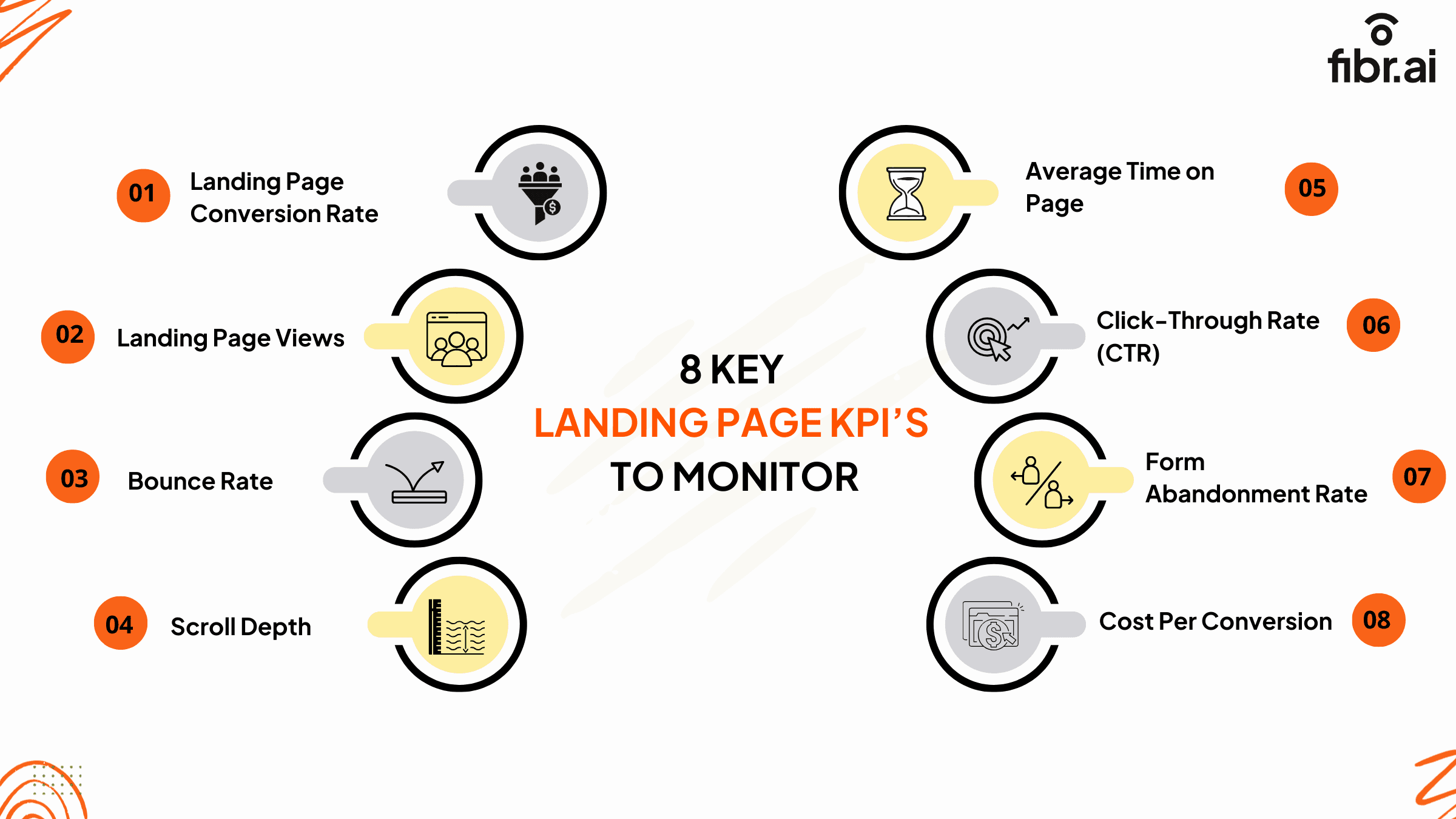
8 Key Landing Page KPIs to Monitor
1. Landing Page Conversion Rate
Conversion rate is the single most important metric for any landing page. It tells you the percentage of visitors who complete your desired action, whether that's filling out a form, making a purchase, downloading a resource, or booking a demo.
Why conversion rate matters
Conversion rate reveals whether your landing page is doing its job. You can have thousands of visitors, but if they're not converting, your page is failing. This metric shows you the direct impact of your page on revenue and lead generation.
How to calculate conversion rate
Conversion Rate = (Number of Conversions / Number of Visitors) × 100
For example, if 100 people visit your landing page and 4 of them complete your form, your conversion rate is 4%.
What's a good conversion rate?
Average across all industries:2.35%
Top 25% of pages: 5.31% or higher
Top 10% of pages: 11.45% or higher
Your target will vary based on your industry, traffic source, and offer complexity. B2B SaaS pages typically see 5-10% conversion rates, while ecommerce product pages might aim for 2-5%.
How to track conversion rate in GA4
Go to Admin > Data display > Events
Create or mark an event as a "Key Event" (like form submission or purchase)
Navigate to Reports > Engagement > Conversions
View your key event rate (this is your conversion rate)
How to improve conversion rate
Match your ad promise: If your ad says "Download Free Guide," your landing page headline should say exactly that. Message mismatch kills conversions instantly.
Simplify your form: Every field you remove can increase conversions by 10-20%. Only ask for information you absolutely need.
Make your CTA impossible to ignore: Use contrasting colors, action-oriented copy ("Get My Free Guide" not "Submit"), and place it prominently above the fold.
Add social proof: Include testimonials, customer logos, case study results, or the number of people who've already converted. Specific numbers work better than vague claims.
2. Landing Page Views
Landing page views tell you how many people actually saw your page during a specific time period. This is your baseline metric. Without views, nothing else matters.
Why page views matter
Page views show whether your marketing efforts are working to drive traffic. A sudden spike might indicate a successful campaign or viral social post. A drop could signal technical issues, ad problems, or seasonality.
But views alone don't tell the whole story. A landing page with 10,000 views and a 1% conversion rate (100 conversions) is less valuable than one with 1,000 views and a 15% conversion rate (150 conversions).
How to track landing page views in GA4
Navigate to Reports > Engagement > Pages and screens
Use the search box to find your specific landing page URL
Look at the "Views" column to see total pageviews
Add a date range filter to see views over time
You can also add a secondary dimension for Session source to see which channels are driving the most views.
What affects landing page views
Ad spend and targeting: More budget and better targeting = more views
SEO performance: Higher rankings drive consistent organic traffic
Social media reach: Viral posts or influencer mentions create spikes
Email list size: Larger lists generate more clicks
Seasonality: B2B pages often see drops on weekends and holidays
How to increase landing page views
Focus your efforts on channels that are already working. If paid search drives 60% of your views with good conversion rates, increase that budget before trying entirely new channels.
Also, check for technical issues. If views dropped suddenly, verify your page loads correctly, ads are pointing to the right URL, and tracking is set up properly.
3. Bounce Rate
A bounce is technically the opposite of a conversion. It is when a user who lands on your landing page leaves it without engaging with the content or performing the desired action. The bounce rate tells you the percentage of visitors who leave your landing page without interacting with it. A high bounce rate is a cause for concern because it means that users are not finding what they expected, or the page isn't engaging enough to retain them.
How to Calculate Bounce Rate
Bounce Rate = (Number of Single-Page Visits / Total Number of Visits) x 100%
For example, if you had 1,000 visitors and 600 of them left without interacting, your bounce rate would be:
Bounce Rate = (600 / 1,000) x 100% = 60%
Interpreting the Results
Ideally, when you monitor landing page metrics, you want your bounce rate to be 0, but that's nearly impossible. However, you can aim to reduce your bounce rate as much as possible and try to achieve a lower bounce rate each time. So, benchmark your bounce rate analysis based on whether the percentage is higher or lower than in the past.
How to Reduce Landing Page Bounce Rate
Visitors leave your landing page without engaging if they feel that it doesn't meet their expectations, loads too slowly, or is difficult to navigate. Here are some ways you can ensure that visitors convert without bouncing:
Ensure your landing page matches the ad or marketing campaign that leads users to it.
Customize your landing page to align it perfectly with your target demographic. Use strategies like using the user's language, appropriate colors, relevant images, and clear CTAs.
Segment your audience into smaller groups to target your landing page ads better.
Check for technical glitches that may be causing users to leave and resolve them as soon as possible.
4. Scroll Depth
Scroll depth measures how far down your page visitors are scrolling. It's typically tracked in percentages: 25%, 50%, 75%, and 100%.
Why scroll depth matters
If your most compelling content, testimonials, or CTA are halfway down the page, but most visitors never scroll past 25%, they're not seeing your best stuff. Scroll depth reveals whether your page structure matches visitor behavior.
How to track scroll depth in GA4
GA4 automatically tracks scroll depth as an event. To view it:
1. Go to Reports > Engagement > Events
2. Find the "scroll" event
3. Click on it to see the breakdown by page
4. Check the "percent_scrolled" parameter to see how deep users go
You can also create a custom report showing scroll depth alongside conversion rates to identify the optimal page length.
How to improve scroll depth
Hook them immediately: Your above-the-fold content needs to be so compelling that visitors want to keep reading. Use a strong headline, clear value proposition, and visual cues (like arrows or images of people looking down) that encourage scrolling.
Break up long blocks of text: Use short paragraphs, bullet points, subheadings, and images every few paragraphs. Wall-of-text pages kill scroll depth.
Place CTAs strategically: Don't wait until the bottom. Add CTAs at 25%, 50%, and 75% scroll points so visitors can convert whenever they're ready.
Use curiosity gaps: End sections with hints about what comes next. "But here's where it gets interesting..." or "The results? See below."
5. Average Time on Page and Its Impact on Conversions
The more time users spend on your landing page, the more they engage with your content, and the more they are likely to perform the desired action. The average time on page (ATP) is a measure of how much time users spend on your landing page. Longer times on the page mean that users are going through your content more carefully to understand your offering and consider converting.
How to calculate the average time on a page?
Average time on page (ATP) is a simple measure of how much time, on average, users spend on your page. You can calculate it with the formula:
ATP = Total Time Spent on Page / Number of Page Views
To understand what your ATP really means, you have to set benchmarks. Now, each landing page is different and would require users to spend different amounts of time before they can convert or leave.
Set benchmarks for ATP based on the landing page type. For example, if your landing page is a simple contact form, users may take only a few seconds to fill it out. On the other hand, if it is a more detailed content-heavy page, users may need several minutes to read and understand the information provided.
Interpreting the Results
A low average time on landing page metrics is not always a bad sign, as it may not signify anything about conversion rates at all. Visitors may fill out a form in just a few seconds and leave; while in this case, your ATP is low, there are conversions happening. Whereas a landing page with many sections of content will have a longer ATP, which may or may not lead to higher conversions depending on how engaging the content is.
How to Improve Average Time on Page
Here are some strategies you can use to encourage users to spend more time on your landing page:
Create useful, engaging content that speaks to your visitors and addresses their problems and needs.
Improve the readability of your page by using the right fonts, headings, and visuals. Make your content scannable.
Add interactive and multimedia content to your landing pages to keep your visitors engaged.
6. Click-Through Rate (CTR)
Click-through rate measures the percentage of visitors who click on specific elements on your landing page, like CTA buttons, links, or navigation items.
Why CTR matters
CTR shows whether your calls-to-action are compelling enough to drive clicks. A landing page might have great traffic and low bounce rates, but if nobody's clicking your CTA button, you won't get conversions.
How to calculate CTR
CTR = (Number of Clicks on CTA / Number of Page Visitors) × 100
If 500 people visit your page and 50 click your main CTA button, your CTR is 10%.
How to track CTR in GA4
For button clicks, you'll need to set up event tracking:
1. Use Google Tag Manager to create a click event
2. Tag your CTA buttons with specific identifiers
3. In GA4, go to Reports > Engagement > Events
4. Find your custom click event to see total clicks
5. Compare against page views to calculate CTR
How to improve CTR
Make your CTA stand out visually: Use a contrasting color that pops against your page background. If your page is blue, try an orange or green button.
Use action-oriented copy: "Get Started Free" beats "Submit." "Download My Guide" beats "Click Here." Be specific about what happens when they click.
Create urgency: Add phrases like "Limited Time Offer," "Only 3 Spots Left," or "Offer Ends Tonight" to encourage immediate action.
Test button size and placement: Sometimes bigger buttons work better. Sometimes, smaller, more subtle CTAs convert higher. A/B test to find out.
7. Form Abandonment Rate
Form abandonment rate tells you the percentage of visitors who start filling out your form but leave before completing it.
Why form abandonment matters
If visitors are clicking your CTA and starting your form, they're interested. But if they're abandoning it halfway through, something's wrong with the form itself. Maybe it's too long, asks for sensitive information, or has technical issues.
How to calculate form abandonment rate
Form Abandonment Rate = ((Form Starts - Form Completions) / Form Starts) × 100
If 100 people start your form but only 60 complete it, your abandonment rate is 40%.
Industry benchmarks
According to Research, the average form abandonment rate is around 67%. That means more than two-thirds of people who start forms don't finish them. Even small improvements here can significantly boost conversions.
How to track form abandonment in GA4
1. Set up events for "form_start" and "form_submit."
2. Navigate to Reports > Engagement > Events
3. Compare the number of form starts to submissions
4. Calculate your abandonment rate
You can also use tools like Hotjar or Microsoft Clarity to watch session recordings and see exactly where users abandon forms.
How to reduce form abandonment
Keep forms short: Every field you remove increases completion rates. If you need detailed information, use a multi-step form that feels less overwhelming.
Explain why you need information: Add helper text like "We need your phone number to send order updates" rather than just labeling a field "Phone."
Show progress: For multi-step forms, add a progress bar showing "Step 2 of 3." People are more likely to finish when they know how much is left.
Optimize for mobile: Test your form on mobile devices. Are the fields easy to tap? Does the keyboard cover important buttons? Is autofill working correctly?
Remove unnecessary fields: Do you really need their company size, job title, and phone number just to send them an ebook? Probably not.
8. Cost Per Conversion
Cost per conversion shows how much you're spending to acquire each conversion through paid advertising. It's essential for understanding whether your landing page campaigns are profitable.
Why cost per conversion matters
You might have a landing page with a 10% conversion rate, but if you're spending $200 to acquire each lead and those leads are only worth $50, you're losing money. Cost per conversion connects marketing spend to business outcomes.
How to calculate cost per conversion
Cost Per Conversion = Total Advertising Spend / Number of Conversions
If you spent $2,000 on Google Ads and got 40 conversions, your cost per conversion is $50.
What's a good cost per conversion?
This varies wildly by industry and business model:
B2B SaaS: $200-$500 per lead can be profitable if customer lifetime value is $10,000+ Ecommerce: $10-$50 per sale, depending on average order value.
Local services: $50-$150 per lead for plumbers, lawyers, contractors
High-ticket consulting: $500+ per qualified lead can still deliver strong ROI
The key is that your cost per conversion should be significantly lower than your customer lifetime value.
How to track cost per conversion
If you're running Google Ads:
Link Google Ads to GA4
Import your GA4 conversions as Google Ads conversion actions
View cost per conversion directly in Google Ads under Campaigns > Columns > Conversions
For other platforms, you'll need to manually calculate by exporting ad spend from the platform and conversion data from GA4.
How to lower cost per conversion
Improve your Quality Score (for Google Ads): Higher relevance = lower cost per click. Make sure your ad copy matches your landing page headline exactly.
Target more specific audiences: Broad targeting might bring cheaper clicks, but specific targeting brings people who actually convert. It's better to pay $5 for a click that converts than $1 for a click that bounces.
Increase conversion rate: This is huge. If you double your conversion rate while keeping ad spend the same, you cut your cost per conversion in half. Focus on landing page optimization, not just driving more traffic.
Pause underperforming campaigns: Check which campaigns, ad groups, or keywords have the highest cost per conversion. If something isn't working after reasonable testing, shut it down and reallocate budget to what's working.
How to Track Landing Page Metrics in Google Analytics 4
Google Analytics 4 is the standard tool for tracking landing page performance. While it has a learning curve, once you know where to look, you can monitor all your key metrics in one place.
Setting up GA4 for landing page tracking:
Before you can track anything, make sure GA4 is properly installed on your landing page:
1. Create a GA4 property (if you haven't already) at analytics.google.com
2. Install the GA4 tracking code on your landing page
3. Set up key events (conversions) for actions like form submissions, button clicks, or purchases
4. Enable enhanced measurement to automatically track scrolls, clicks, and video engagement
Finding your landing page metrics in GA4
Here's exactly where to find each metric we've covered:
Landing Page Views:
Reports > Engagement > Pages and screens > Search for your page URL
Conversion Rate:
Reports > Engagement > Conversions > View key event rate
Bounce Rate:
Create an Exploration report > Add "Bounce rate" as a metric > Filter by landing page
Average Time on Page:
Reports > Engagement > Pages and screens > Look for "Average engagement time"
Scroll Depth:
Reports > Engagement > Events > Find "scroll" event > Check "percent_scrolled" parameter
Form Metrics:
Reports > Engagement > Events > Set up custom events for form_start and form_submit
Creating a custom landing page dashboard
Rather than jumping between reports, create a custom dashboard:
1. Go to Explore > Blank
2. Add these metrics as columns: Views, Conversions, Key event rate, Bounce rate, Avg engagement time
3. Add "Page path" as a row
4. Filter to show only your landing page URLs
5. Save this as "Landing Page Performance"
Now you can see all your key metrics in one view and track performance over time.
Turn Metrics Into Revenue With Fibr AI
Tracking metrics is step one. But manually creating dozens of landing page variations to test different headlines, CTAs, and layouts? That's where most teams get stuck.
That's where Fibr AI changes the game.
Fibr AI is the Agentic Experience Layer that turns your static URLs into intelligent, self-optimizing experiences. Instead of manually building and testing landing page variants, Fibr detects every visitor signal (ad source, location, device, referring URL) and generates contextual experiences before the page even loads.
Here's what that means for your Metrics:
Higher conversion rates: automatically Fibr's agents detect which ad someone clicked and rewrite your landing page headline, visuals, and CTAs to match that exact intent. When your page mirrors what brought them there, conversions jump. Users see an average 28% ROI increase within the first 90 days.
Lower bounce rates through relevance: Generic landing pages make visitors bounce. Fibr ensures every visitor sees a version engineered for their specific context. No more mismatched messaging between ads and landing pages.
Better cost per conversion: When more visitors convert, your cost per conversion drops automatically. Fibr users report 30% lower customer acquisition costs without changing their ad strategy.
Faster optimization cycles: Traditional A/B testing takes weeks to reach statistical significance. Fibr's autonomous agents learn from every session in real time and scale winning patterns to similar visitor cohorts instantly.
The best part? You don't need developers or weeks of testing. Fibr handles the entire optimization workflow while you maintain creative control and brand consistency.
If your landing page metrics show there's room for improvement (and let's be honest, there almost always is), Fibr can help you close that gap. Book a demo to see how autonomous experience generation can transform your conversion rates.
FAQs
1. What is the best tool to track landing page metrics?
Fibr.ai is one of the best tools for tracking landing page metrics. It is a comprehensive tool that lets you track essential metrics and easily use this data to build high-performing landing pages that perfectly align with source ads and marketing content.
2. How to optimize a landing page for conversions?
To optimize a landing page for conversions, focus on clear and compelling calls-to-action (CTAs), ensure mobile responsiveness, and use persuasive copy that highlights your value proposition. Add social proof to build credibility and trust. Also, use A/B testing to identify what works best with your audience.
3. What makes a high-converting landing page?
A high-converting landing page features a strong, clear value proposition, compelling and concise copy, visually appealing design, and a personalized call-to-action. It also offers social proof, minimizes distractions, is mobile-optimized, and is perfectly aligned with the source ad or marketing campaign.
4. What is a good average time on a landing page?
A good average time on a landing page typically ranges between 2 and 3 minutes and indicates that visitors are engaging with the content. However, this can vary depending on the industry and the type of landing page content. The longer users spend on your landing page, the more likely they are to convert.
5. What is a good landing page scroll depth?
A good landing page scroll depth means that visitors are reaching at least 75% of your content. High scroll depth means strong engagement and that your content is compelling enough to keep users interested. To achieve this, place key information and CTAs strategically throughout the page to encourage scrolling.





Meenal Chirana
Content Marketing Manager
Meenal Chirana, Content Marketer at Fibr, brings five years of experience in the content field to the team. Her passion for creating engaging content is matched only by her expertise in writing, SEO and content marketing . Passionate about all things content and digital marketing, she is always on the lookout for innovative ways to connect with audiences and elevate brands.
Read summarized version with
Your landing page looks perfect. The design is clean, the copy is compelling, and you've spent hours getting every detail just right.
But here's the question that keeps you up at night: Is it actually working?
You're driving traffic to the page. That much you know. But are those visitors converting? Are they bouncing immediately? Are they even scrolling past the fold?
Without tracking the right landing page metrics, you're flying blind. You might be pouring money into ads that send people to pages that don't convert. You could have a killer offer that nobody sees because they leave too quickly. Or maybe your forms are scaring people away right before they convert.
That's where landing page metrics come in.
These aren't vanity numbers. They're the data points that tell you exactly what's happening on your page, where visitors are getting stuck, and what you need to fix to turn more clicks into customers. When you know which metrics to track and how to interpret them, you can make smart, data-driven decisions instead of guessing.
In this guide, we'll walk through the 8 essential landing page metrics you need to monitor in 2026. For each one, you'll learn what it measures, why it matters, how to track it in Google Analytics 4, and specific strategies to improve it.
Let's turn your landing page into a conversion machine.
Why Tracking Landing Page Performance Is Crucial for Conversions
A landing page is a standalone web page created related to a marketing campaign. It's where a visitor lands after they click on a link in an email, ad, or other digital marketing content. The primary function of a landing page is to drive conversions by encouraging visitors to take a specific action, whether that's making a purchase, signing up for a newsletter, downloading an ebook, or filling out a contact form.
A landing page is a standalone web page created for a marketing campaign. It's where a visitor lands after they click on a link in an email, ad, or other digital marketing content. The primary function of a landing page is to drive conversions by encouraging visitors to take a specific action, whether that's making a purchase, signing up for a newsletter, downloading an ebook, or filling out a contact form.
Here's the reality: in 2026, most landing pages underperform. According to Unbounce's Conversion Benchmark Report, the average landing page conversion rate sits at just 2.35%. The top 10% of landing pages convert at 11.45% or higher. That's almost 5x better than average. What separates the winners from the losers? It's not luck or bigger budgets. It's data. The best-performing landing pages are constantly monitored, tested, and optimized based on actual user behavior, not guesswork.
Given that conversions are the ultimate goal, it's essential that a landing page performs optimally. Here's why tracking your landing page performance is crucial:
1. Identify and Resolve Performance Issues
When landing pages perform poorly, it often means there are underlying issues preventing visitors from converting. Without tracking metrics, you might be unaware of these problems. Performance metrics reveal issues like slow load times, broken links, or poor mobile optimization that cause visitors to leave prematurely.
2. Understand User Behavior and Preferences
Tracking performance allows you to gain valuable insights into how users interact with your landing page. You can then use this information to tailor your landing page to better meet the needs and preferences of your audience.
3. Optimize Marketing Spend
Building and hosting landing pages cost money, which means you have to invest in them thoughtfully. Metrics help you identify which landing pages are driving the most conversions by tracking marketing attribution for each page. This way, you can optimize the allocation of your marketing budget to focus on the channels and pages that deliver the highest return on investment (ROI).
4. Enhance User Experience
A positive user experience drives performance, but creating positive experience starts with identifying and weeding out the bad ones. Performance metrics show you areas where visitors may experience friction like complicated navigation, unclear CTAs, or irrelevant content. You can create a smoother user journey by identifying these points of friction and smoothening them out.
5. Test and Refine Strategies
Tracking metrics allows you to conduct A/B testing on various elements of your landing page, such as headlines, images, or call-to-action buttons. By measuring the performance of each variation, you can refine your strategies based on data rather than assumptions.
6. Stay Competitive in the Market
Regularly monitoring your landing page performance ensures you stay informed about emerging trends and shifting consumer behaviors. This agile and proactive approach allows you to adapt your strategies, keeping your brand competitive and relevant.
8 Key Landing Page KPIs to Monitor
1. Landing Page Conversion Rate
Conversion rate is the single most important metric for any landing page. It tells you the percentage of visitors who complete your desired action, whether that's filling out a form, making a purchase, downloading a resource, or booking a demo.
Why conversion rate matters
Conversion rate reveals whether your landing page is doing its job. You can have thousands of visitors, but if they're not converting, your page is failing. This metric shows you the direct impact of your page on revenue and lead generation.
How to calculate conversion rate
Conversion Rate = (Number of Conversions / Number of Visitors) × 100
For example, if 100 people visit your landing page and 4 of them complete your form, your conversion rate is 4%.
What's a good conversion rate?
Average across all industries:2.35%
Top 25% of pages: 5.31% or higher
Top 10% of pages: 11.45% or higher
Your target will vary based on your industry, traffic source, and offer complexity. B2B SaaS pages typically see 5-10% conversion rates, while ecommerce product pages might aim for 2-5%.
How to track conversion rate in GA4
Go to Admin > Data display > Events
Create or mark an event as a "Key Event" (like form submission or purchase)
Navigate to Reports > Engagement > Conversions
View your key event rate (this is your conversion rate)
How to improve conversion rate
Match your ad promise: If your ad says "Download Free Guide," your landing page headline should say exactly that. Message mismatch kills conversions instantly.
Simplify your form: Every field you remove can increase conversions by 10-20%. Only ask for information you absolutely need.
Make your CTA impossible to ignore: Use contrasting colors, action-oriented copy ("Get My Free Guide" not "Submit"), and place it prominently above the fold.
Add social proof: Include testimonials, customer logos, case study results, or the number of people who've already converted. Specific numbers work better than vague claims.
2. Landing Page Views
Landing page views tell you how many people actually saw your page during a specific time period. This is your baseline metric. Without views, nothing else matters.
Why page views matter
Page views show whether your marketing efforts are working to drive traffic. A sudden spike might indicate a successful campaign or viral social post. A drop could signal technical issues, ad problems, or seasonality.
But views alone don't tell the whole story. A landing page with 10,000 views and a 1% conversion rate (100 conversions) is less valuable than one with 1,000 views and a 15% conversion rate (150 conversions).
How to track landing page views in GA4
Navigate to Reports > Engagement > Pages and screens
Use the search box to find your specific landing page URL
Look at the "Views" column to see total pageviews
Add a date range filter to see views over time
You can also add a secondary dimension for Session source to see which channels are driving the most views.
What affects landing page views
Ad spend and targeting: More budget and better targeting = more views
SEO performance: Higher rankings drive consistent organic traffic
Social media reach: Viral posts or influencer mentions create spikes
Email list size: Larger lists generate more clicks
Seasonality: B2B pages often see drops on weekends and holidays
How to increase landing page views
Focus your efforts on channels that are already working. If paid search drives 60% of your views with good conversion rates, increase that budget before trying entirely new channels.
Also, check for technical issues. If views dropped suddenly, verify your page loads correctly, ads are pointing to the right URL, and tracking is set up properly.
3. Bounce Rate
A bounce is technically the opposite of a conversion. It is when a user who lands on your landing page leaves it without engaging with the content or performing the desired action. The bounce rate tells you the percentage of visitors who leave your landing page without interacting with it. A high bounce rate is a cause for concern because it means that users are not finding what they expected, or the page isn't engaging enough to retain them.
How to Calculate Bounce Rate
Bounce Rate = (Number of Single-Page Visits / Total Number of Visits) x 100%
For example, if you had 1,000 visitors and 600 of them left without interacting, your bounce rate would be:
Bounce Rate = (600 / 1,000) x 100% = 60%
Interpreting the Results
Ideally, when you monitor landing page metrics, you want your bounce rate to be 0, but that's nearly impossible. However, you can aim to reduce your bounce rate as much as possible and try to achieve a lower bounce rate each time. So, benchmark your bounce rate analysis based on whether the percentage is higher or lower than in the past.
How to Reduce Landing Page Bounce Rate
Visitors leave your landing page without engaging if they feel that it doesn't meet their expectations, loads too slowly, or is difficult to navigate. Here are some ways you can ensure that visitors convert without bouncing:
Ensure your landing page matches the ad or marketing campaign that leads users to it.
Customize your landing page to align it perfectly with your target demographic. Use strategies like using the user's language, appropriate colors, relevant images, and clear CTAs.
Segment your audience into smaller groups to target your landing page ads better.
Check for technical glitches that may be causing users to leave and resolve them as soon as possible.
4. Scroll Depth
Scroll depth measures how far down your page visitors are scrolling. It's typically tracked in percentages: 25%, 50%, 75%, and 100%.
Why scroll depth matters
If your most compelling content, testimonials, or CTA are halfway down the page, but most visitors never scroll past 25%, they're not seeing your best stuff. Scroll depth reveals whether your page structure matches visitor behavior.
How to track scroll depth in GA4
GA4 automatically tracks scroll depth as an event. To view it:
1. Go to Reports > Engagement > Events
2. Find the "scroll" event
3. Click on it to see the breakdown by page
4. Check the "percent_scrolled" parameter to see how deep users go
You can also create a custom report showing scroll depth alongside conversion rates to identify the optimal page length.
How to improve scroll depth
Hook them immediately: Your above-the-fold content needs to be so compelling that visitors want to keep reading. Use a strong headline, clear value proposition, and visual cues (like arrows or images of people looking down) that encourage scrolling.
Break up long blocks of text: Use short paragraphs, bullet points, subheadings, and images every few paragraphs. Wall-of-text pages kill scroll depth.
Place CTAs strategically: Don't wait until the bottom. Add CTAs at 25%, 50%, and 75% scroll points so visitors can convert whenever they're ready.
Use curiosity gaps: End sections with hints about what comes next. "But here's where it gets interesting..." or "The results? See below."
5. Average Time on Page and Its Impact on Conversions
The more time users spend on your landing page, the more they engage with your content, and the more they are likely to perform the desired action. The average time on page (ATP) is a measure of how much time users spend on your landing page. Longer times on the page mean that users are going through your content more carefully to understand your offering and consider converting.
How to calculate the average time on a page?
Average time on page (ATP) is a simple measure of how much time, on average, users spend on your page. You can calculate it with the formula:
ATP = Total Time Spent on Page / Number of Page Views
To understand what your ATP really means, you have to set benchmarks. Now, each landing page is different and would require users to spend different amounts of time before they can convert or leave.
Set benchmarks for ATP based on the landing page type. For example, if your landing page is a simple contact form, users may take only a few seconds to fill it out. On the other hand, if it is a more detailed content-heavy page, users may need several minutes to read and understand the information provided.
Interpreting the Results
A low average time on landing page metrics is not always a bad sign, as it may not signify anything about conversion rates at all. Visitors may fill out a form in just a few seconds and leave; while in this case, your ATP is low, there are conversions happening. Whereas a landing page with many sections of content will have a longer ATP, which may or may not lead to higher conversions depending on how engaging the content is.
How to Improve Average Time on Page
Here are some strategies you can use to encourage users to spend more time on your landing page:
Create useful, engaging content that speaks to your visitors and addresses their problems and needs.
Improve the readability of your page by using the right fonts, headings, and visuals. Make your content scannable.
Add interactive and multimedia content to your landing pages to keep your visitors engaged.
6. Click-Through Rate (CTR)
Click-through rate measures the percentage of visitors who click on specific elements on your landing page, like CTA buttons, links, or navigation items.
Why CTR matters
CTR shows whether your calls-to-action are compelling enough to drive clicks. A landing page might have great traffic and low bounce rates, but if nobody's clicking your CTA button, you won't get conversions.
How to calculate CTR
CTR = (Number of Clicks on CTA / Number of Page Visitors) × 100
If 500 people visit your page and 50 click your main CTA button, your CTR is 10%.
How to track CTR in GA4
For button clicks, you'll need to set up event tracking:
1. Use Google Tag Manager to create a click event
2. Tag your CTA buttons with specific identifiers
3. In GA4, go to Reports > Engagement > Events
4. Find your custom click event to see total clicks
5. Compare against page views to calculate CTR
How to improve CTR
Make your CTA stand out visually: Use a contrasting color that pops against your page background. If your page is blue, try an orange or green button.
Use action-oriented copy: "Get Started Free" beats "Submit." "Download My Guide" beats "Click Here." Be specific about what happens when they click.
Create urgency: Add phrases like "Limited Time Offer," "Only 3 Spots Left," or "Offer Ends Tonight" to encourage immediate action.
Test button size and placement: Sometimes bigger buttons work better. Sometimes, smaller, more subtle CTAs convert higher. A/B test to find out.
7. Form Abandonment Rate
Form abandonment rate tells you the percentage of visitors who start filling out your form but leave before completing it.
Why form abandonment matters
If visitors are clicking your CTA and starting your form, they're interested. But if they're abandoning it halfway through, something's wrong with the form itself. Maybe it's too long, asks for sensitive information, or has technical issues.
How to calculate form abandonment rate
Form Abandonment Rate = ((Form Starts - Form Completions) / Form Starts) × 100
If 100 people start your form but only 60 complete it, your abandonment rate is 40%.
Industry benchmarks
According to Research, the average form abandonment rate is around 67%. That means more than two-thirds of people who start forms don't finish them. Even small improvements here can significantly boost conversions.
How to track form abandonment in GA4
1. Set up events for "form_start" and "form_submit."
2. Navigate to Reports > Engagement > Events
3. Compare the number of form starts to submissions
4. Calculate your abandonment rate
You can also use tools like Hotjar or Microsoft Clarity to watch session recordings and see exactly where users abandon forms.
How to reduce form abandonment
Keep forms short: Every field you remove increases completion rates. If you need detailed information, use a multi-step form that feels less overwhelming.
Explain why you need information: Add helper text like "We need your phone number to send order updates" rather than just labeling a field "Phone."
Show progress: For multi-step forms, add a progress bar showing "Step 2 of 3." People are more likely to finish when they know how much is left.
Optimize for mobile: Test your form on mobile devices. Are the fields easy to tap? Does the keyboard cover important buttons? Is autofill working correctly?
Remove unnecessary fields: Do you really need their company size, job title, and phone number just to send them an ebook? Probably not.
8. Cost Per Conversion
Cost per conversion shows how much you're spending to acquire each conversion through paid advertising. It's essential for understanding whether your landing page campaigns are profitable.
Why cost per conversion matters
You might have a landing page with a 10% conversion rate, but if you're spending $200 to acquire each lead and those leads are only worth $50, you're losing money. Cost per conversion connects marketing spend to business outcomes.
How to calculate cost per conversion
Cost Per Conversion = Total Advertising Spend / Number of Conversions
If you spent $2,000 on Google Ads and got 40 conversions, your cost per conversion is $50.
What's a good cost per conversion?
This varies wildly by industry and business model:
B2B SaaS: $200-$500 per lead can be profitable if customer lifetime value is $10,000+ Ecommerce: $10-$50 per sale, depending on average order value.
Local services: $50-$150 per lead for plumbers, lawyers, contractors
High-ticket consulting: $500+ per qualified lead can still deliver strong ROI
The key is that your cost per conversion should be significantly lower than your customer lifetime value.
How to track cost per conversion
If you're running Google Ads:
Link Google Ads to GA4
Import your GA4 conversions as Google Ads conversion actions
View cost per conversion directly in Google Ads under Campaigns > Columns > Conversions
For other platforms, you'll need to manually calculate by exporting ad spend from the platform and conversion data from GA4.
How to lower cost per conversion
Improve your Quality Score (for Google Ads): Higher relevance = lower cost per click. Make sure your ad copy matches your landing page headline exactly.
Target more specific audiences: Broad targeting might bring cheaper clicks, but specific targeting brings people who actually convert. It's better to pay $5 for a click that converts than $1 for a click that bounces.
Increase conversion rate: This is huge. If you double your conversion rate while keeping ad spend the same, you cut your cost per conversion in half. Focus on landing page optimization, not just driving more traffic.
Pause underperforming campaigns: Check which campaigns, ad groups, or keywords have the highest cost per conversion. If something isn't working after reasonable testing, shut it down and reallocate budget to what's working.
How to Track Landing Page Metrics in Google Analytics 4
Google Analytics 4 is the standard tool for tracking landing page performance. While it has a learning curve, once you know where to look, you can monitor all your key metrics in one place.
Setting up GA4 for landing page tracking:
Before you can track anything, make sure GA4 is properly installed on your landing page:
1. Create a GA4 property (if you haven't already) at analytics.google.com
2. Install the GA4 tracking code on your landing page
3. Set up key events (conversions) for actions like form submissions, button clicks, or purchases
4. Enable enhanced measurement to automatically track scrolls, clicks, and video engagement
Finding your landing page metrics in GA4
Here's exactly where to find each metric we've covered:
Landing Page Views:
Reports > Engagement > Pages and screens > Search for your page URL
Conversion Rate:
Reports > Engagement > Conversions > View key event rate
Bounce Rate:
Create an Exploration report > Add "Bounce rate" as a metric > Filter by landing page
Average Time on Page:
Reports > Engagement > Pages and screens > Look for "Average engagement time"
Scroll Depth:
Reports > Engagement > Events > Find "scroll" event > Check "percent_scrolled" parameter
Form Metrics:
Reports > Engagement > Events > Set up custom events for form_start and form_submit
Creating a custom landing page dashboard
Rather than jumping between reports, create a custom dashboard:
1. Go to Explore > Blank
2. Add these metrics as columns: Views, Conversions, Key event rate, Bounce rate, Avg engagement time
3. Add "Page path" as a row
4. Filter to show only your landing page URLs
5. Save this as "Landing Page Performance"
Now you can see all your key metrics in one view and track performance over time.
Turn Metrics Into Revenue With Fibr AI
Tracking metrics is step one. But manually creating dozens of landing page variations to test different headlines, CTAs, and layouts? That's where most teams get stuck.
That's where Fibr AI changes the game.
Fibr AI is the Agentic Experience Layer that turns your static URLs into intelligent, self-optimizing experiences. Instead of manually building and testing landing page variants, Fibr detects every visitor signal (ad source, location, device, referring URL) and generates contextual experiences before the page even loads.
Here's what that means for your Metrics:
Higher conversion rates: automatically Fibr's agents detect which ad someone clicked and rewrite your landing page headline, visuals, and CTAs to match that exact intent. When your page mirrors what brought them there, conversions jump. Users see an average 28% ROI increase within the first 90 days.
Lower bounce rates through relevance: Generic landing pages make visitors bounce. Fibr ensures every visitor sees a version engineered for their specific context. No more mismatched messaging between ads and landing pages.
Better cost per conversion: When more visitors convert, your cost per conversion drops automatically. Fibr users report 30% lower customer acquisition costs without changing their ad strategy.
Faster optimization cycles: Traditional A/B testing takes weeks to reach statistical significance. Fibr's autonomous agents learn from every session in real time and scale winning patterns to similar visitor cohorts instantly.
The best part? You don't need developers or weeks of testing. Fibr handles the entire optimization workflow while you maintain creative control and brand consistency.
If your landing page metrics show there's room for improvement (and let's be honest, there almost always is), Fibr can help you close that gap. Book a demo to see how autonomous experience generation can transform your conversion rates.
FAQs
1. What is the best tool to track landing page metrics?
Fibr.ai is one of the best tools for tracking landing page metrics. It is a comprehensive tool that lets you track essential metrics and easily use this data to build high-performing landing pages that perfectly align with source ads and marketing content.
2. How to optimize a landing page for conversions?
To optimize a landing page for conversions, focus on clear and compelling calls-to-action (CTAs), ensure mobile responsiveness, and use persuasive copy that highlights your value proposition. Add social proof to build credibility and trust. Also, use A/B testing to identify what works best with your audience.
3. What makes a high-converting landing page?
A high-converting landing page features a strong, clear value proposition, compelling and concise copy, visually appealing design, and a personalized call-to-action. It also offers social proof, minimizes distractions, is mobile-optimized, and is perfectly aligned with the source ad or marketing campaign.
4. What is a good average time on a landing page?
A good average time on a landing page typically ranges between 2 and 3 minutes and indicates that visitors are engaging with the content. However, this can vary depending on the industry and the type of landing page content. The longer users spend on your landing page, the more likely they are to convert.
5. What is a good landing page scroll depth?
A good landing page scroll depth means that visitors are reaching at least 75% of your content. High scroll depth means strong engagement and that your content is compelling enough to keep users interested. To achieve this, place key information and CTAs strategically throughout the page to encourage scrolling.
Meenal Chirana
Content Marketing Manager
Meenal Chirana, Content Marketer at Fibr, brings five years of experience in the content field to the team. Her passion for creating engaging content is matched only by her expertise in writing, SEO and content marketing . Passionate about all things content and digital marketing, she is always on the lookout for innovative ways to connect with audiences and elevate brands.


